11.6 In Ear Monitoring Magic
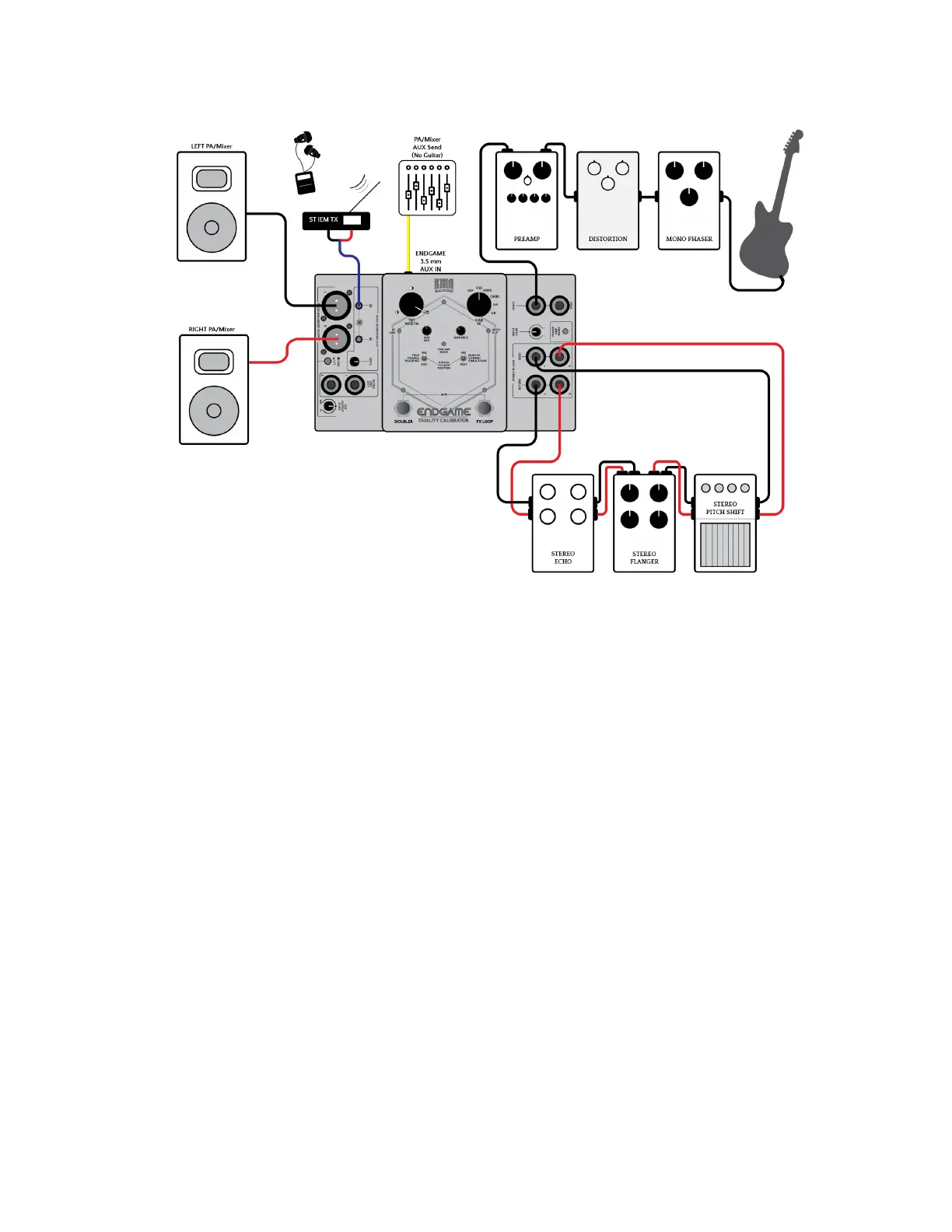
KMA ENDGAME Setup example: In Ear Monitoring Magic
When using In Ear Monitors for your live monitoring, the mix for this is usually provided from the
PA/Front-of-House mixer etc. via an Aux Mix/Send.
However, you may want more of your own level or have an easy and simple way to blend your
own monitoring levels.
Many musicians can experience a slight delay between their own signal and what comes back
from the monitor mix depending on the type of connections used and this is even more
prevalent with many digital consoles. In addition, if there are not enough aux sends on your rig,
sometimes you may not be able to hear yourself in stereo either.
So, by using the analog AUX input for your monitor mix in and the ENDGAME’s headphone out to
your wired IEMs (or connected to your own IEMs wireless set up) you will have more direct
control over your own levels. In this case though, you just need to set the relevant internal DIP
switch to not pass the Aux input section to the Main Outputs (see Section 5.5 Internal DIP
Switches) – no more debating with the engineer for “more me” – you have your own control!
Tone Tip: If your Mixer’s dedicated Aux send is Mono, you will need to make a special 3.5 mm
mini TRS cable where both left and right poles are “bridged” to both sides. We recommend that
any Aux mix sent to ENDGAME has no guitar signal present, else you may experience strange
effects like comb ltering etc. To set your ideal balance between the direct ENDGAME signal and
your PA Aux feed, use the AUX MIX control to blend. For this setup, we recommend that both FX
Loop position toggle switches on the ENDGAME are set to PRE.


 To Next Page