11.5 Multi Monitoring
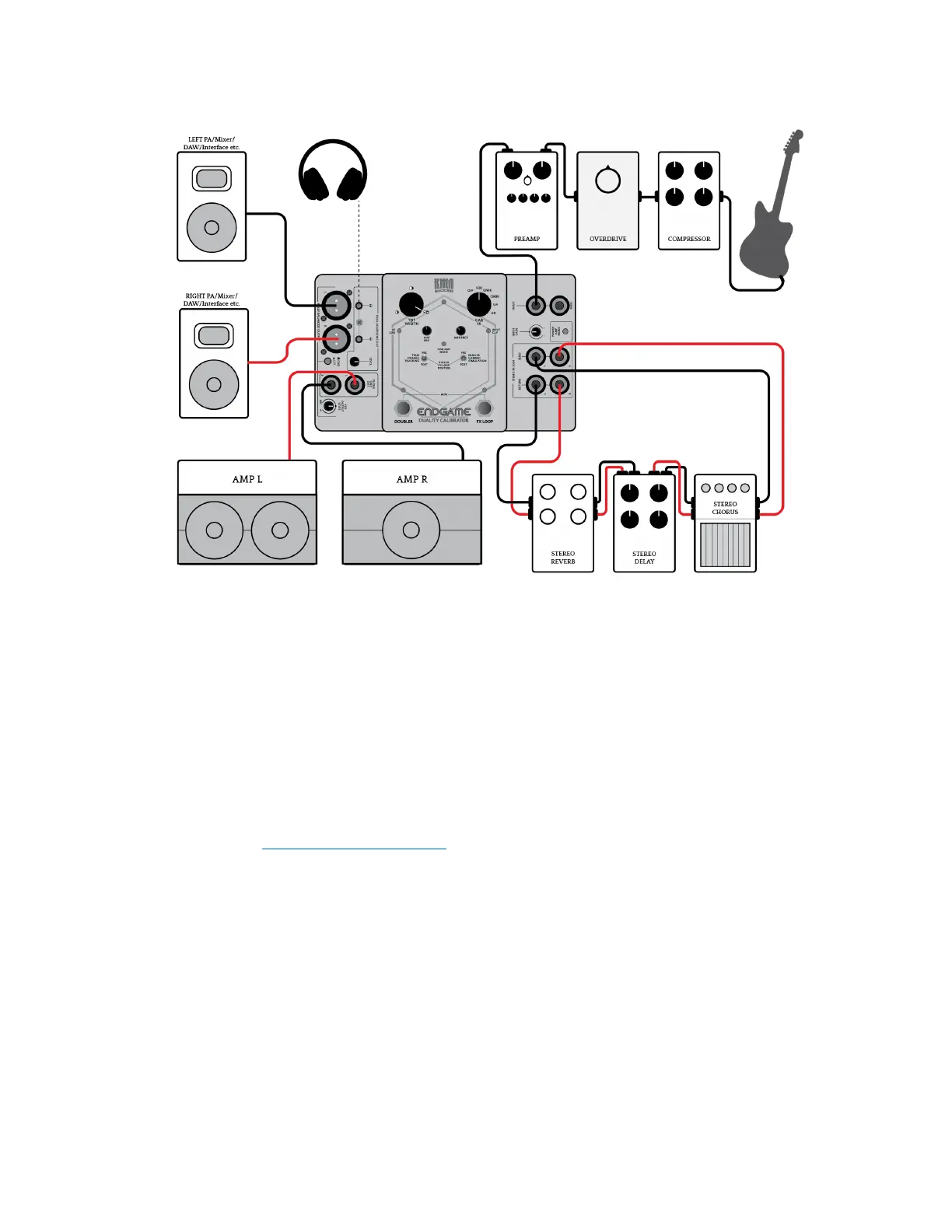
KMA ENDGAME Setup example: Multi Monitoring
In a live scenario, instead of using In-Ear Monitoring or a wedge monitor mix, you may wish to
use guitar combos or a stereo power amp rig with speaker cabinets so you can hear yourself.
Normally this would not be a great idea with any cab/amp simulator devices as this duplicates
the purpose of the device. However, we gave an option to achieve just that.
By moving the second internal dip switch to the “OFF” position, the Impulse Response, Power
Amp and Ambience sections of the ENDGAME are bypassed from the TS/TRS outputs. For more
information, see the
“Internal DIP Switches” section.
This allows you to use these connections for your amps, while the XLR outs send the full signal
chain, including Impulse Response, Power Amp and Ambience to the Front of House or any other
external monitoring system, all adding exibility and maximising the potential of your on-stage
setup.
Tone Tip:Rather than micing up cabs at a performance, taking the direct signal from the
ENDGAME’s XLR outputs guarantees that your stereo tone arrives at the desk exactly the way
you intend it to be heard. For this setup to function correctly, we recommend that the TRUE
DOUBLE TRACKING toggle switch is set to PRE, while the DUAL IR CABINET SIMULATION toggle
switch must be set to POST.
KMA Machines ENDGAME manual ⋅ firmware version V2 https://kma.specs-and-docs.online/kma_endgame_manual__English.htm
48 von 57 08.01.2025, 14:38


 To Next Page