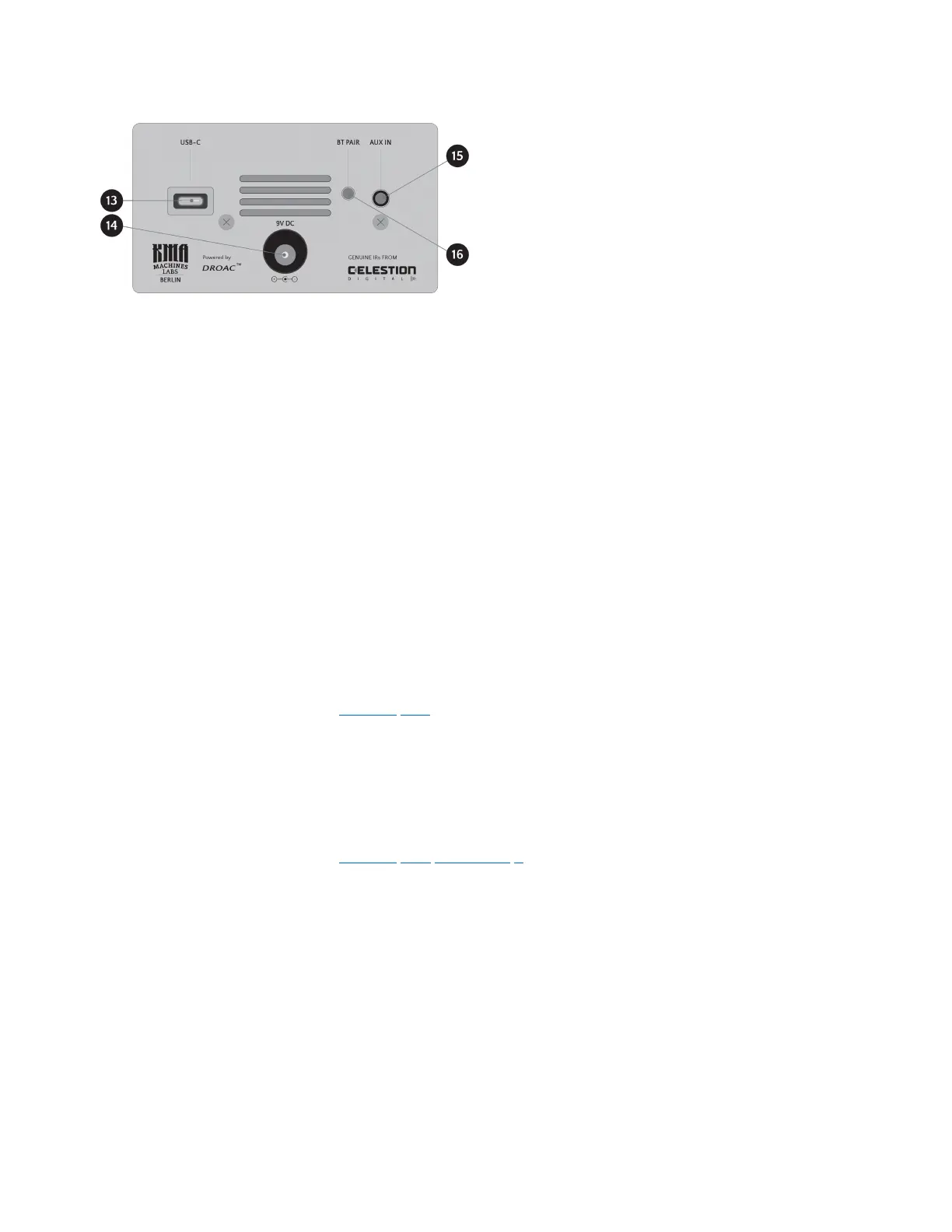
13 – USB-C Port
Use the USB-C port to connect ENDGAME to a PC or Mac for loading user Impulse Responses
and Software Updates.
14 – 9V DC input
Connect a standard 9 V DC power supply unit (not supplied) to the 9V DC input. The power
supply unit must provide a minimum of 480mA at 2.1mm negative center polarity.
KMA recommends that you always use a good pedal-specic transformer isolated power supply
or multiple isolated output devices to eliminate noise. Unclean or unregulated power, daisy
chaining, and non-pedal specic power supplies can cause issues.
15 – AUX IN jack (Auxiliary Signal Input)
Use the AUX IN 3.5 mm TRS jack to connect a stereo analog audio signal source to ENDGAME.
For more information, see the “Aux Input” section.
16 – BT PAIR button
The BT PAIR button allows you to pair ENDGAME with a Bluetooth® audio device for audio
streaming, substituting the analog AUX IN connection.
For more information, see the “Aux Input (Bluetooth)” section.
KMA Machines ENDGAME manual ⋅ firmware version V2 https://kma.specs-and-docs.online/kma_endgame_manual__English.htm
22 von 57 08.01.2025, 14:38


 To Next Page