DUAL IR CABINET SIMULATION
toggle to move the Stereo FX Loop before (
PRE
or after (POSTsetting) the Dual Impulse Response Cabinet Simulation.
For more information, see the “FX Loop Position” section.
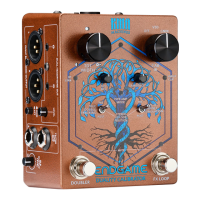
7 – DOUBLER Foot-switch
Activates/Deactivates the Stereo True Double-Tracking Doubler.
The Blue LED above the switch indicates when active.
8 – FX LOOP Foot-switch
Use the FX LOOP Foot-switch to activate/deactivate the Buffered Serial Stereo FX Loop.
The Blue LED above the switch indicates when active.
Note: Holding down both Foot-switches for approximately 1 second activates the MUTE function,
no audio signal will pass to the XLR or TS/TRS Outputs and both LEDs will ash slowly.
To UNMUTE, push either switch.
9 – Main LED
A steady green LED indicates that ENDGAME is powered and functioning normally.
10 – BT LINK Link
A blue BT LED indicates ENDGAME’s Bluetooth® status.
For more information, see the “Aux Input (Bluetooth)” section.
11 – INPUT CLIP LED
A red INPUT CLIP LED indicates if clipping is present via the INPUT or the Stereo FX LOOP
returns.
For more information, see the “Setting Levels” section.
12 – PWR AMP MODE LED
The colour of the PWR AMP MODE LED indicates the currently selected Power Amp Simulation
model.
For more information, see the “Power Amp Mode” section.
KMA Machines ENDGAME manual ⋅ firmware version V2 https://kma.specs-and-docs.online/kma_endgame_manual__English.htm
21 von 57 08.01.2025, 14:38


 To Next Page