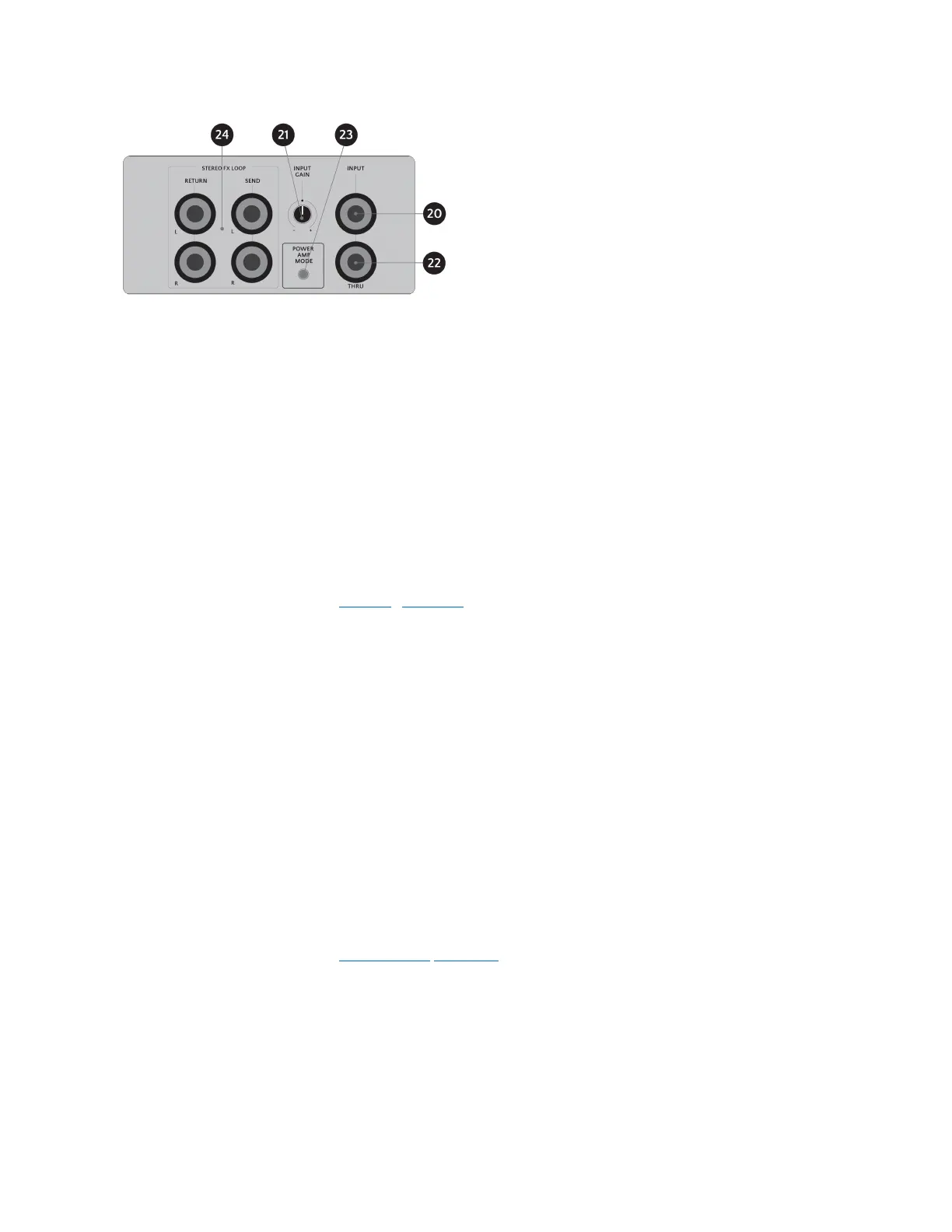
20 – INPUTJack
Connect the last mono device in your signal chain to the 6.35 mm INPUT jack. This is typically
your preamp, modulation pedal, mono cab sim etc. or your source instrument (guitar, bass or
other).
21 – INPUT GAIN Control
The INPUT GAIN control with its premium high impedance circuitry can provide up to +/-24 dB
of gain/reduction.
Use the INPUT GAIN control to reduce the gain if the red INPUT CLIP LED (11) is illuminated.
For more information, see the “Setting Levels” section.
22 – THRU Jack
The THRU jack outputs the INPUT signal in parallel.
This extra connection is useful for a multitude of situations e.g.for an amp, tuner output, separate
channel etc. or for recording the dry unprocessed signal into a DAW for post processing.
23 – POWER AMP MODE button
The POWER AMP MODE push button toggles between the three available Power Amp Models
and Off/Bypass.
The colour of the front panel PWR AMP MODE LED indicates the currently selected Power Amp
Simulation model.
For more information, see the
“Power Amp Mode” section.
24 – STEREO FX LOOP Send/Return Jacks
Insert Stereo devices using the respective L (Left) and R (Right) jacks of the STEREO FX LOOP
section. The FX Loop is enabled/disabled with the FX LOOP Foot-switch (8) on the front panel.
Use the TRUE DOUBLE TRACKING and DUAL IR CABINET SIMULATION toggles o set the PRE/
POST position of the FX Loop within ENDGAME’s signal chain.
KMA Machines ENDGAME manual ⋅ firmware version V2 https://kma.specs-and-docs.online/kma_endgame_manual__English.htm
24 von 57 08.01.2025, 14:38


 To Next Page