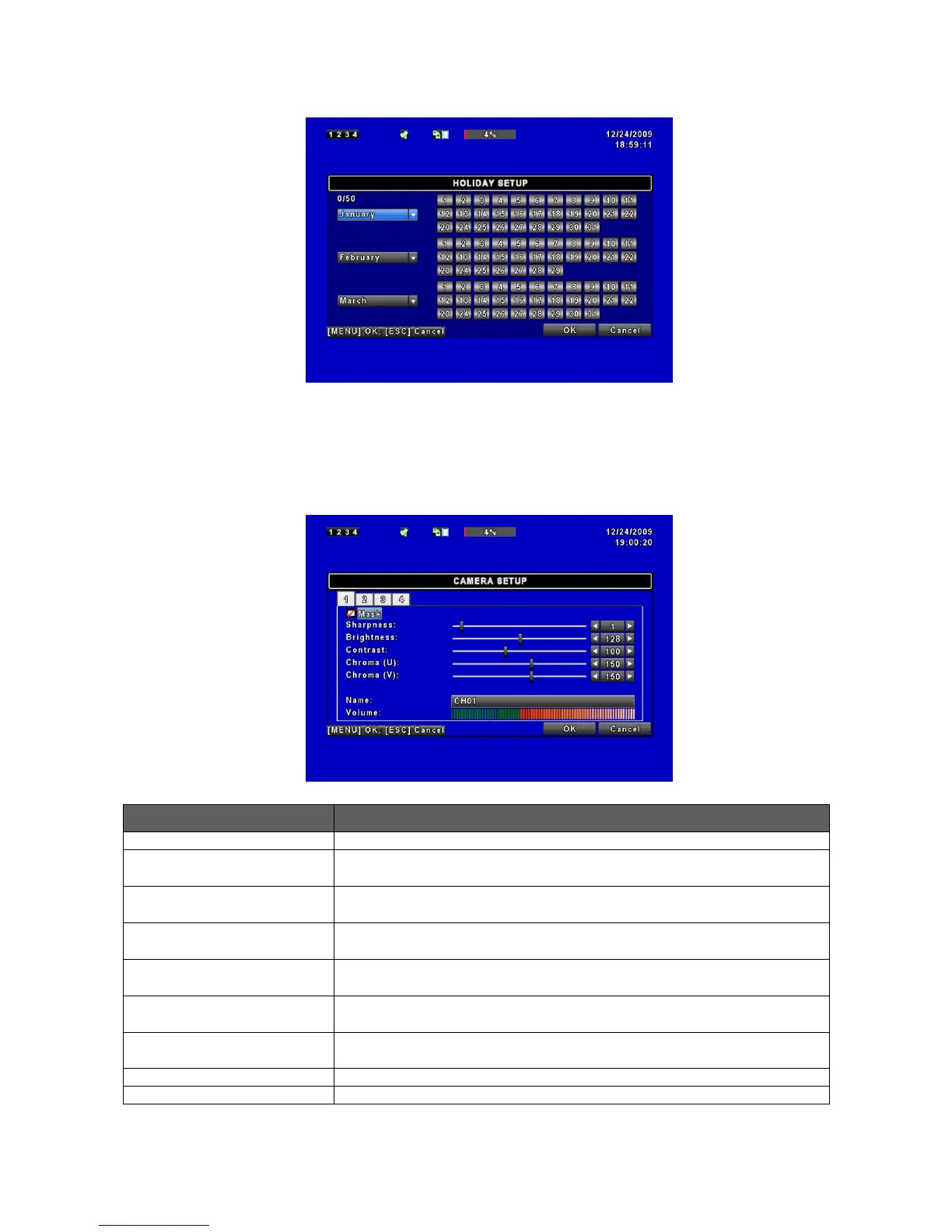
4.4.2 Holiday Setup
Since holidays are different between countries and regions, you can setup the holiday of
your location accordingly (Maximum Setup: 50).
4.5 Camera Setup
Check the box to Enable/ Disable mask function for LIVE mode
Drag the white bar or press ◀ ▶ to adjust Sharpness of your camera from
value 0 to 15. The default value is 1.
Drag the white bar or press ◀ ▶ to adjust Brightness of your camera from
value 0 to 255. The default value is 128.
Drag the white bar or press ◀ ▶ to adjust Contrast of your camera from
value 0 to 255. The default value is 100.
Drag the white bar or press ◀ ▶ to adjust Chroma (U) of your camera from
value 0 to 255. The default value is 150.
Drag the white bar or press ◀ ▶ to adjust Chroma (V) of your camera from
value 0 to 255. The default value is 150.
Drag the white bar or press ◀ ▶ to adjust Hue of your camera from value 0 to
255. The default value is 150. (This function is ineffective in PAL system).
Set up name of each channel.
Select to adjust audio volume under LIVE mode and recording mode.



 To Next Page