Operating vacuum pump system Vacuum Pump System SC 920G
28 Translation of original Operating Instructions, English, KNF 121308-121311 07/18
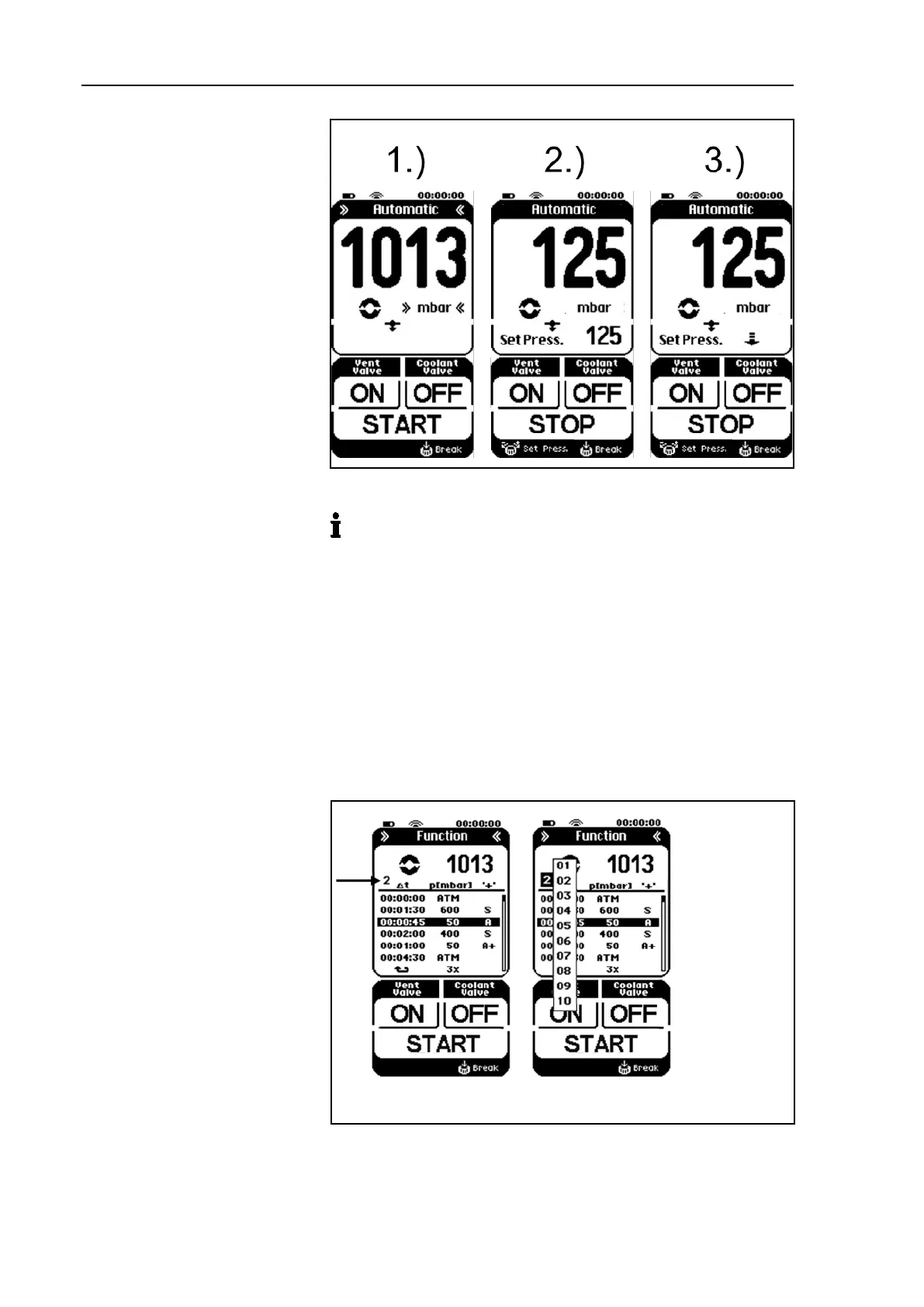
operating mode
2.) Boiling point detected;
pressure
3.) Automatic pressure
reduction
Fig. 12: Automatic function sequence
If you press the arrow key (see Fig. 9/7) during automatic
pressure reduction, the current pressure is applied as the new
setpoint pressure and the vacuum pump system regulates to
this pressure. The current setpoint pressure is
shown in the
display in place of the arrow.
If you press again on the setpoint pressure value, automatic
pressure reduction is reactivated and the arrow appears in the
display after about 25 seconds.
Entering value in Function operating mode
The desired pressure curve is entered via data points that connect
the vacuum pump system to pressure ramps.
Fig. 13: Menu for Function operating mode
Entering data points (up to 12):
1. Time interval since the last data point: ∆ t


 To Next Page