Vacuum Pump System SC 920G Operating vacuum pump system
Translation of original Operating Instructions, English, KNF 121308-121311 07/18 25
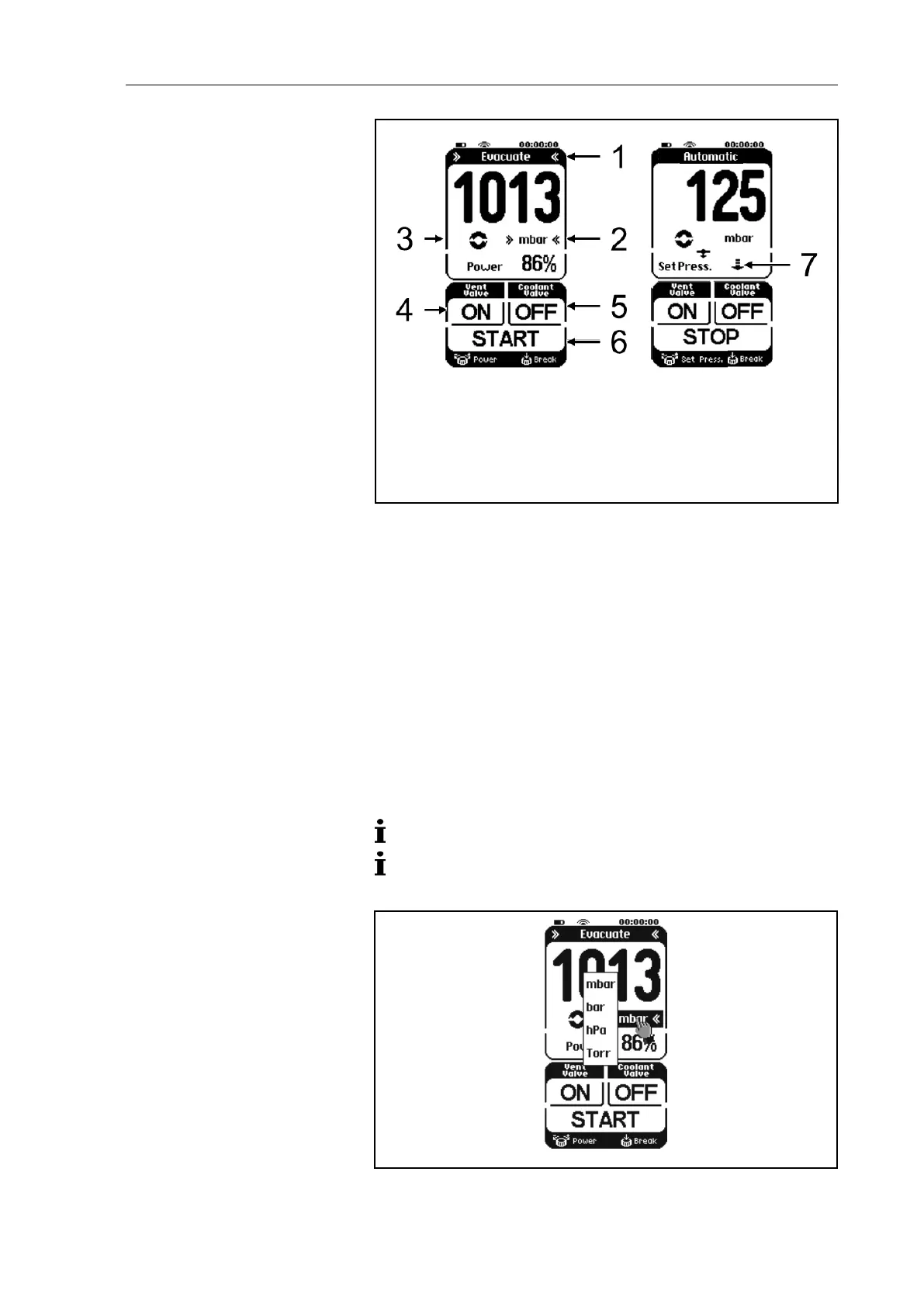
Operating mode menu
Pressure units menu
Button Actuating the vacu-
um pump system (Paging)
Button for ventilation valve:
ON = To open
CLOSE = To close
Button for coolant valve
(accessory) at high-
performance condenser:
ON = To open
CLOSE = To close
Button for the process:
START = To start
STOP = To stop
Button for automatic
pressure reduction:
Press = Finish (the current
pressure is applied as the
Fig. 9: Menus and buttons on the touchscreen
8.1.2. Operation
Menu language
When the start page appears after switching the hand terminal on,
choose between the following languages: German, English, French,
Italian, Spanish, Dutch, Japanese, and Chinese. The selection can
be made only immediately after switching on.
Pressure unit
Process pressure can be displayed on the hand terminal in mbar,
bar, hPa, or Torr.
Use the Pressure units menu to select the pressure units (button
on touchscreen; see Fig. 10).
Pressure units can be changed only when no process is active.
In order to change the unit of pressure, it is necessary to
temporarily switch to another operating mode.
Fig. 10: Pressure units menu


 To Next Page