EasyManua.ls Logo

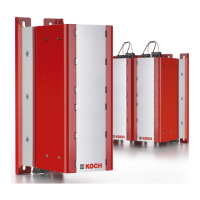
Koch 2.0 Series - User Manual

Koch 2.0 Series
80 pages
Go to English
Print Icon
To Next Page IconTo Next Page
Loading...
Energizing Productivity
Energiespeicherlösungen Serie 2.0 und 3.0
Energy Storage Solutions series 2.0 and 3.0
Betriebsanleitung
Operating Manual

Table of Contents

Question and Answer IconNeed help?

Do you have a question about the Koch 2.0 Series and is the answer not in the manual?

Summary

1 Introduction

1.1 Foreword

Brief introduction and company overview.

1.2 Environmental protection

Information on packaging disposal and equipment take-back.

1.3 Working with this Operating manual

Guidance on how to use the operating manual effectively.

2 Description of the device

2.1 Intended use

Describes the purpose and application of different device types.

2.2 Applied guidelines

Lists the directives and standards the device complies with.

2.3 Type designation

Explains the naming convention and coding for device models.

2.4 Overview diagram

Visual representation and labeling of the energy storage solution components.

2.5 Type plate

Details the information found on the device's identification plate.

2.6 Labels on the housing

Explains the meaning of various warning and information labels on the device.

2.7 Ambient conditions

Specifies the operational and storage environmental parameters.

2.8 Electrical supply data

Provides technical specifications for electrical input and power.

2.9 Dimensions and weight

Lists the physical size and weight of the device.

2.10 Noise emission

States the noise levels generated by the device.

3 Basic safety instructions

3.1 Personnel

Outlines requirements and responsibilities for personnel handling the device.

3.2 The device

Covers safety aspects related to the device itself during operation.

3.3 Requirements of Underwriters Laboratories (UL)

Details specific requirements for UL compliance and usage.

4 Transport; Storage; Installation

4.1 Checking the delivery

Procedures for verifying the received shipment and identifying damages.

4.2 Transporting the Energy storage solution

Guidelines for safely moving the device during transport.

4.3 Storing the Energy storage solution

Recommendations for proper storage conditions to maintain device integrity.

4.4 Unpacking the Energy storage solution

Steps for safely removing the device from its packaging.

4.5 Installing the Energy storage solution

Instructions for mounting and securing the device in its operational location.

4.6 Earthing the Energy storage solution

Procedure for correctly connecting the device to earth ground for safety.

5 Commissioning

5.1 Connecting the Energy storage solution

Step-by-step guide for establishing electrical connections to the device.

5.2 Connecting two or more Energy storage solutions in parallel

Instructions for wiring multiple devices together in parallel.

5.3 Connecting two or more applications with a DC link system to one Energy storage solution

Describes how to connect multiple applications to a single storage unit.

5.4 Connecting the RS422 communication interface

Details the process for establishing serial communication via RS422.

5.5 Connecting the monitoring interface (depending on device)

Guide for connecting the device's monitoring interface to external systems.

5.6 Disconnecting the Energy storage solution

Procedures for safely disconnecting the device from the DC link.

5.7 Conditioning the Energy storage solution

Steps for re-energizing and conditioning a de-energized storage solution.

6 Other tasks

6.1 Cleaning the Energy storage solution

Instructions for cleaning the device safely.

6.2 Maintaining the Energy storage solution

Information on maintenance requirements for the device.

6.3 Repairing the Energy storage solution

Details on how faulty devices should be repaired.

6.4 Disposing of the Energy storage solution

Guidelines for the proper disposal of the device.

7 Extension module

7.1 Ambient conditions

Specifies environmental parameters for extension modules.

7.2 Electrical supply data

Details usable storage capacity for extension modules.

7.3 Dimensions and weight

Lists the physical size and weight of extension modules.

7.4 Transport; Storage; Installation

General instructions for handling extension modules.

7.5 Connecting an extension module to the Energy storage solution

Step-by-step guide for connecting an extension module.

7.6 Connecting an additional extension module

Instructions for connecting multiple extension modules.

7.7 Disconnecting an extension module

Procedures for safely disconnecting an extension module.

7.8 Other tasks

Refers to other task sections for extension modules.

Summary

1 Introduction

1.1 Foreword

Brief introduction and company overview.

1.2 Environmental protection

Information on packaging disposal and equipment take-back.

1.3 Working with this Operating manual

Guidance on how to use the operating manual effectively.

2 Description of the device

2.1 Intended use

Describes the purpose and application of different device types.

2.2 Applied guidelines

Lists the directives and standards the device complies with.

2.3 Type designation

Explains the naming convention and coding for device models.

2.4 Overview diagram

Visual representation and labeling of the energy storage solution components.

2.5 Type plate

Details the information found on the device's identification plate.

2.6 Labels on the housing

Explains the meaning of various warning and information labels on the device.

2.7 Ambient conditions

Specifies the operational and storage environmental parameters.

2.8 Electrical supply data

Provides technical specifications for electrical input and power.

2.9 Dimensions and weight

Lists the physical size and weight of the device.

2.10 Noise emission

States the noise levels generated by the device.

3 Basic safety instructions

3.1 Personnel

Outlines requirements and responsibilities for personnel handling the device.

3.2 The device

Covers safety aspects related to the device itself during operation.

3.3 Requirements of Underwriters Laboratories (UL)

Details specific requirements for UL compliance and usage.

4 Transport; Storage; Installation

4.1 Checking the delivery

Procedures for verifying the received shipment and identifying damages.

4.2 Transporting the Energy storage solution

Guidelines for safely moving the device during transport.

4.3 Storing the Energy storage solution

Recommendations for proper storage conditions to maintain device integrity.

4.4 Unpacking the Energy storage solution

Steps for safely removing the device from its packaging.

4.5 Installing the Energy storage solution

Instructions for mounting and securing the device in its operational location.

4.6 Earthing the Energy storage solution

Procedure for correctly connecting the device to earth ground for safety.

5 Commissioning

5.1 Connecting the Energy storage solution

Step-by-step guide for establishing electrical connections to the device.

5.2 Connecting two or more Energy storage solutions in parallel

Instructions for wiring multiple devices together in parallel.

5.3 Connecting two or more applications with a DC link system to one Energy storage solution

Describes how to connect multiple applications to a single storage unit.

5.4 Connecting the RS422 communication interface

Details the process for establishing serial communication via RS422.

5.5 Connecting the monitoring interface (depending on device)

Guide for connecting the device's monitoring interface to external systems.

5.6 Disconnecting the Energy storage solution

Procedures for safely disconnecting the device from the DC link.

5.7 Conditioning the Energy storage solution

Steps for re-energizing and conditioning a de-energized storage solution.

6 Other tasks

6.1 Cleaning the Energy storage solution

Instructions for cleaning the device safely.

6.2 Maintaining the Energy storage solution

Information on maintenance requirements for the device.

6.3 Repairing the Energy storage solution

Details on how faulty devices should be repaired.

6.4 Disposing of the Energy storage solution

Guidelines for the proper disposal of the device.

7 Extension module

7.1 Ambient conditions

Specifies environmental parameters for extension modules.

7.2 Electrical supply data

Details usable storage capacity for extension modules.

7.3 Dimensions and weight

Lists the physical size and weight of extension modules.

7.4 Transport; Storage; Installation

General instructions for handling extension modules.

7.5 Connecting an extension module to the Energy storage solution

Step-by-step guide for connecting an extension module.

7.6 Connecting an additional extension module

Instructions for connecting multiple extension modules.

7.7 Disconnecting an extension module

Procedures for safely disconnecting an extension module.

7.8 Other tasks

Refers to other task sections for extension modules.

Koch 2.0 Series Specifications

General IconGeneral
BrandKoch
Model2.0 Series
CategoryAudio & Video Accessories
LanguageEnglish