Disabling set speed limit
›
Select and confirm the menu item (warning when speed limit is exceeded).
›
By confirming the speed stored in the memory, the speed limit is reset.
Notice
The speed limit set mode is stored even after the ignition is switched off and
on.
Memory
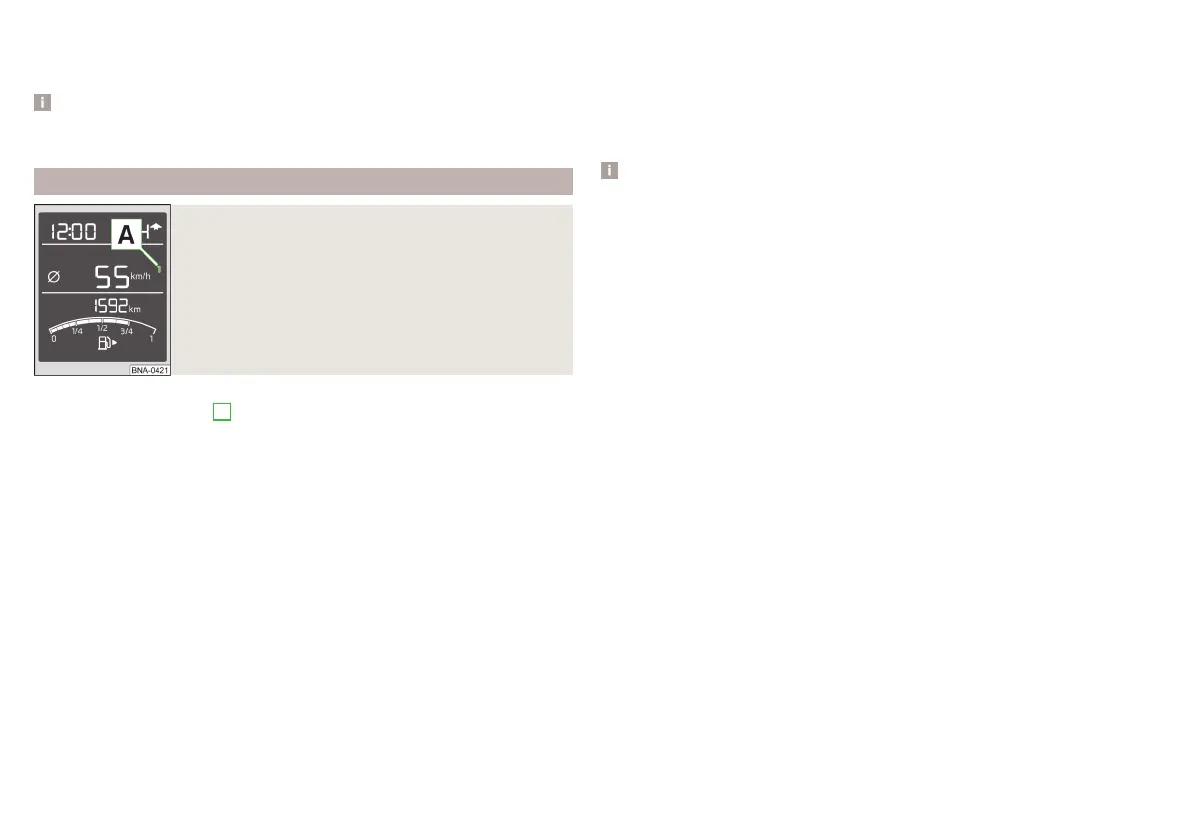
Fig. 19
Multi-function display - display example of the mem-
ory
The system stores data from the two memories described below, which are
then displayed at position
A
» fig. 19.
“1” – Single-trip memory
Driving data is stored from when the ignition is switched on to when it is
switched off. If the trip is continued within 2 hours after switching off the ig-
nition, new data will also flow into the calculation of the current driving infor-
mation.
If the trip is interrupted for more than 2 hours, the memory is automatically
erased.
“2” – Long-term memory
The memory gathers driving information from any number of individual jour-
neys up to a total of 19 hours and 59 minutes driving or 1 999 kilometres driv-
en.
The indicator is automatically set back to zero if one of the indicated values is
exceeded.
›
To select the preferred memory bank choose the desired specification of
the multi-function display and select by repeatedly confirming the preferred
memory bank.
Reset memory » page 29.
The following driving data is stored in memory banks.
▶
Average fuel consumption.
▶
Distance driven.
▶
Average speed.
▶
Driving time.
Notice
Disconnecting the vehicle battery will delete all memory data.
30
Usage


 To Next Page