Communication and Multimedia
Phone operation via the multifunction steering wheel
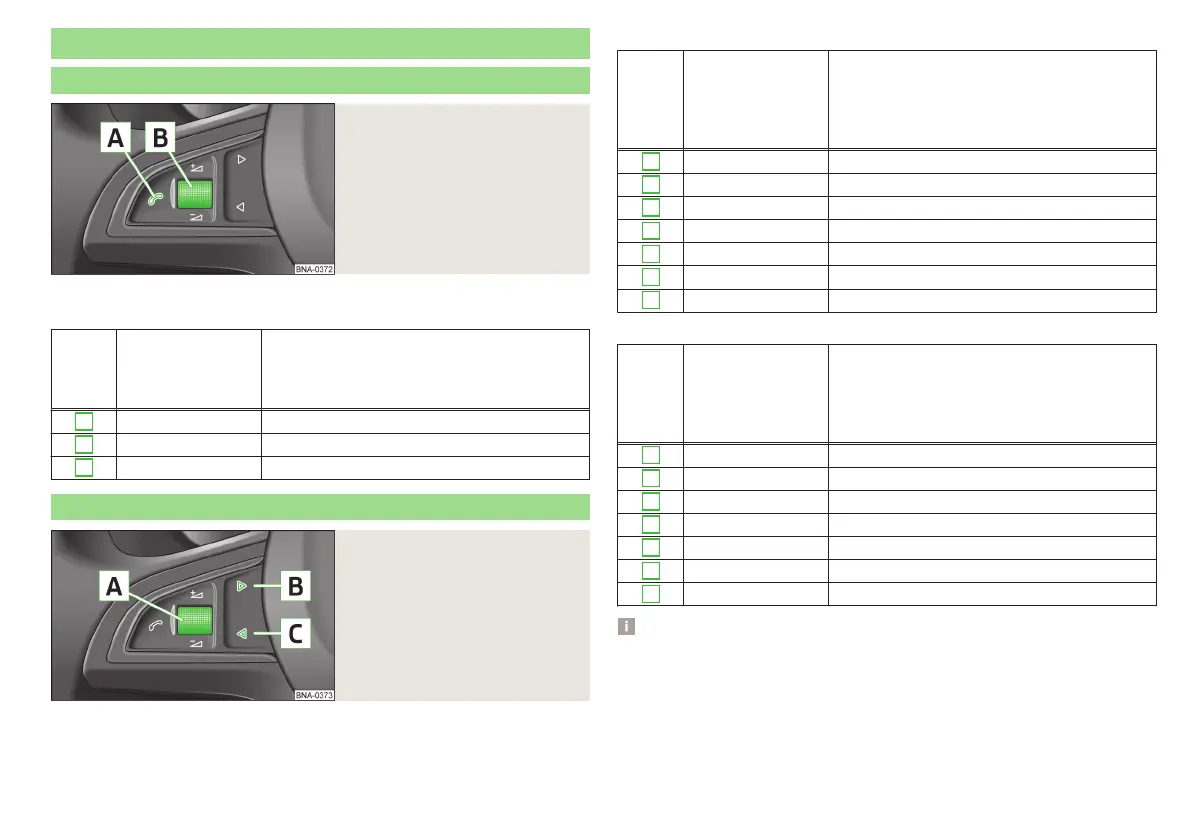
Fig. 59
Buttons/dial on the multifunc-
tion steering wheel
To operate the telephone from the multifunction steering wheel, it is necessa-
ry to pair the phone and Infotainment» Infotainment Owner´s Manual.
But-
ton /
dial
» fig. 59
Action Function
A
Press Answer call / end call
A
Hold Reject call/last number dialled
B
Turn Volume setting
Multimedia operation via the multifunction steering wheel
Fig. 60
Buttons/dial on the multifunc-
tion steering wheel
Radio menu
But-
ton /
dial
» fig. 6
0
Action Function
A
Press Switch sound off/on
A
Hold Switch device on/off
A
Turn Volume setting
B
Press Skip to next stored channel
B
Hold Search forwards
C
Press Switch to previous stored channel
C
Hold Search backwards
Media menu
But-
ton /
dial
» fig. 6
0
Action Function
A
Press Switch sound off/on
A
Hold Switch device on/off
A
Turn Volume setting
B
Press Skip to next track
B
Hold Fast forward
C
Press Switch to previous track
C
Hold Fast rewind
Notice
The devices connected to the AUX input can not be operated with the but-
tons/dial on the multifunction steering wheel.
53
Communication and Multimedia



 To Next Page