If during comfort signalling the operating lever is pressed in the opposite di-
rection, the indicating will stop.
WARNING
Only turn on the main beam or the headlight flasher if other road users will
not be dazzled.
Automatic driving light control
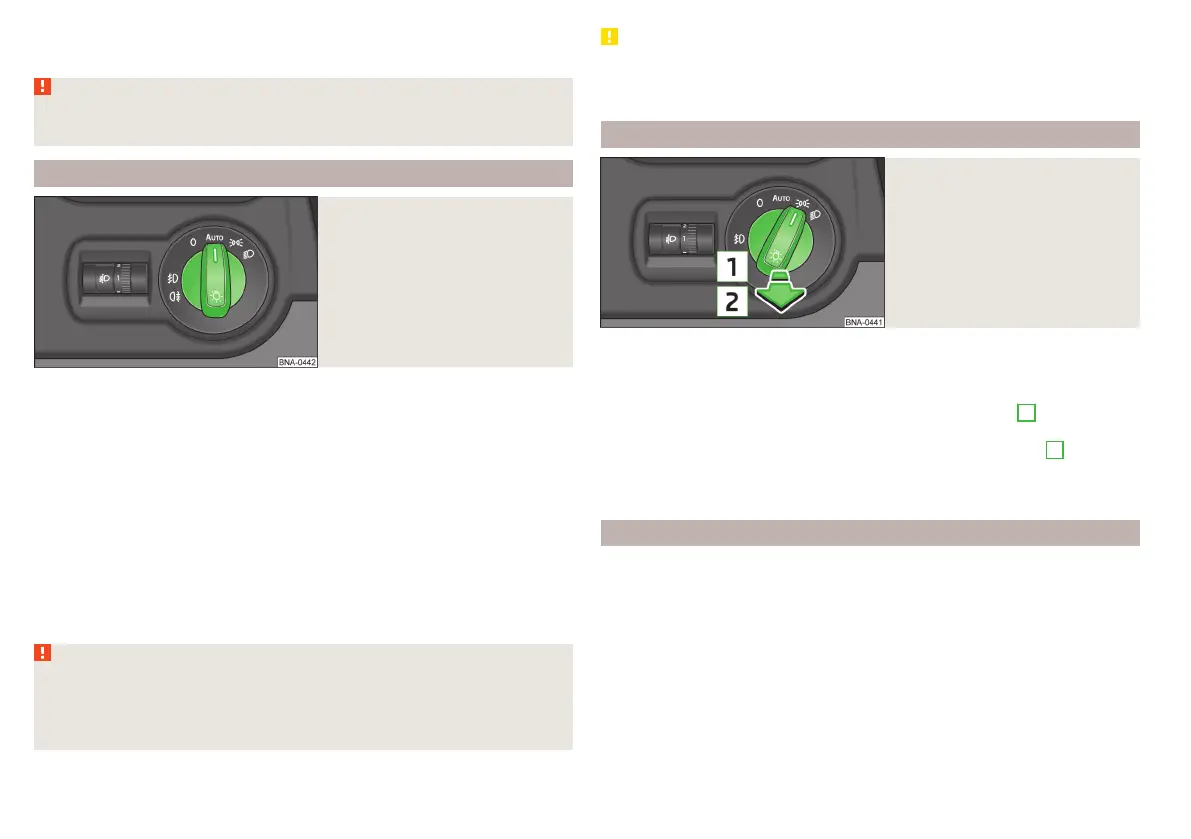
Fig. 30
Light switch: Position
If the light switch is in position
» fig. 30, then, depending on the equip-
ment, the lights switch on/off automatically corresponding to the light or
weather conditions (rain).
If the light switch is in position
, the lettering
illuminates next to the
light switch. If the light is switched on automatically, the symbol
also illumi-
nates next to the light switch.
Automatic driving light control during rain
The dipped beam is switched on automatically if the following conditions are
met.
The light switch is in the position .
The windscreen wipers are on for more than 15 s.
The light turns off automatically about 4 minutes after turning off the wipers.
WARNING
The automatic driving lamp control (position only operates as a sup-
port and does not release the driver from his responsibility to check the
light and, if necessary, to switch on the light depending on the prevailing
light conditions.
CAUTION
Poorer visibility is evaluated by a sensor mounted below the windscreen in the
holder of the rear-view mirror. Do not cover the sensor - the system function
may be disrupted.
Fog lights/rear fog light
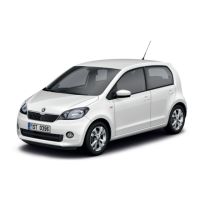
Fig. 31
Light switch - switch on front
and rear fog lights
Switching on the fog lights / rear fog lights is possible if the following con-
ditions apply.
The lights switch is in position
,
or
» fig. 31.
›
To switch on the fog lights, pull the light switch in position
1
; the warning
light illuminates in the instrument cluster.
›
To switch on the rear fog light, pull the light switch to position
2
, the indi-
cator light
will light up in the instrument cluster.
The fog lights/rear fog light are switched off in the reverse order.
Parking light
The side light is provided for lighting of the parked vehicle.
Switching on the side light on one side
Only vehicles with LED daytime running lights have this feature.
›
Switch off the ignition.
›
Press the control lever all the way into position or until it stops » fig. 29
on page 37.
The parking light is turned on on the relevant side of the vehicle.
Switching on the side light on both sides
›
Switch on the ignition and turn the light switch into position ,» page 36the
parking lights are turned on.
38
Usage


 To Next Page