Do more with your camera
www.kodak.com/go/support 23
Using Program mode
The Program Scene mode gives access to the greatest number of
settings.
1 Tap , then tap Scene.
2 Tap Program, then tap Apply.
NOTE:
Settings that you change in Program mode apply only to pictures taken in Program
mode. Use Reset Camera to reset Program mode to its default settings.
Changing Program mode settings
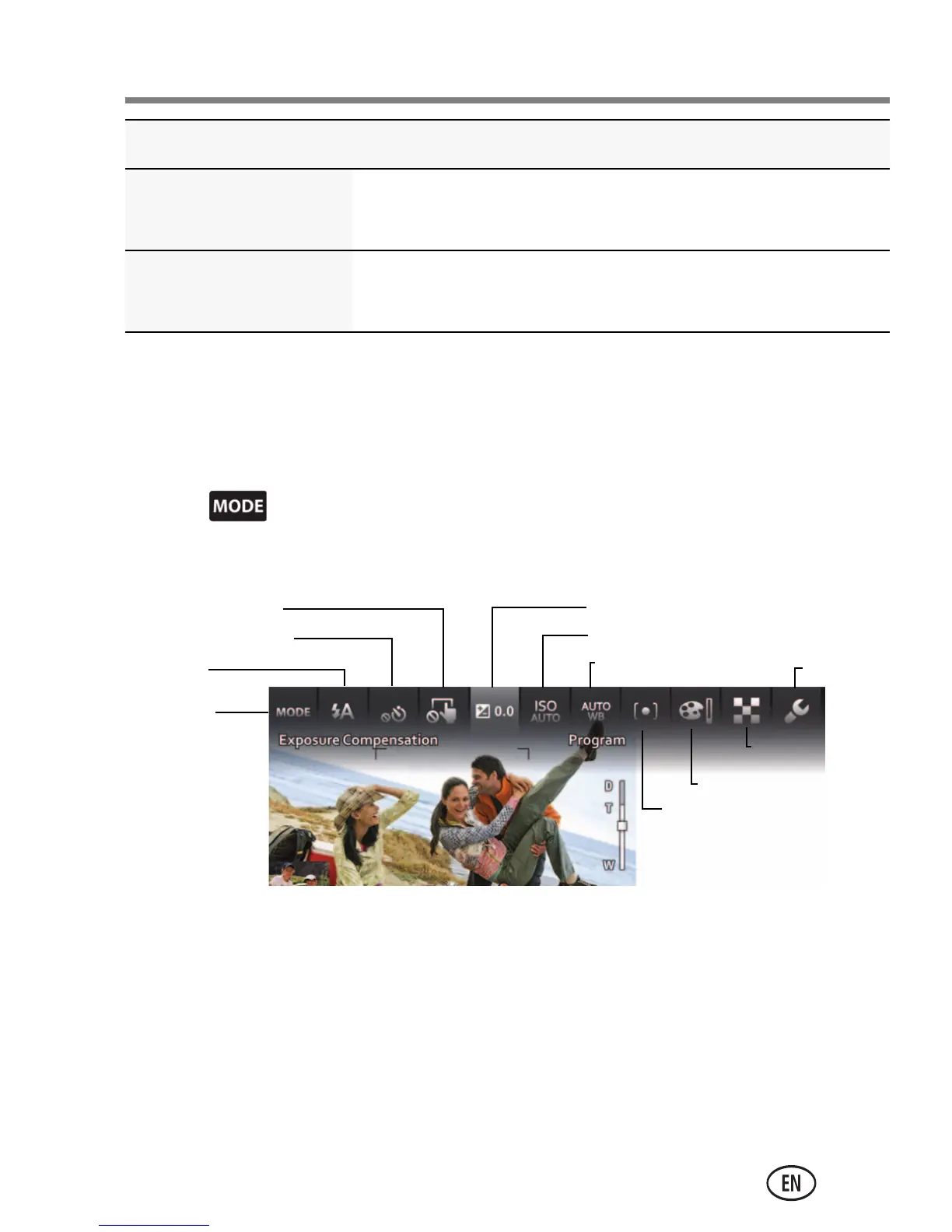
In Program Scene mode, tap a setting. Then change its value.
Panorama “Stitching” 2 or 3 pictures into 1 panoramic
scene.
Long Exposure Imparting a sense of motion (0.5 Sec., 1.0 Sec.,
2.0 Sec., 4.0 Sec., 8.0 sec.)
Scene mode For
Capture
mode
Flash
Self-timer/Burst
Touch Shutter Exposure compensation
ISO
White balance
Focus/Exposure zone
Color mode
Sharpness
Settings
urg_01219.book Page 23 Wednesday, March 9, 2011 11:52 AM














 To Next Page