www.kodak.com/go/support 17
ENGLISH
Install software, transfer pictures
IMPORTANT:
To use the sharing and social networking features,
you must install the KODAK Share Button App.
Make sure the computer is connected to the Internet. When
you connect the camera to the computer, the KODAK Camera
Setup App automatically runs. Follow the prompts to install the
KODAK Share Button App.
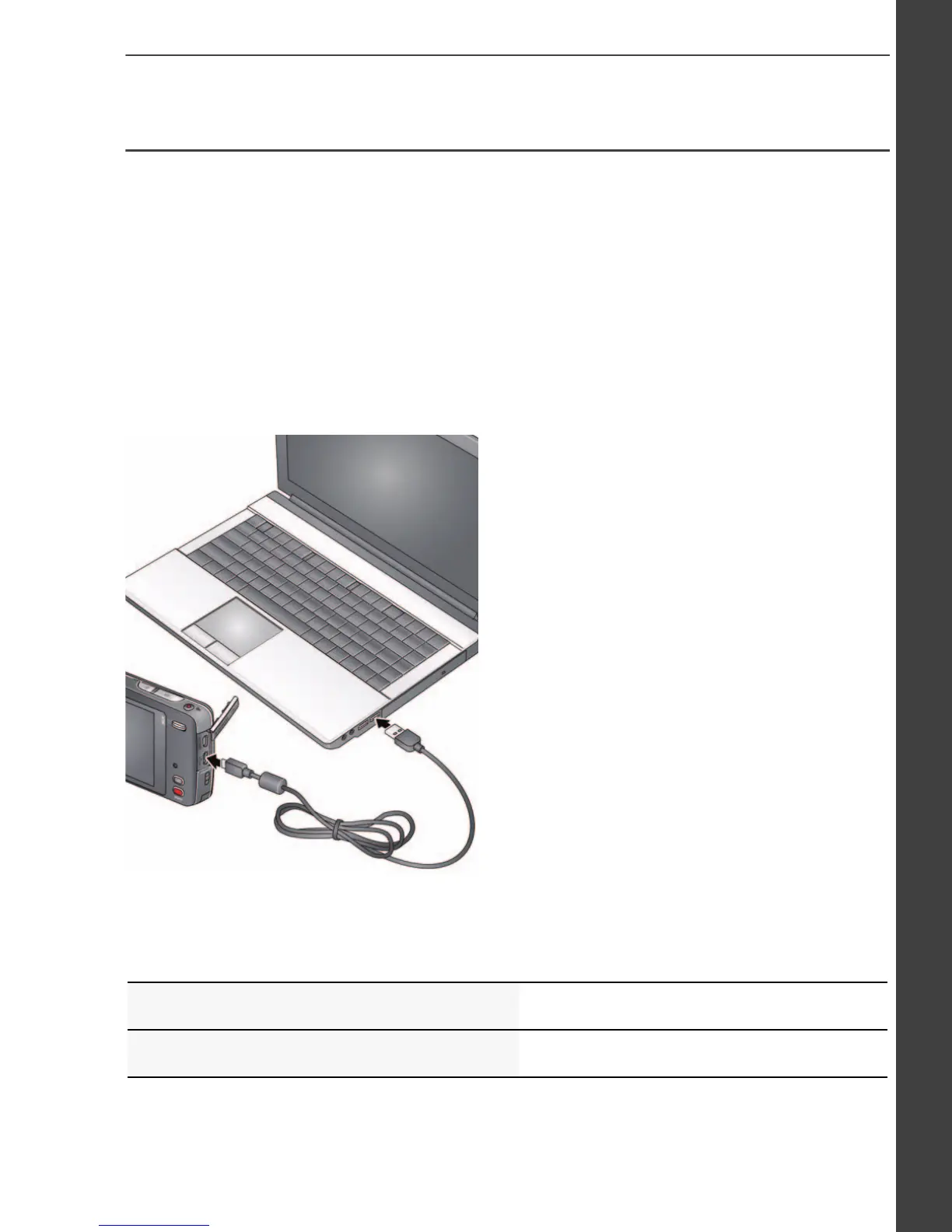
1 Turn off the camera.
2 Use a KODAK Camera USB
Cable, Micro B / 5-Pin to
connect camera to computer.
3 Turn on the camera.
4 After the software is
installed, follow the prompts
to transfer pictures and
videos to your computer.
IMPORTANT:
If the installer does not run, choose and install the
right version for your computer: www.kodak.com/go/camerasw.
See the Extended user guide www.kodak.com/go/m577manuals
See How-To videos www.kodak.com/go/m577demos
urg_01219.book Page 17 Wednesday, March 9, 2011 11:52 AM












 To Next Page