Getting started
www.kodak.com/go/digitalframesupport 5
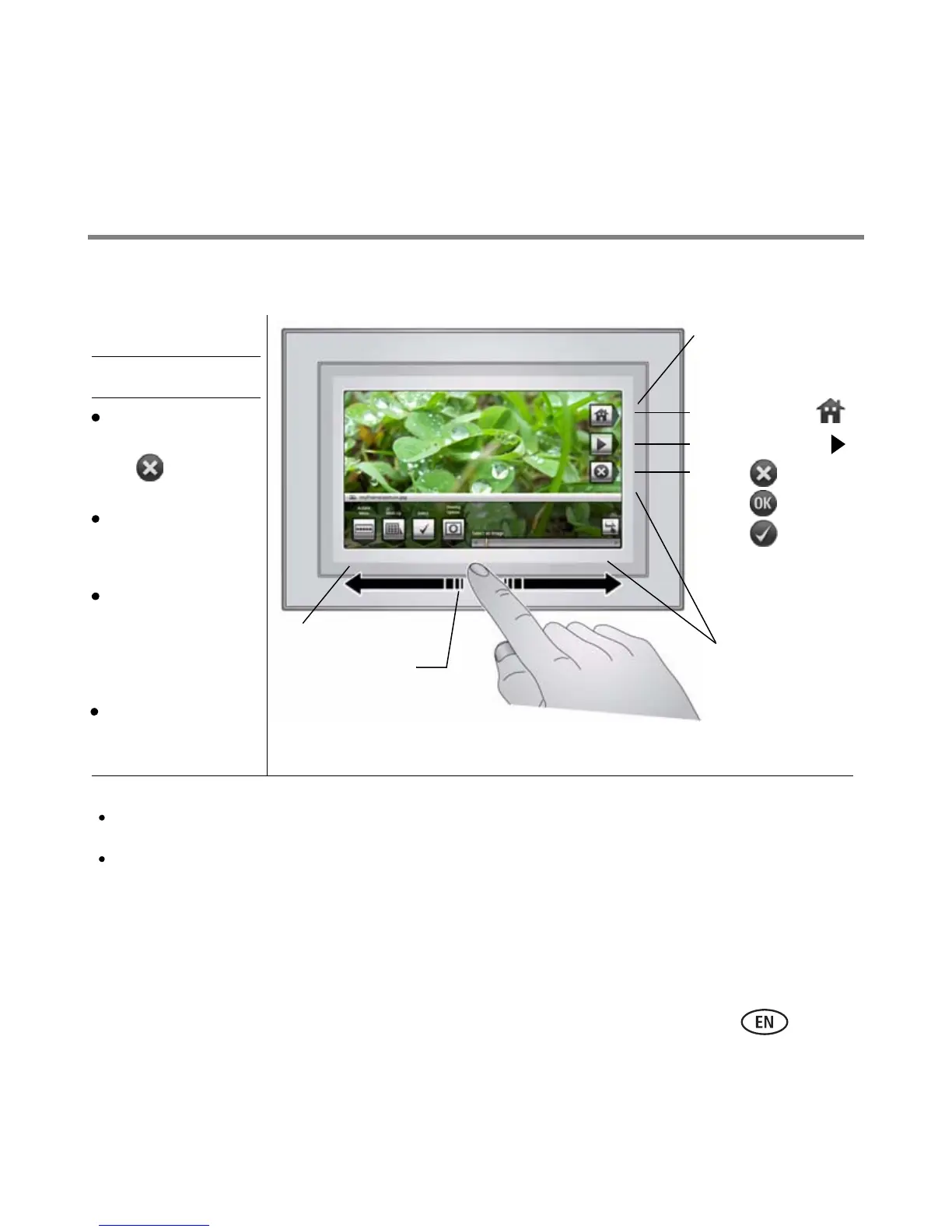
Using your frame’s Quick Touch Borders
Tap next to or
below a button to
select it.
Tap a border to
display the icons.
Tap (Close) to
dismiss them.
Touch tips
Home
Play Slide show
Close
*Quick Touch
OK
Done
Tap and slide on the Quick
Touch Borders* only.
Tap below buttons
Slide on bottom
border only
Slide to highlight
menus, pictures,
videos, options.**
Tap OK to select
them.
Slide to scroll:
Scroll through images—Like turning the pages of a book, slide left ← to go forward, slide right → to go back. For
faster scrolling through larger numbers of pictures, touch and hold (3 seconds), then slide to the end of the border.
Scroll through menus—Slide right → to scroll down, slide left ← to scroll up.
Borders
** Tap below small arrows at the ends of the scroll bar to move the highlight one picture, menu, or item at a time.
Tap next to buttons
No slide here
Important:
The screen is not touch-sensitive. Do not touch it.
Only use your finger to touch the borders. Sharp or metal objects may damage the border or screen
Don’t hover,
borders can be
sensitive.













 To Next Page