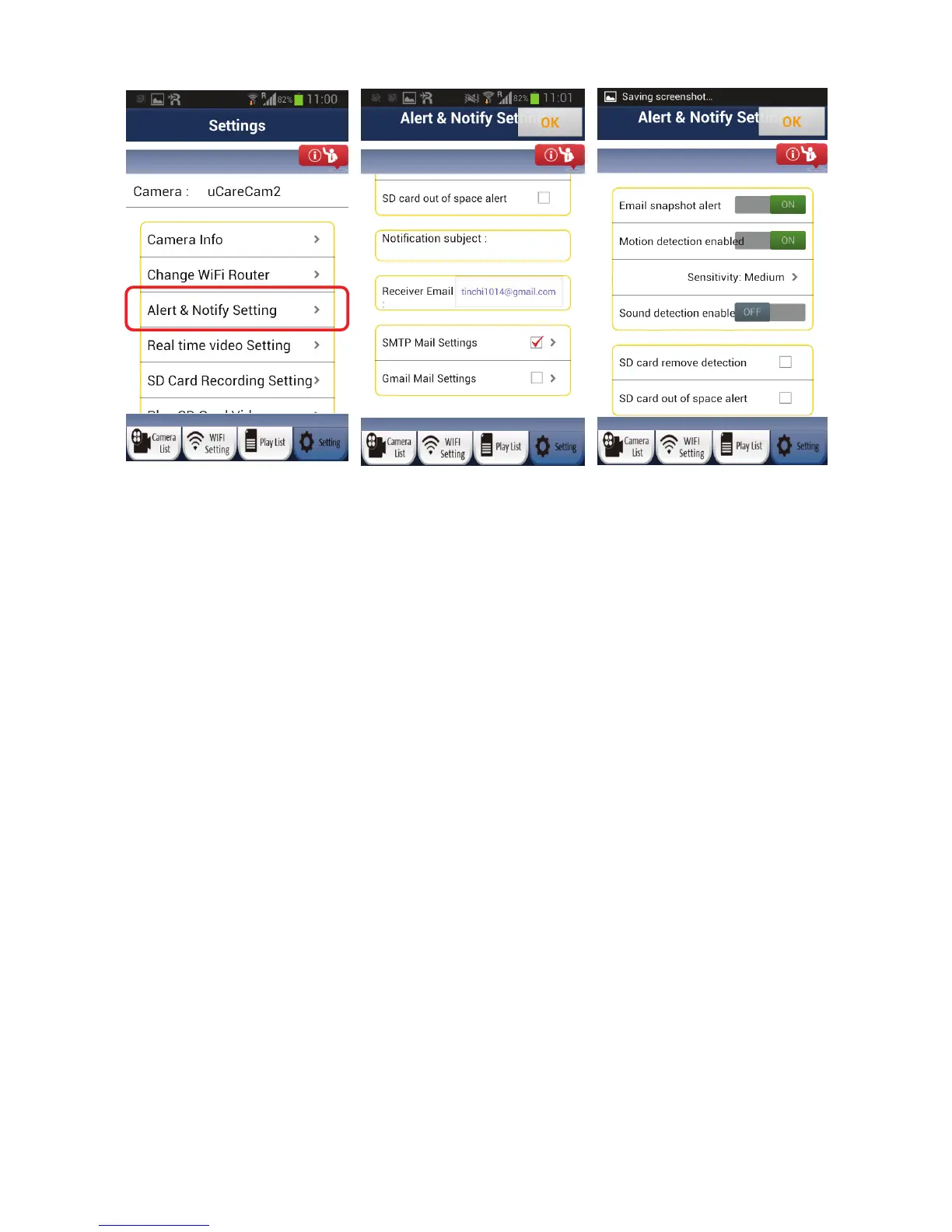
• Email snap
shot alert – Turn email on/off
• Motion detection enabled – Turn motion detection on/off
• Sensitivity – Motion detection sensitivity (High, Medium, Low)
• Sound detection enabled – Turn sound detection on/off
• SD card remove detection – Send alert if SD card is removed
• SD card out of space alert – Send alert if SD card is full
• Notification subject – Note to be added to email alert (less than 10 characters)
• Receiver Email – email address to send alert to
• SMTP Mail Settings – only either SMTP or Gmail mail settings can be set. Please enter your email
provider’s SMTP server settings. You may need to contact your email provider for the server settings.
Please enter your email address and email password. This account will be used as the “Sender” or
“From” for the email alerts.
• Gmail Mail Settings – only either SMTP or Gmail mail settings can be set. For convenience, we have
already entered Gmail’s SMTP server settings. Please enter your Gmail account email and Gmail
password. This account will be used as the “Sender” or “From” for the email alerts.
3) Real-time video setting
User can adjust the video quality settings based on the status of the network connection. If the user does
not have adequate video performance, please turn off motion detection and reduce the resolution.
(1) Frames: The default is motion image detection
(2) Resolution: The default is 640x480
17


 To Next Page