Back
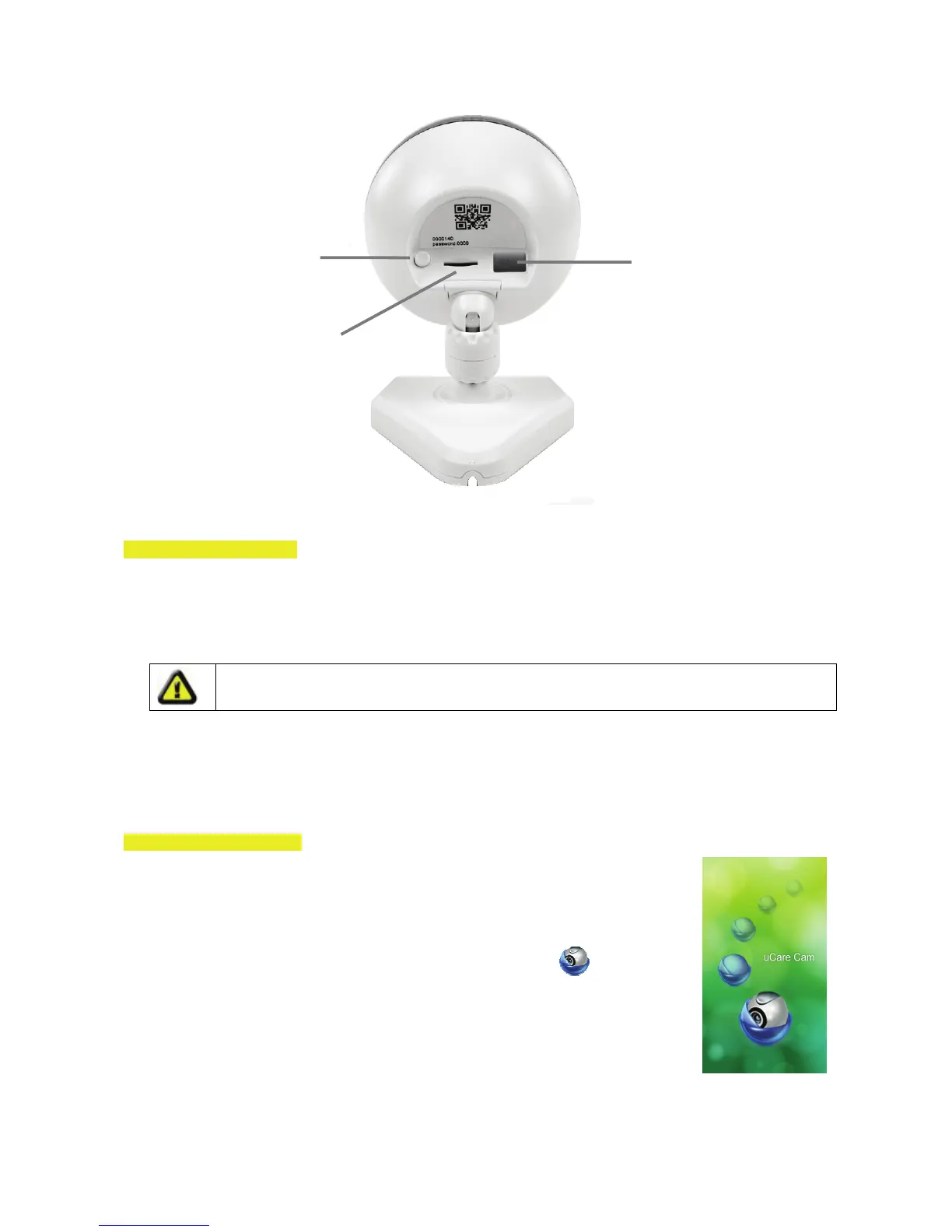
WPS/Reset button for
set-up and reset
5V DC input
Slot for Micro SD card
User instructions:
A. Hardware Installation
1. Please find a location to install the uCare Cam that is within good WiFi signal reach of your home router.
2. If you plan to hang the uCare Cam, you can use the mounting kit included.
3. If the power cable included is not long enough to reach a power outlet, please purchase an extender
cable from your local electronics store.
4. Connect the camera power adapter.
Warning:
Please use the power adapter included with your camera to avoid damage to the camera.
When the camera powers up, the status LED will be green for about 15 seconds before flashing red. If
there is no red LED flashing, please unplug the power cord, wait 5 seconds, then re-connect the power. It
will take about 60 seconds for the uCare Cam to finish starting up. The status LED should alternate
between red and green. If the status LED does not flash red and green, please press and hold the
WPS/REST button at the back of the uCare Cam for 10 seconds.
B. Hardware Installation
1. Download the Smartphone App “uCare Cam” from the App store (iOS) or Play
Store (Android).
2. Search for the App named “uCare Cam”, then download and install it on your
smartphone.
3. After the software installation is complete, this icon will appear
. Click on
this to run the App.
5


 To Next Page