6.3. Cleaning the sensor
Fiber Optic lenses should be clean all the time. Cleaning should primarily to be done through the
fiber optics opening in the sensor head. Cotton stick are the preferred means.
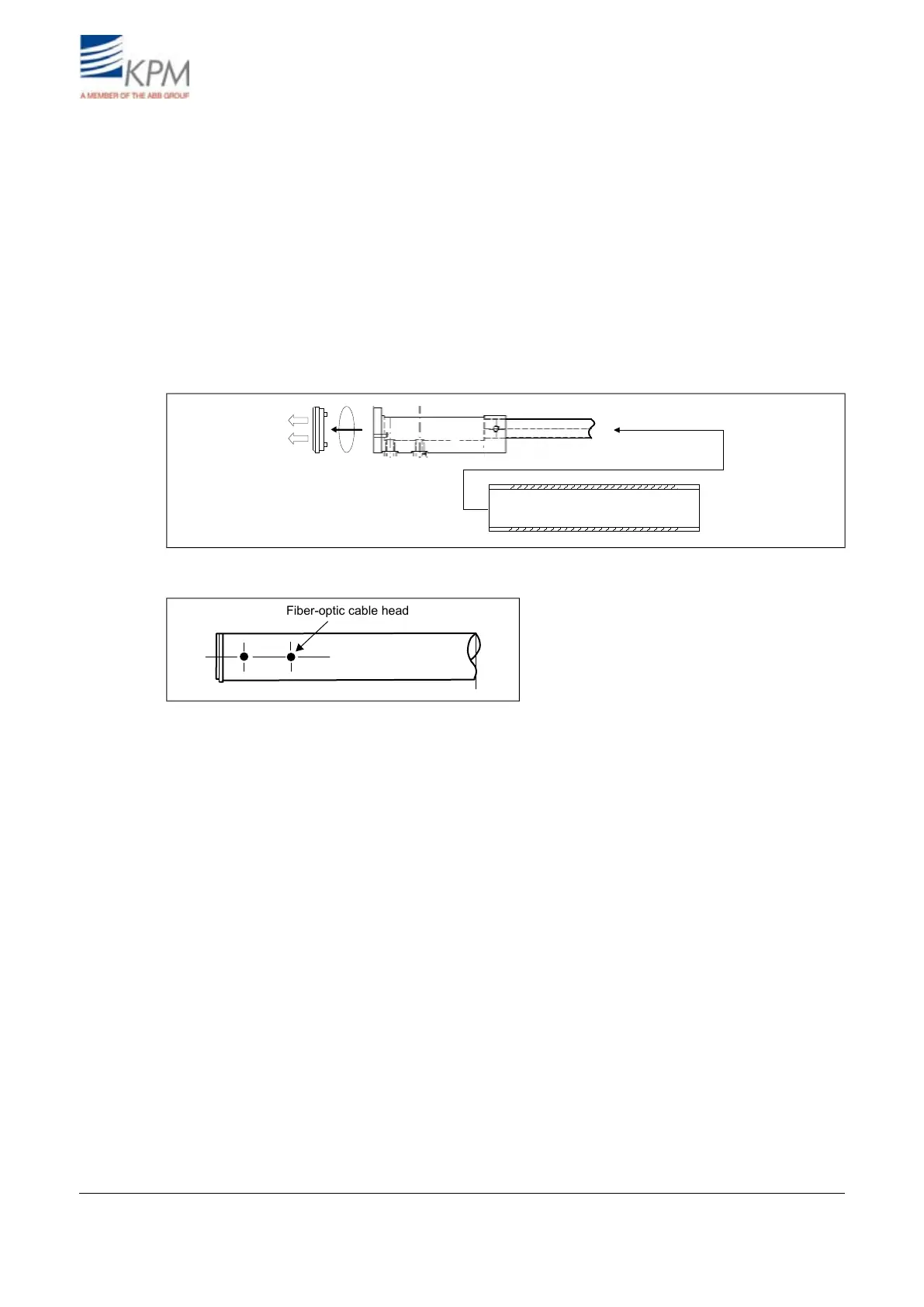
In case cleaning requires disassembly of the sensor head proceed as follows:
1. Release the fiber optic cable from the display unit and remove also the conduit bushing in order
to get the cable to slide inside the conduit.
2. Remove the end plate from the sensor head by removing the two fastening screws.
3. Remove the locking ring.
4. Pull the fiber-optic cable through the optical sensor housing.
5. Wipe the lenses clean with soft fabrics or paper and reinstall.
6. Eyes must be centered over the holes in the pipe.
Fig. 6.2. Dismantling the sensor housing.
Fig. 6.3. Fiber optic cable head.
KB² Man W41100099V1.225August 2012


 To Next Page