VP-311DVI Automatic DVI / Audio Switcher
KRAMER: SIMPLE CREATIVE TECHNOLOGY
4
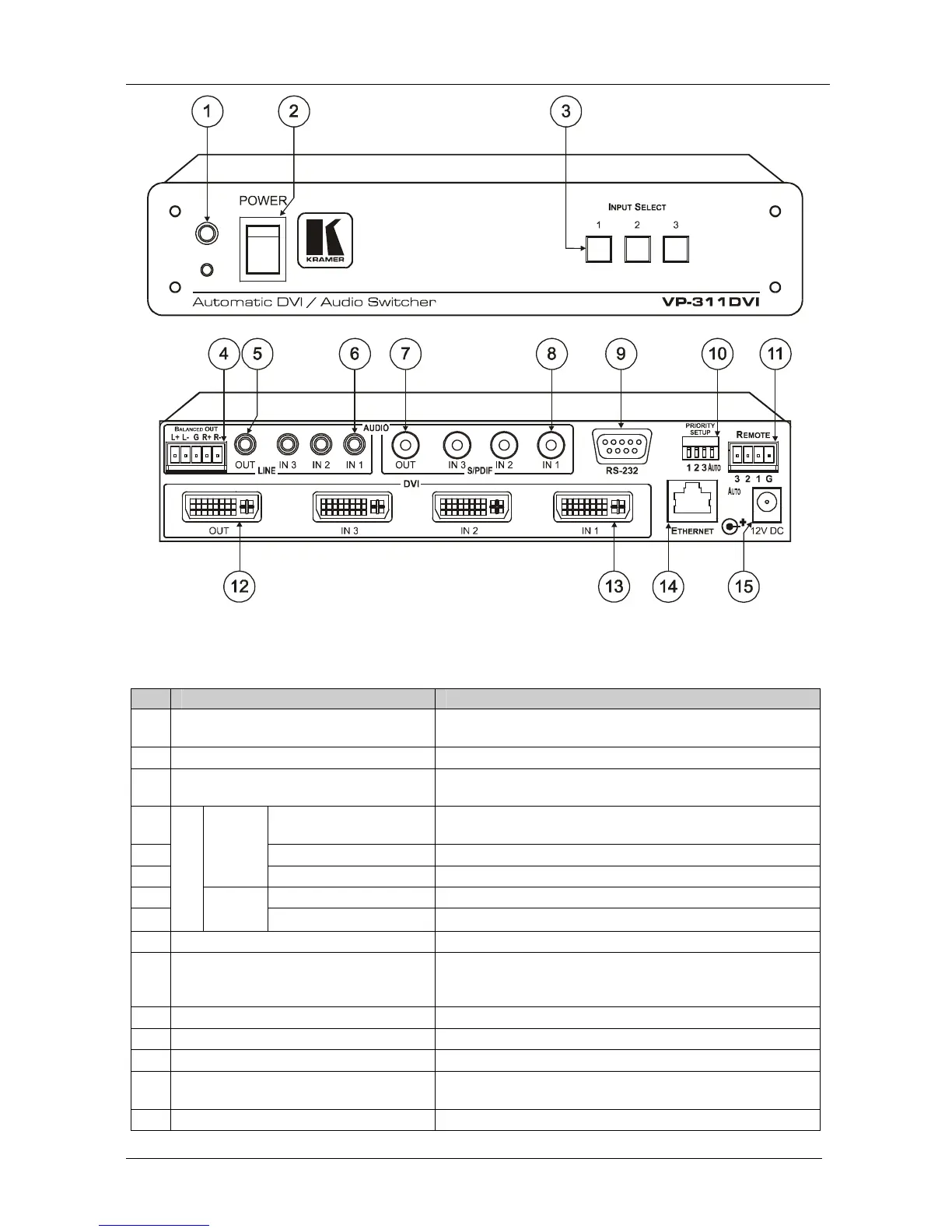
Figure 1: VP-311DVI Automatic DVI / Audio Switcher
Table 2: VP-311DVI Automatic DVI / Audio Switcher Features
# Feature Function
1 IR Receiver The red LED lights when receiving signals from the
Infra-red remote control transmitter
2 POWER Switch Illuminated switch for turning the unit ON or OFF
3 INPUT SELECT Buttons Press the INPUT button (from 1 to 3) to select the input to
switch to the output
4 BALANCED OUT
Terminal Block Connector
Connects the balanced stereo audio output to a balanced
stereo audio acceptor
5 OUT 3.5mm Mini Jack Connect to an unbalanced stereo audio output
6
LINE
IN 3.5mm Mini Jack Connect to unbalanced stereo audio inputs (from 1 to 3)
7 OUT RCA Connector Connect to a digital audio (S/PDIF) output
8
AUDIO
S/PDIF
IN RCA Connectors Connect to digital audio (S/PDIF) inputs (from 1 to 3)
9 RS-232 DB 9F Port Connect to the PC or the Remote Controller
10 PRIORITY SETUP Dipswitches Dipswitches for setup of the machine: DIPs 1, 2, 3 are for
setting the signal priorities, DIP 4 is for setting to the
manual or the AUTO mode (see section 5.1)
11 REMOTE Terminal Block Connects to a dry contact switch (see section 5.2)
12 OUT DVI-I Connector Connect to the DVI acceptor
13 IN DVI-I Connectors Connect to the DVI sources (from 1 to 3)
14 ETHERNET Connector Connect to the PC or other Serial Controller through computer
networking
15 12V DC +12V DC connector for powering the unit


 To Next Page