EasyManua.ls Logo

Kreg Straight Edge Guide - User Manual

Kreg Straight Edge Guide
96 pages
Print Icon
To Next Page IconTo Next Page
Loading...
English
2
French (N. America)
17
Spanish (N. America)
33
French
49
Spanish
65
German
81
OWNER’S MANUAL
We’re here to help.
We want you to have an exceptional project building experience.
If you have questions or need support, please get in touch.
1-800-447-8638 | technicalsupport@kregtool.com
Tell us about your experience.
Your opinion counts. And we’re always looking for ways to improve.
Share your feedback so we can keep growing and innovating for you.
www.kregtool.com/feedback
WARNING Every user must read and follow instructions and safety precautions in this manual.
Failure to do so could result in serious injury. Save manual for future reference.
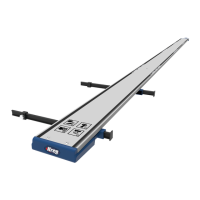
Straight Edge Guide
Manual applies to Item #
KMA4500 and KMA4500-E (Straight Edge Guide),
KMA4600 and KMA4600-E (Straight Edge Guide Extension),
KMA4700 and KMA4700-E (Straight Edge Guide XL)

Questions and Answers

  • A
    Alexa BooneAug 21, 2025
    How to connect Kreg Straight Edge Guide guide rails snugly?
    • S
      Stanley MurphyAug 21, 2025
      If the guide rails of your Kreg Power Tool Accessories do not connect snugly, ensure the top and base plate connectors with set screws are secured tight.
  • W
    William CochranAug 25, 2025
    How to align Kreg Power Tool Accessories rails?
    • J
      Jeremy MooreAug 25, 2025
      If the rails of your Kreg Power Tool Accessories are misaligned, use a level or straightedge to align them.
  • R
    rickallenAug 26, 2025
    Why does my Kreg Straight Edge Guide Power Tool Accessories guide move during use?
    • A
      angelica14Aug 26, 2025
      To prevent the Kreg Power Tool Accessories guide from moving or shifting during use, ensure you apply adequate clamping pressure when positioning the tool.
  • E
    ericcunninghamAug 27, 2025
    What to do if the Kreg Straight Edge Guide clamp does not hold?
    • C
      Carol HorneAug 28, 2025
      If the Kreg Power Tool Accessories clamp does not hold to the material, a possible solution is to check the material for square edges.
  • B
    benjamin90Aug 30, 2025
    Why does the Kreg Straight Edge Guide guide rail slip?
    • D
      Denise FieldsAug 30, 2025
      If the Kreg Power Tool Accessories guide rail slips and the clamp does not hold to the material snugly, make sure the guide rail sits flat and the cutline indicator arms are flat against the material. Avoid pulling upwards when setting the clamp.
  • R
    Ralph SmithSep 1, 2025
    Why is my saw hard to push with Kreg Power Tool Accessories?
    • L
      laurenhallSep 1, 2025
      If the saw gets hard to push, burning occurs, or the saw walks away from the Kreg Power Tool Accessories guide, the saw blade may not be square to the saw base plate. Refer to the saw owner’s manual for instructions.
  • D
    Daniel ReedSep 3, 2025
    How to fix inaccurate cuts with Kreg Power Tool Accessories?
    • R
      rbradfordSep 3, 2025
      If the cut is not accurate to the line when using Kreg Power Tool Accessories, recalibrate the tool.
  • J
    James FordSep 5, 2025
    Why does material warp under Kreg Power Tool Accessories clamp?
    • N
      Nathan RiddleSep 5, 2025
      If the material warps under the clamp pressure when using Kreg Power Tool Accessories, causing the guide not to sit flat, it is recommended to fully support the workpiece and cutoff with 2x4s or with 2"-thick (50 mm) rigid foam insulation laid flat on the floor.
  • Z
    zpalmerSep 7, 2025
    Why don't my dadoes align with Kreg Power Tool Accessories?
    • T
      Tammy FieldsSep 8, 2025
      If routing dadoes and rabbets do not align to your measurements when using Kreg Power Tool Accessories, recalibrate the indicator arms considering the bit type and diameter.
  • J
    Jaime FosterSep 9, 2025
    Why won't Kreg Straight Edge Guide Power Tool Accessories guide sit flat?
    • J
      John MartinezSep 9, 2025
      If the Kreg Power Tool Accessories guide will not sit flat on the material because the clamp pads touch the ground, note that the clamp pads are designed for material thickness 3/4" or greater for on the ground cutting. For thinner materials such as 1/2" or less, elevate the workpiece to ensure the pads are off the ground.

Summary

Safety Precautions

Pre-Assembly

Recommended Tools;Materials (Not Included)

Lists tools and materials required but not provided with the product.

Hardware;Tools Included

Details the specific hardware and tools that are included in the product package.

Product Description

Assembly

Prepare the Upper Connector Bars

Instructions for preparing the upper connector bars by threading set screws into them.

Assemble the Connector Bars

Steps for assembling the upper and lower connector bars into the guide rail channels.

Attach the Guide Rails

Guidance on sliding and aligning guide rails onto the connector bars and tightening screws.

Install the Adjustable GripMaxx Clamp

Instructions for installing the adjustable GripMaxx clamp onto the underside of the guide rail assembly.

Install the Handle

Steps to slide the handle onto the guide rail and secure it with bolts and nuts.

Assemble the Cutline Indicator Stops

Process for installing thumb screws and nuts into the cutline indicator stops.

Install the Indicator Arms

Instructions for sliding indicator arms into the clamp and attaching indicator stops.

Calibration

Position the Saw and Make Reference Marks

Steps to position the saw on material and mark reference lines for calibration.

Align the Guide Rail to the Marks

Guidance on placing the guide rail on material and aligning it with reference marks.

Align the Cutline Indicator Arms

Instructions on sliding indicator arms and stops to align with material edges for calibration.

Operation

Measure and Mark Your Material

Steps to measure and mark the material edge for precise cutting.

Position the Guide Rail and Cutline Indicator Arms

How to position the guide rail and slide indicator arms to align with material marks.

Clamp the Straight Edge Guide in Place on Your Material

Method for securing the straight edge guide onto the material using the clamp.

Cut Your Material

Instructions on how to cut the material using the guide rail, ensuring the tool follows the rail.

Remove the Straight Edge Guide from the Material

Steps for safely detaching the straight edge guide from the material after cutting.

Tips and Tricks for Successful Operation

Trim Router Calibration

Trim Router Operation

Care and Maintenance

Troubleshooting

Assembly

Lists common problems and solutions related to the assembly of the guide rails.

Set Up and Operation

Addresses issues encountered during setup and operation, offering troubleshooting steps.

Kreg Straight Edge Guide Specifications

General IconGeneral
BrandKreg
ModelStraight Edge Guide
CategoryPower Tool Accessories
LanguageEnglish

Related product manuals