54
ENGLISH
Note: Each variety of coee beans can behave dierently during grinding and this is the reason
why setting the quantity at the beginning might require extra care.
TIPS: When you change your grinding neness, we recommend to make a grinding ush, to avoid
a mix of neness between your previous and new settings. To remove the “old” ground coee, just
press START/STOP GRIND button (19), let the ground coee come out for 2 seconds and press the
button again to stop the grinding.
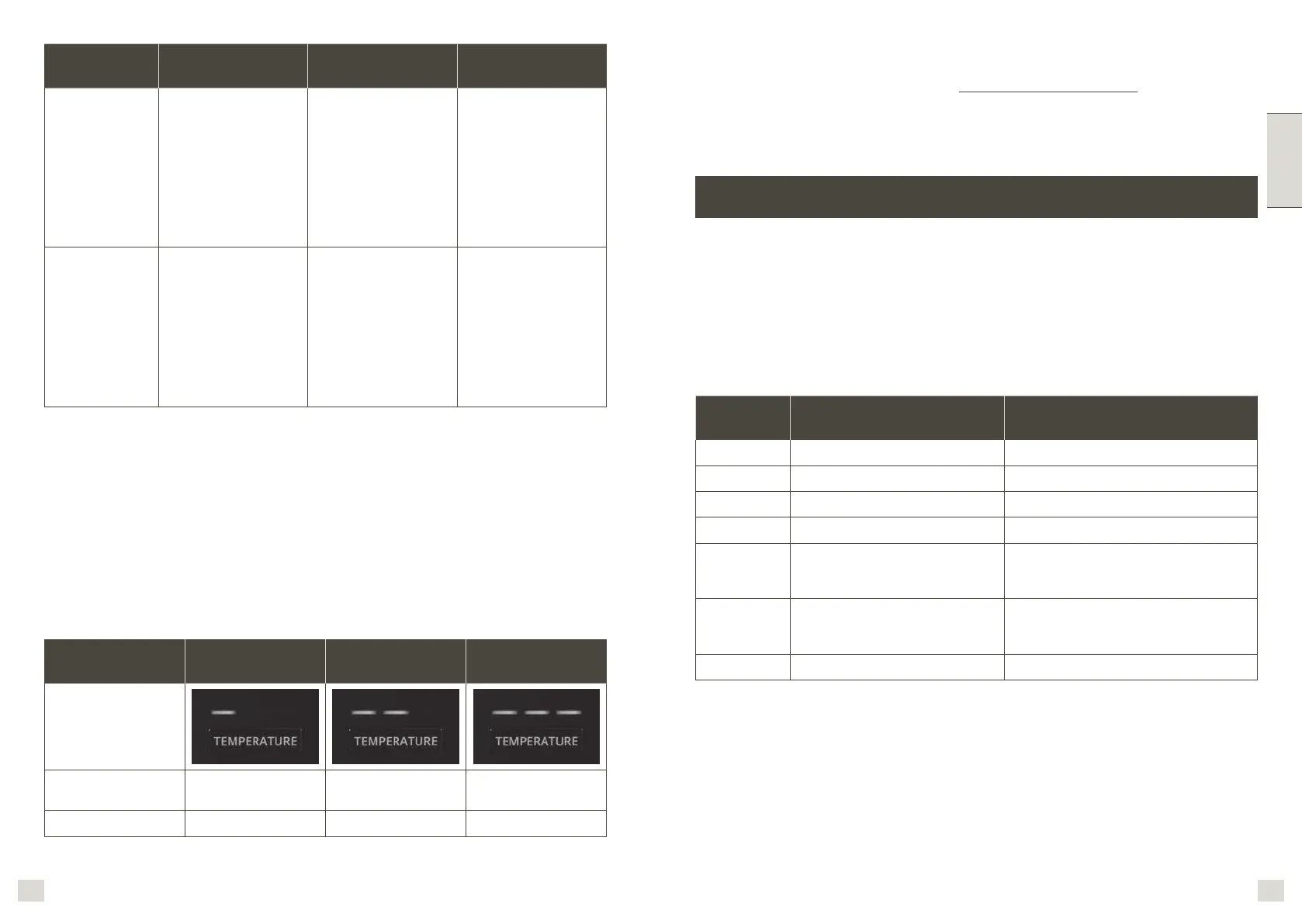
CORRECT
EXTRACTION
UNDER
EXTRACTION
OVER EXTRACTION
Result • Flow slow like warm
honey
• Crema is golden
brown with a ne
mousse texture
• Espresso is dark
brown
• Flow starts after 1–3
secs
• Flow fast like water
• Crema is thin and
pale
• Espresso is pale
brown
• Tastes weak and
watery
• Flow starts after
8secs
• Flow drips or not at
all
• Crema is dark and
spotty
• Espresso is very dark
brown
• Tastes bitter and
burnt
Solution /
• Grind Finer
• Tamp stronger, using
15 kilos of pressure.
• Increase the coee
quantity
• Grind Coarser
• Tamp using 15 kilos
of pressure. The top
edge of metal cap on
the tamper should
be level with the top
of the lter basket
AFTER tamping.
• Reduce the coee
quantity
b) Flavor
The longer the pre-infusion time, the better the aromas will be from your coee.
Temperature level LOW MID HIGH
Corresponding light
Coee Beans
Roasting Range
DARK DARK to MEDIUM MEDIUM to LIGHT
Impact on avor
Enhances sourness Balanced Enhances bitterness
Note: Coee beans varieties as well as roasting colors require their own specic temperature
setting for the best extraction. For example, a lower temperature is preferred for Robusta coee
beans than Arabica; the same is applicable to beans with a darker roasting color or to freshly
roasted beans than those degassed over time.
a) Changing beverage quantities
You can adjust coee quantity of 1 or 2 cups.
1. Prepare the machine to deliver 1 or 2 cups of the beverage you want to make (portalter
inserted lled with 1 or 2 cup lter with ground coee).
2. Turn the recipes dial to select the beverage being programmed (10), then press and hold the
START/STOP BREW button during 3s (8). After 3 seconds, the indicator ashes white and you
can release it. Delivery of coee starts.
3. When you reach the quantity you wished, press the START/STOP BREW button (8), the new
coee volume is saved.
PROGRAMMING BEVERAGE QUANTITES
Recipe Default volume Programmable volume
Espresso ≅ 30ml From ≅ 20ml to ≅ 60ml
Espresso x 2 ≅ 60ml From ≅ 40ml to ≅ 120ml
Lungo ≅ 70ml From ≅ 60ml to ≅ 100ml
Lungo x 2 ≅ 140ml From ≅ 120ml to ≅ 200ml
Americano* ≅ 120ml (Espresso: ≅
60ml + Hotwater: ≅
60ml)
From ≅ 20ml to ≅ 60ml
From ≅ 20ml to ≅ 150ml
Americano*
x 2
≅ 240ml (Espresso: ≅
120ml + Hotwater: ≅
120ml)
From ≅ 40ml to ≅ 120ml
From ≅ 40ml to ≅ 300ml
Hot water ≅ 250ml From ≅ 20ml to ≅ 300ml
c) Temperature is low
To make sure your rst coee is hot enough, we recommend you to make a “ush” before making
a coee. Insert a lter in the portalter but without adding ground coee in it (25). Insert the
portalter under the coee brewing head, press START/STOP BREW button (8). Some hot water
comes out from the coee spouts. After a few seconds press again the button to stop the ow.
This operation helps to warm internal circuit and the portalter before coee extraction. You can
also warm your cup by using HOT WATER function before coee extraction.
Note: Americano is made by 1 espresso followed by hot water. You can make only 1 cup of
Americano at once, not possible to make 2 cups at once, because of only 1 hot water outlet.
However, you can make a double dose americano if you select 2 CUPS and you put only one big cup.
b) Restoring default settings
1. Press and hold the POWER button (5) + TEMPERATURE button (27). All lights ash 2 times.
Whole machine has been restored to factory settings.




 To Next Page