‐7‐
Step 3: Communication connection
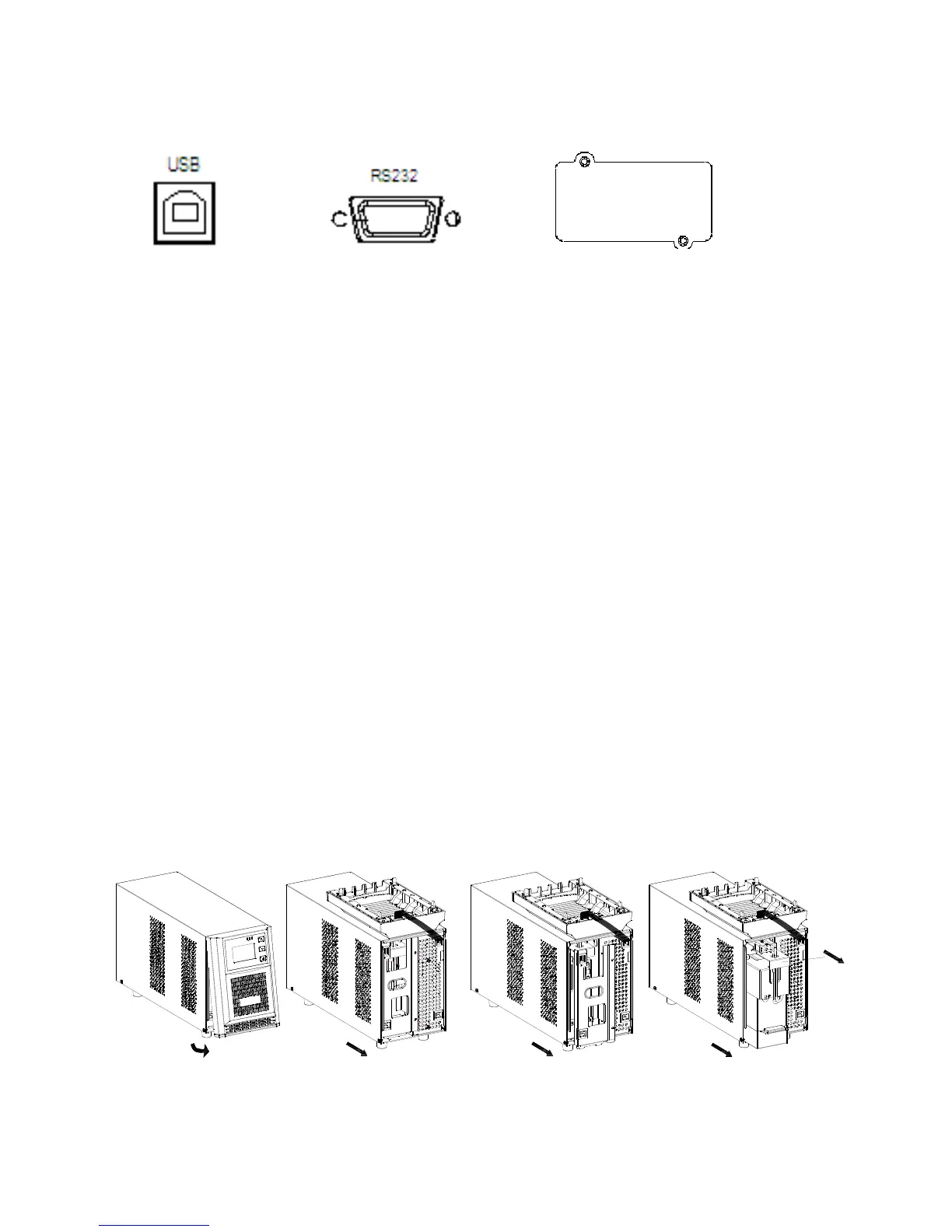
Communication ports:
USB port RS-232port Intelligent slot
To allow for unattended UPS shutdown/start-up and status monitoring, connect the
communication cable one end to the USB/RS-232 port and the other to the communication port
of your PC. With the monitoring software installed, you can schedule UPS shutdown/start-up and
monitor UPS status through PC.
The UPS is equipped with intelligent slot perfect for either SNMP or AS400 card. When installing
either SNMP or AS400 card in the UPS, it will provide advanced communication and monitoring
options.
Step 4: Disable and enable EPO function
Keep the pin 1 and pin 2 closed for UPS normal operation. To activate EPO function, cut the
wire between pin 1 and pin 2.
Step 5: Turn on the UPS
Press the ON button on the front panel for two seconds to power on the UPS.
Note: The battery charges fully during the first five hours of normal operation. Do not expect full
battery run capability during this initial charge period.
Step 6: Install software
For optimal computer system protection, install UPS monitoring software to fully configure UPS
shutdown. Please use software CD or go to website http://www.megatec.com.tw/Download.htm
2-4 Battery Replacement
NOTICE: This UPS is equipped with internal batteries and user can replace the batteries without
shutting down the UPS or connected loads.(hot-swappable battery design) Replacement is a
safe procedure, isolated from electrical hazards.
CAUTION!! Consider all warnings, cautions, and notes before replacing batteries.
Note: Upon battery disconnection, equipment is not protected from power outages.
For 1KVA Step 1 Step 2 Step 3
Removefrontpanel. Unscrewthebatteryboxfrontpanel. Pulloutthebatteryboxby
removingthefrontpaneland
disconnectbatterywires



 To Next Page