11OPERATING THE TRACTOR
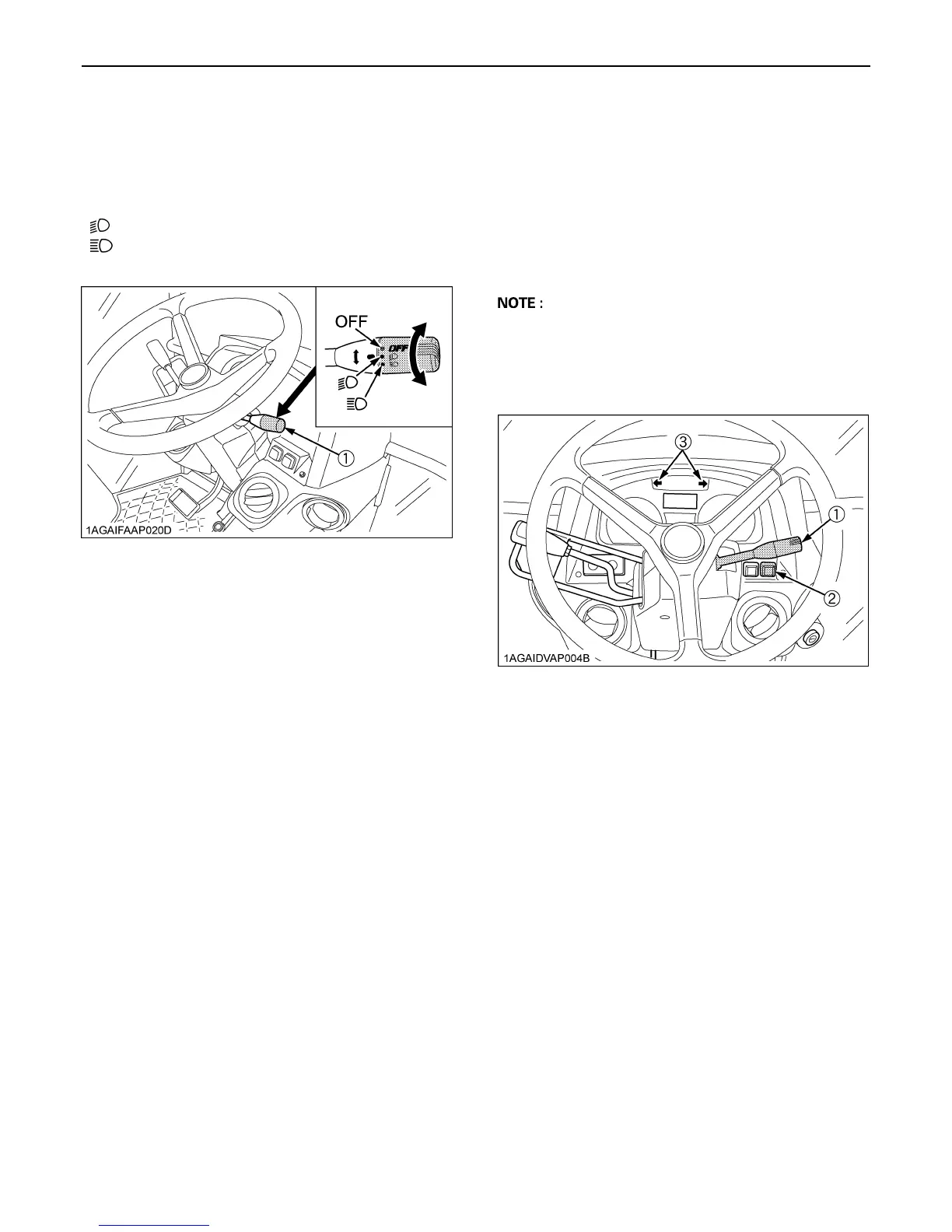
BLight Switch
Turn the light switch clockwise, and the following lights are
activated on the switch position.
BTurn Signal / Hazard Light Switch
C Turn Signal Light Switch
To indicate a right turn, turn the turn signal light switch
clockwise. To indicate a left turn, turn the turn signal light
switch counter-clockwise. The corresponding right and
left turn signal lights and indicator on the instrument panel
will flash. Turn signal is active when key switch is in the
"ON" position.
A Be sure to return switch to center position after turning.
C Hazard Light Switch
When hazard light switch is pushed, the hazard lights
flash along with the indicator on the instrument panel.
Press the hazard light switch again to turn off the light.
BWith Trailer Connector
When you operate the turn signal light switch with the
trailer power connector connected, the trailer indicator in
the instrumental panel also starts flashing along with the
turn signal indicator.
OFF...... Head lights OFF.
....... Head lights dimmed, low beam.
....... Head lights ON, high beam.
(1) Head light switch
(1) Turn signal light switch
(2) Hazard light switch
(3) Hazard / Turn signal indicator



 To Next Page