2PR
1-2-5
1-2-3 Installing the expansion memory modules (option)
<Procedure>
1. Turn off printer power switch.
Caution:
Do not insert or remove expansion memory
modules while printer power is on.
Doing so may cause damage to the printer
and the expansion memory modules.
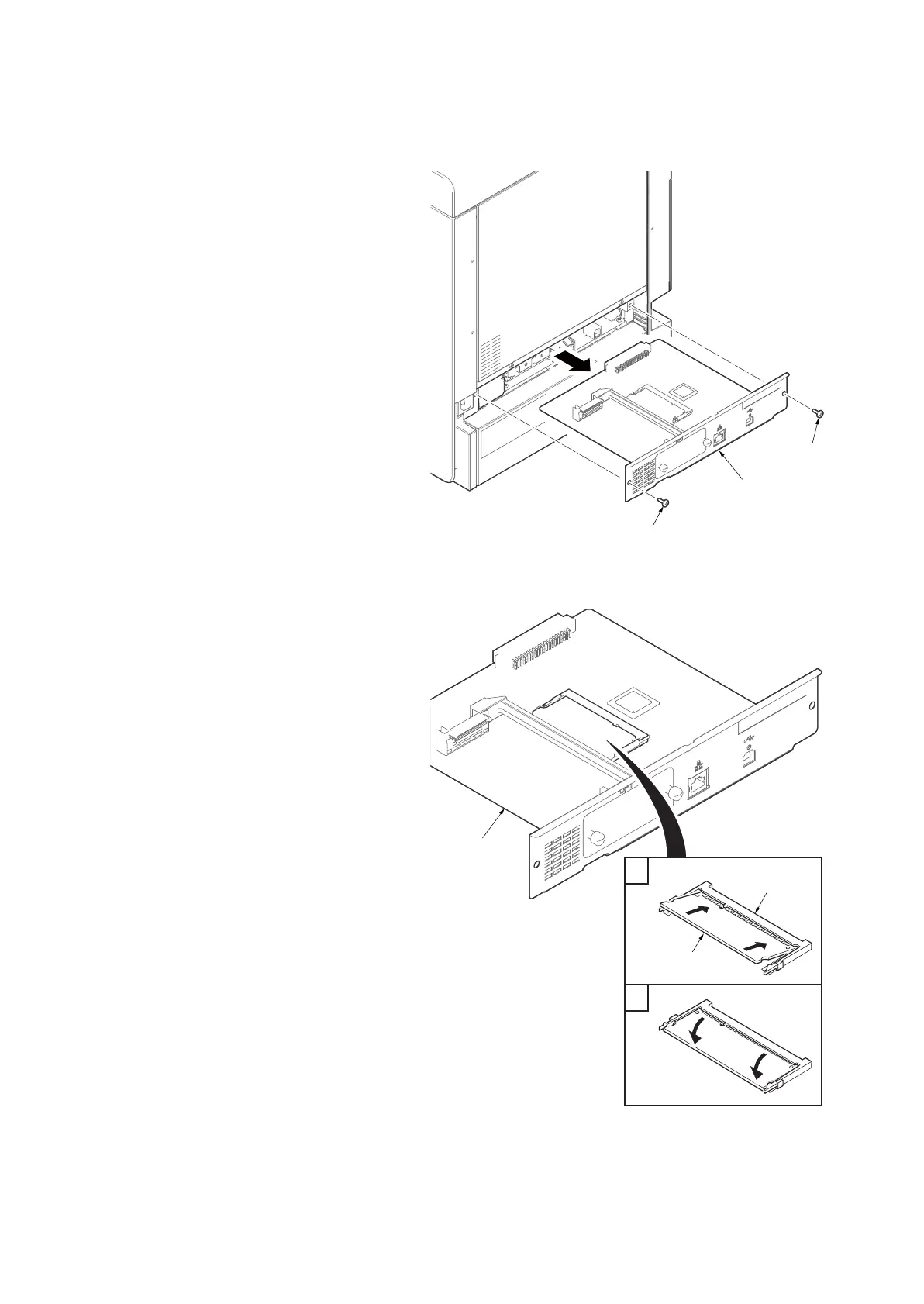
2. Remove two screws and then remove the
main PWB.
Figure 1-2-6
3. Insert the expansion memory modules into
the expansion memory socket so that the
notches on the memory align with the corre-
sponding protrusions in the slot.
4. Refit the main PWB.
5. Print a status page to check the memory
expansion (See page P.1-3-2).
If memory expansion has been properly per-
formed, information on the installed memory
is printed with the total memory capacity has
been increased.
Standard memory capacity: 512 MB
Figure 1-2-7
1
2
Expansion
memory socket
Expansion
memory module
Main PWB


 To Next Page
 Loading...