93
1.
Thumbnail: Thumbnail of the latest image you took. Touch to view and manage.
2.
Recorder button: Touch to take a video. Touch again to stop.
3.
Zoom slider: Drag this slider to change the zoom settings. You can also change the
zoom settings by pressing the volume button up or down.
4.
Switch button: Touch to select camera or camcorder.
5.
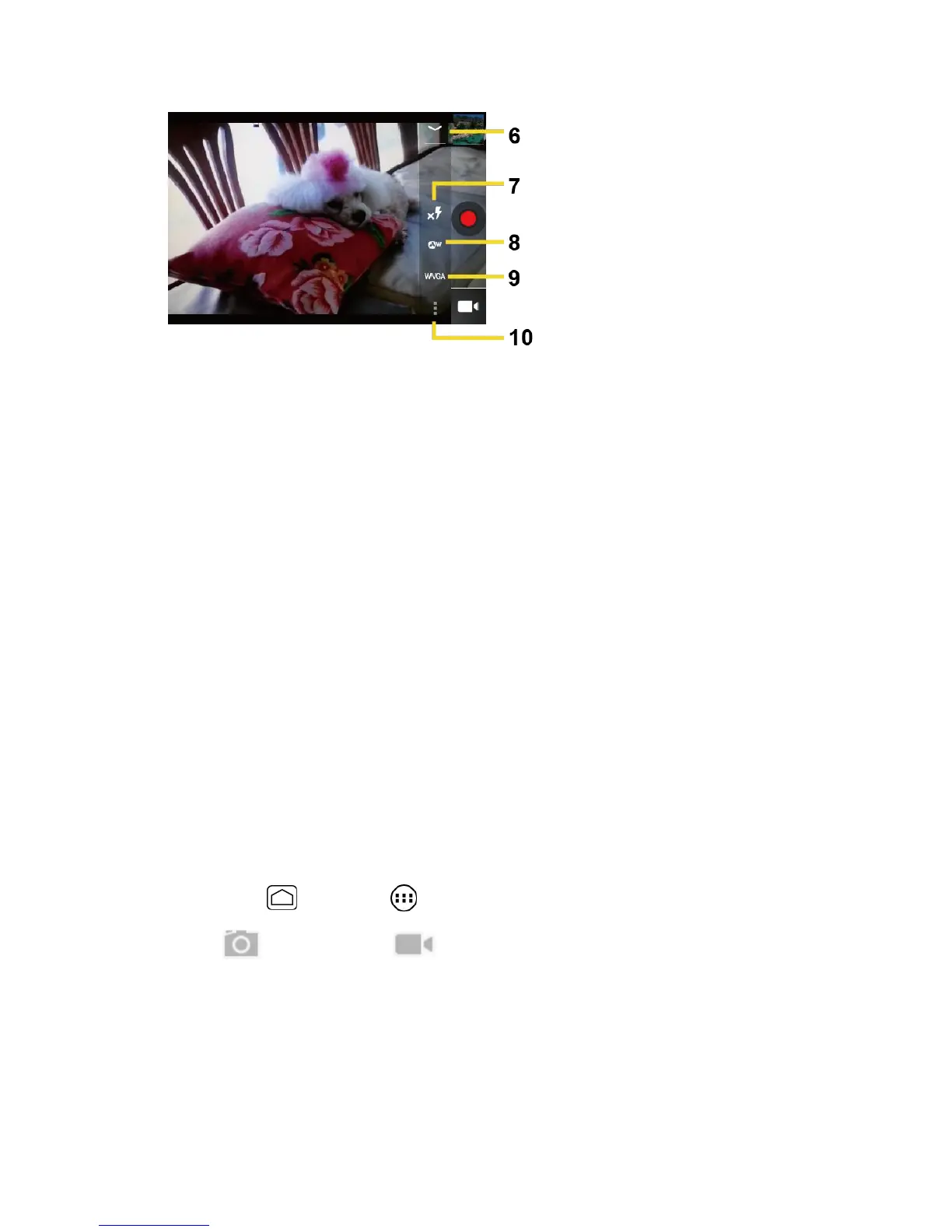
Settings button: Reveals the additional video mode buttons (6-10).
6.
Close button: Touch to close the video mode buttons (7-10) and return to the zoom
slider.
7.
Flash mode button: Touch to select the flash mode.
8.
White balance button: Touch this button to change the white balance to enable the
video to record colors more accurately by adjusting to your current lighting.
9.
Video quality button: Touch to select a video quality.
10.
Video settings button: Touch this button to change the video settings. For more
information, see Camera/Video Settings.
Record a Video
1.
Press Home and touch > Camera.
2.
Touch and then touch to activate camcorder mode.
3.
Select MMS or Long video.
MMS: Select this option to attach the captured video to your mail. The quality will
be automatically set to QCIF (176x144) and the maximum length of a video is 30
seconds.
Long video: Select this option to capture a long video. The quality can be selected.











 To Next Page