119
Install a microSD Card
1.
Remove the battery cover following steps 1-2 in Install the Battery.
2.
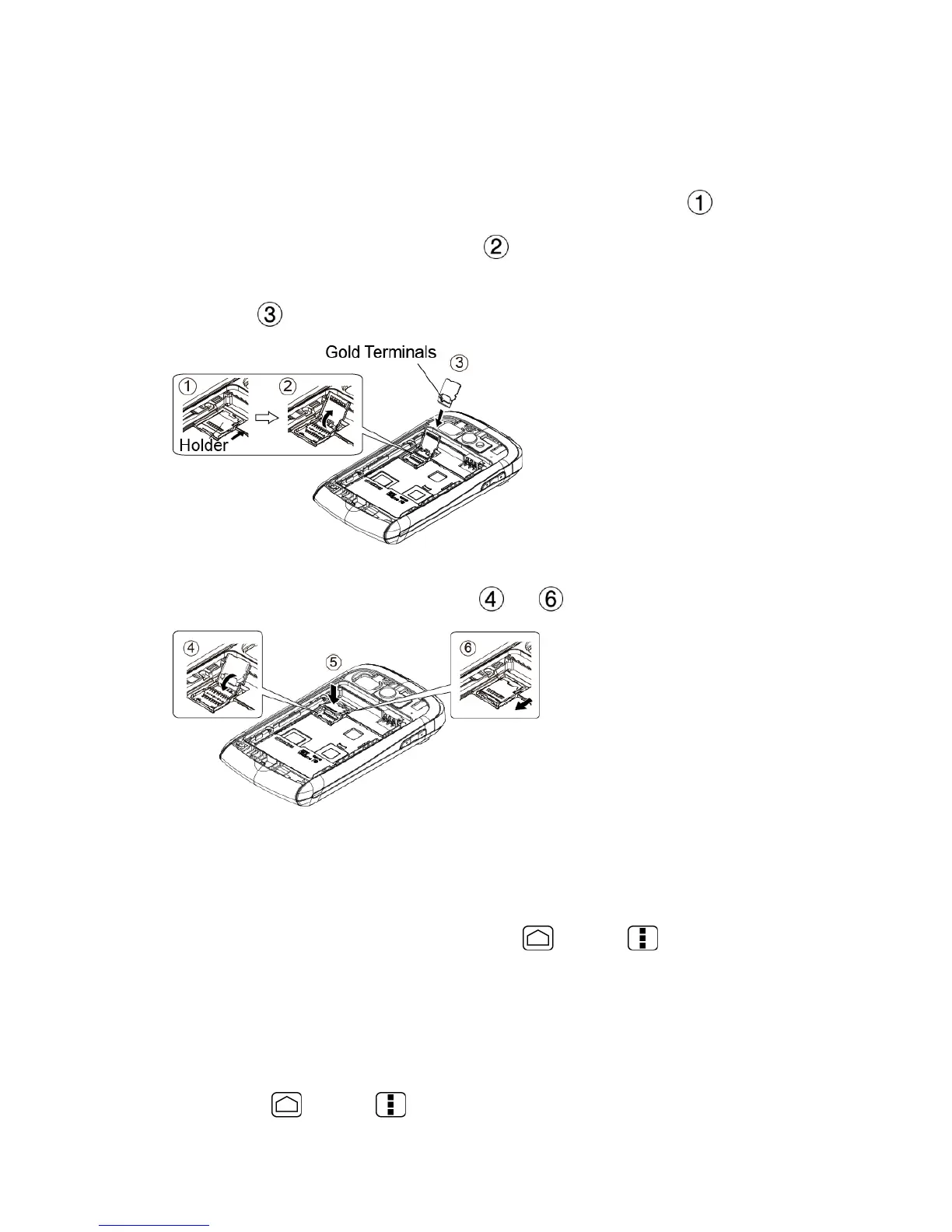
Slide the SD card holder in the direction of the arrow to unlock it ( ).
3.
Raise the card holder with your fingers ( ).
4.
Insert a microSD card into the holder. Make sure to check the position of the gold
terminals ( ).
5.
Replace the card and the card holder and gently press them, and then slide the holder
in the direction of the arrow to lock it ( to ).
6.
Place the battery back into its compartment and replace the battery cover. See steps
3-5 in Install the Battery.
View the microSD Card Memory
1.
With the microSD card inserted, press Home > Menu and touch System
settings > Apps.
2.
Touch the ON SD CARD tab. The total and available memory space will be displayed
at the bottom of the screen.
Format the microSD Card
1.
Press Home > Menu and touch System settings > Storage.











 To Next Page