Page | 6
Professional Remote Monitoring Station
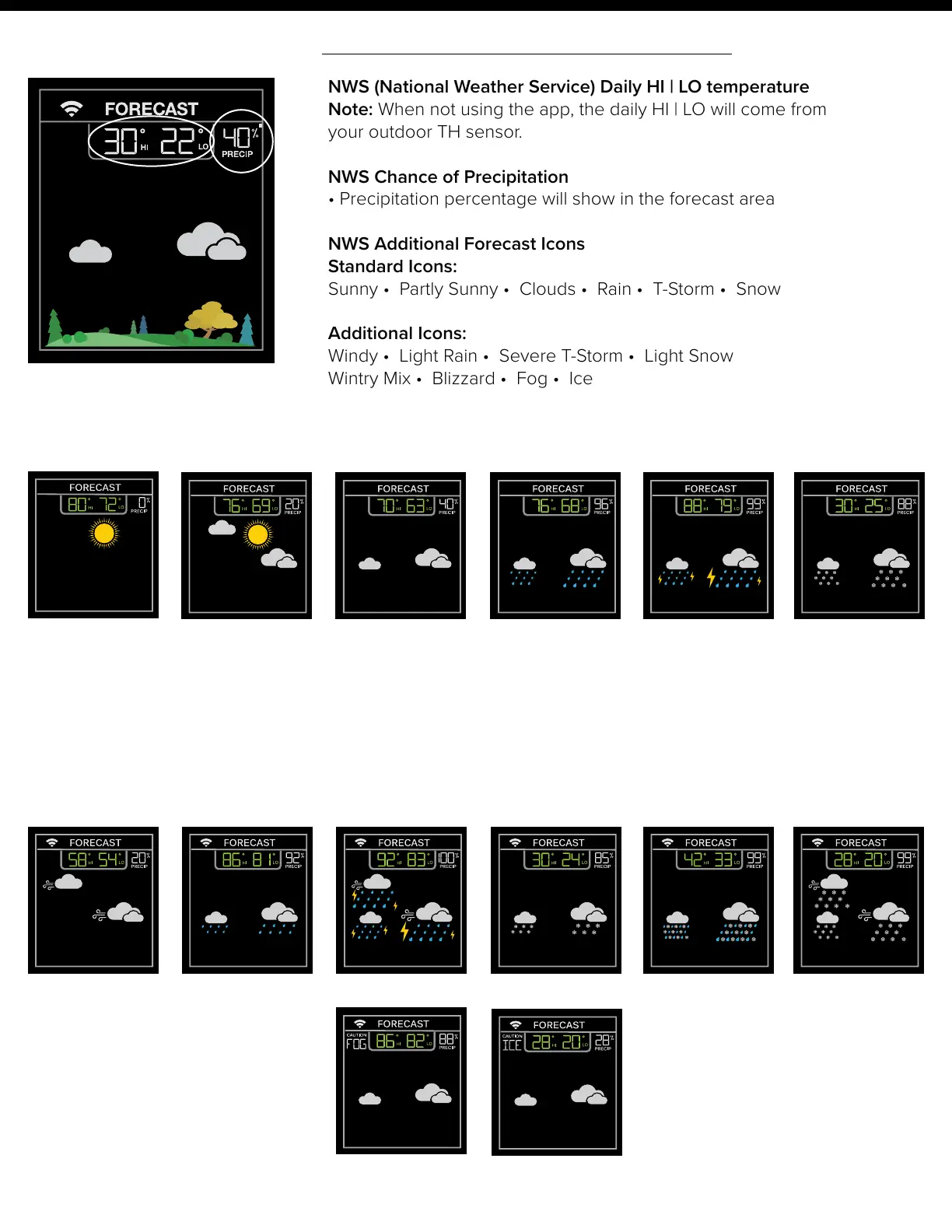
Standard Forecast Icons:
NWS Additional Forecast Icons:
Sunny
Partly Sunny
Clouds Rain T-Storm Snow
Note: Snow icon will show when the outdoor temperature is 32°F or lower and the forecast is Rain or T-Storm.
When your station is connected to the NWS, you will see the six icons above as well as the additional eight
icons here:
Windy
Light Rain
Severe T-Storm Light Snow Wintry Mix Blizzard
Fog
Ice
La Crosse View™ Enhancements
NWS (National Weather Service) Daily HI | LO temperature
Note: When not using the app, the daily HI | LO will come from
your outdoor TH sensor.
NWS Chance of Precipitation
• Precipitation percentage will show in the forecast area
NWS Additional Forecast Icons
Standard Icons:
Sunny • Partly Sunny • Clouds • Rain • T-Storm • Snow
Additional Icons:
Windy • Light Rain • Severe T-Storm • Light Snow
Wintry Mix • Blizzard • Fog • Ice















 To Next Page