LaCie Network Space • DESIGN BY NEIL POULTON Administration
User Manual page 16
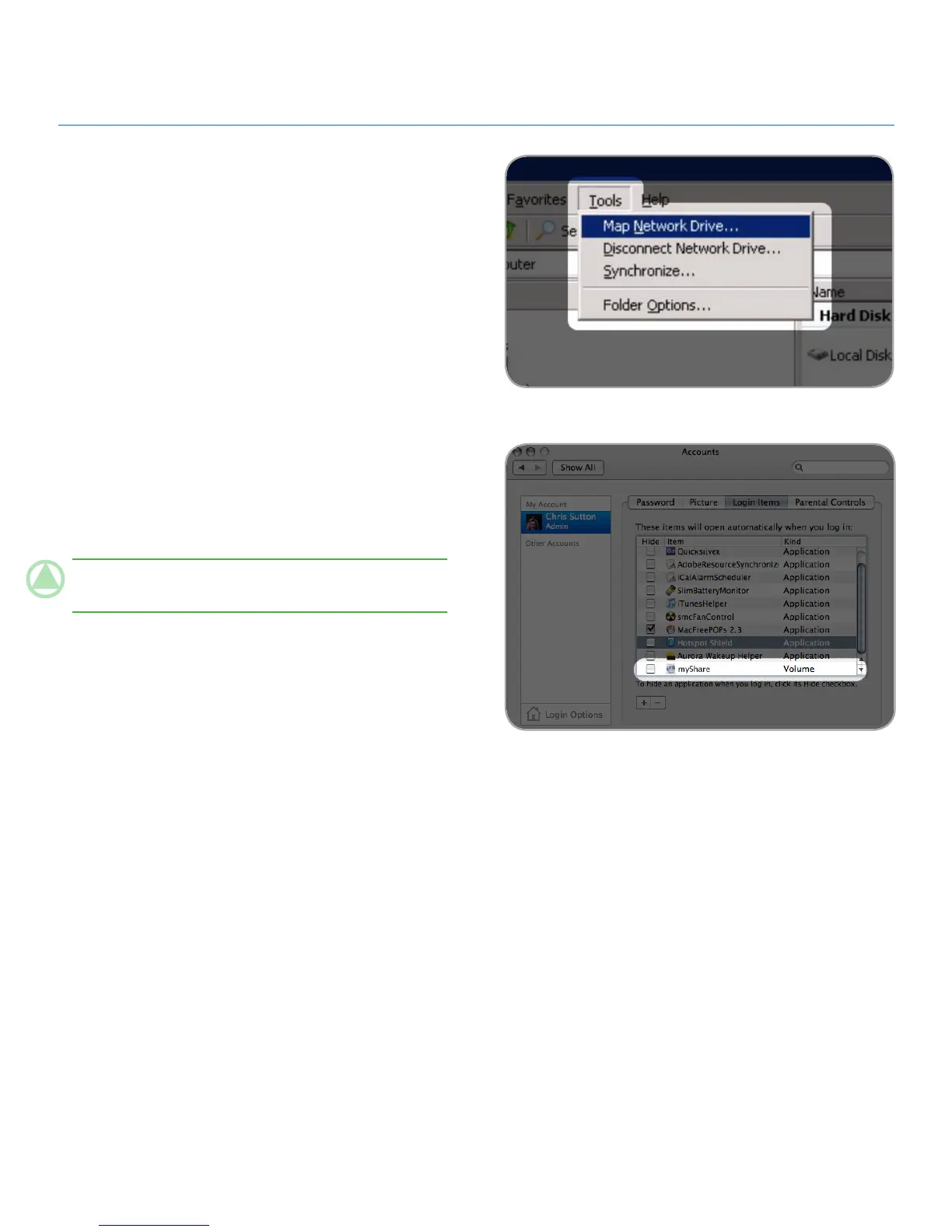
To Map Shared Folders (Windows Users)
In an Explorer window, in the menu bar, select 1. Tools and
then Map Network Drive (Fig. 3.1-A).
Select
2. MyShare.
Repeat process for other shares.
3.
You will then have access to your share from an Explorer 4.
window.
To Map Shared Folders (Mac OS X Users)
From the Apple icon in the menu bar, select 1. System Prefer-
ences > Accounts > Login Items.
Drag the share’s icon from your desktop into the list of ap-
2.
plications (Fig. 3.1-B).
When you log on to the Mac OS, the share(s) will automati-
3.
cally mount on your desktop.
TeChNICAl NOTe: It is recommended to map MyShare first
if you want to map both shares.
Fig. 3.1-A
Fig. 3.1-B













 To Next Page