LaCie Network Space • DESIGN BY NEIL POULTON Administration
User Manual page 20
4.2. Configuration
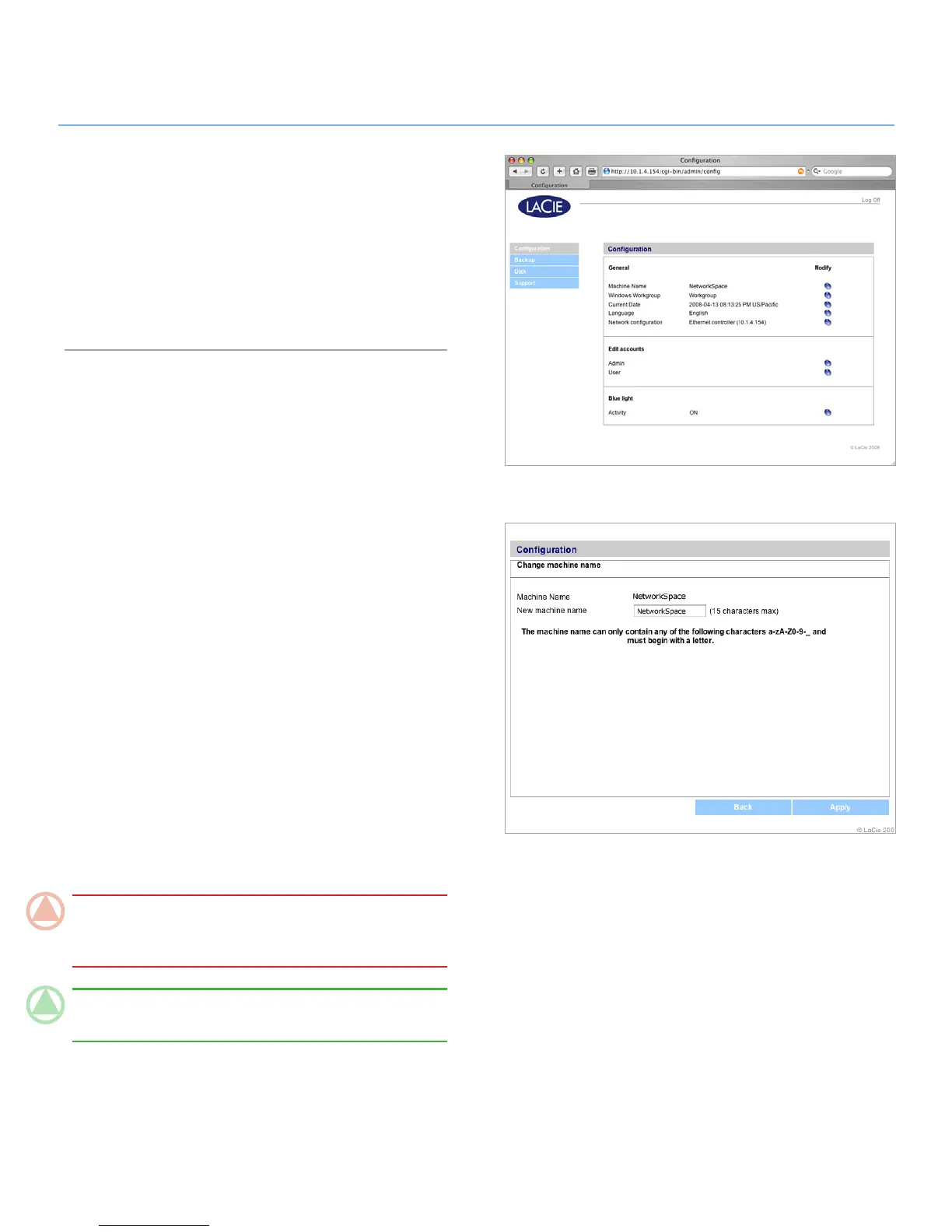
The Configuration page (Fig. 4.2) displays basic information
about your LaCie Network Space. You can modify any of the
items on this page by clicking the corresponding oval “Modify”
button on the right.
Read the following sections to learn more about each of the
items on the Configuration page.
Figure 4.2
Figure 4.2.1
Machine Name4.2.1.
The Machine Name is the name of your LaCie Network Space
on your network. You can use this name to log in to the NAS
administration page by entering it in your brower’s URL field.
To modify the Machine Name:
Click the corresponding oval button on the Configuration 1.
page.
On the “Change machine name“ page (Fig. 4.2.1), enter a
2.
new name in the New machine name field, following the
guidelines stated below the field.
Click
3. Apply.
Use this new machine name when accessing the LaCie Network
Space with your browser’s URL field. Be sure to enter the name
exactly as you did on the “Change machine name” page.
ImpOrTANT INfO: Before changing the machine name, it
is advised that all users disconnect from MyShare and Open-
Share. Changing the machine name can take several minutes.
TeChNICAl NOTe: Changing the machine name will cause
the language setting to revert to the default (English).













 To Next Page