Sensor
field
Function Comment
9
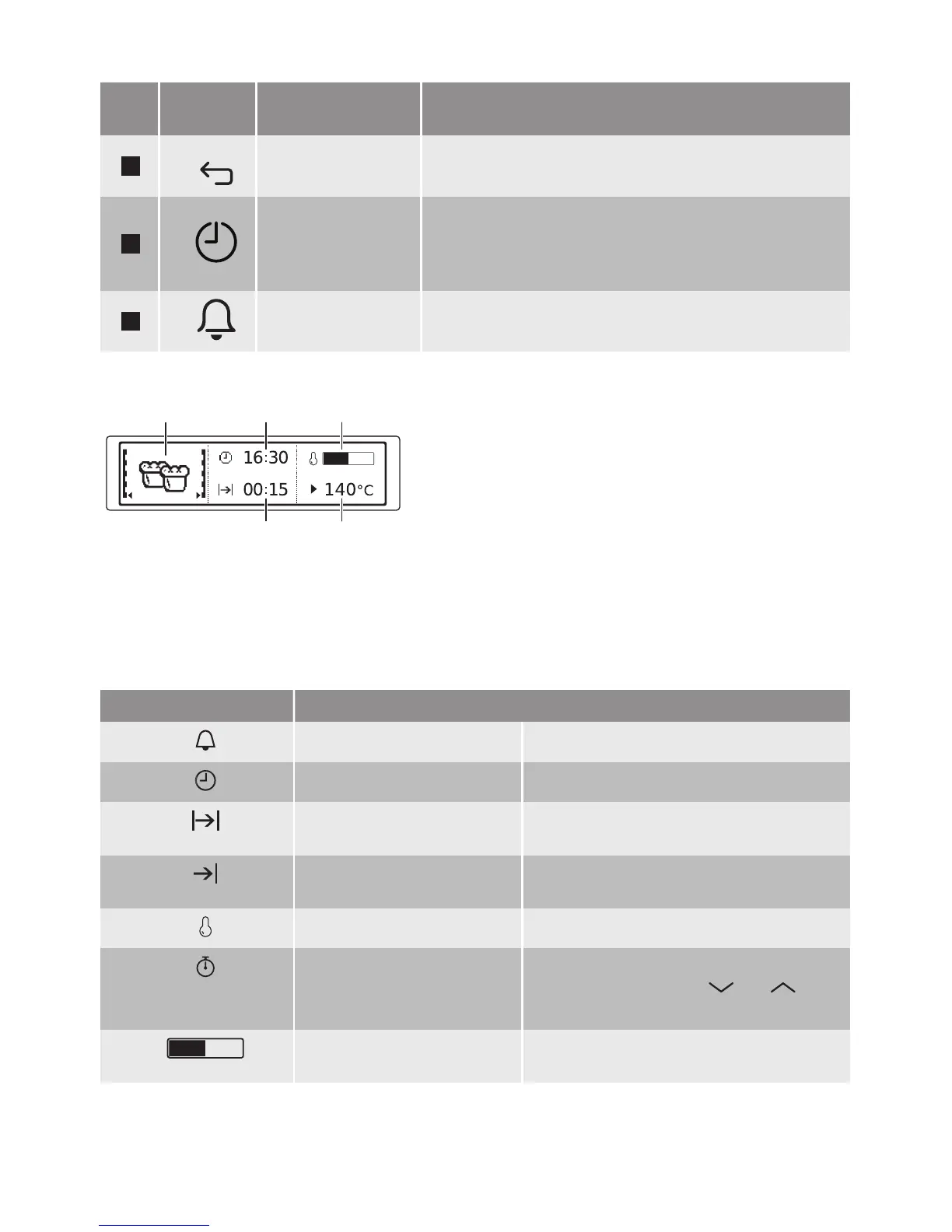
Back key To go back one level in the menu. To show the main
menu, touch the field for 3 seconds.
10
Time and addi-
tional functions
To set different functions. When a heating function op-
erates, touch the sensor field to set the timer or the
functions: Function Lock, Favourites, Heat + Hold, Set
+ Go.
11
Minute Minder To set the function: Minute Minder.
Display
A. Heating function or Microwave function
B. Time of day
C. Heat-up indicator
D. Temperature or power of the microwave
E. Duration time or end time of a function
Other indicators of the display:
Symbol Function
Minute Minder The function works.
Time of day The display shows the current time.
Duration The display shows the necessary time
for cooking.
End Time The display shows when the cooking
time is complete.
Temperature The display shows the temperature.
Time Indication The display shows how long the heating
function works. Press and at the
same time to reset the time.
Heat-up Indicator The display shows the temperature in
the oven.
11


 To Next Page