Getting Started
26
1
When the Authentication
Screen is displayed
When Basic Authentication, Win-
dows Authentication, LDAP Authen-
tication, or Integration Server
Authentication is set, the authentica-
tion screen is displayed. Unless a val-
id user name and password are
entered, operations are not possible
with the machine.
Note
❒ Consult the User Administrator
about your login user name and
login password. For details of the
various types of user authentica-
tion, consult the respective admin-
istrators.
❒ When User Code Authentication is
set, the screen for entering a user
code is displayed instead. For de-
tails, see .p.76 “Authentication In-
formation”
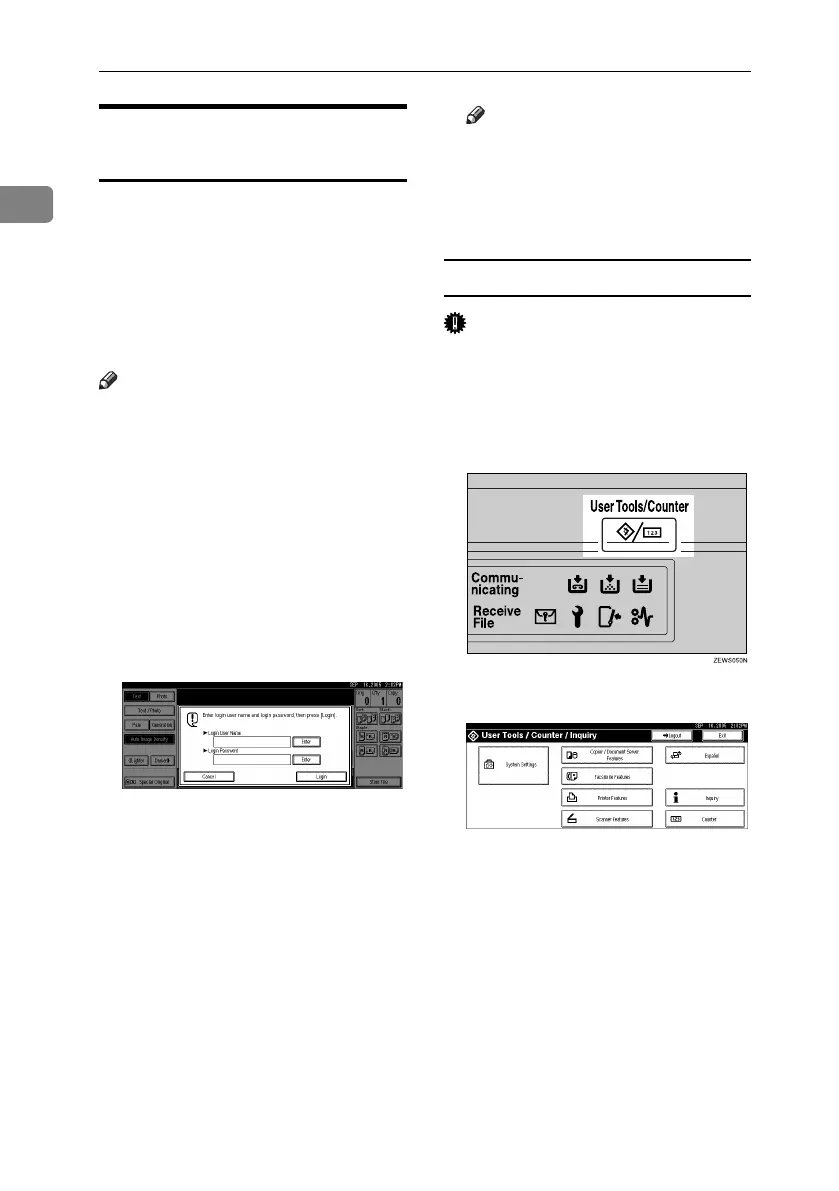
A Press [Enter] for Login User Name.
B
Enter a login user name, and then
press [OK].
C Press [Enter] for Login Password.
D Enter a login password, and then
press [OK].
E Press [Login].
When the user is authenticated, the
screen for the function you are us-
ing appears.
Note
❒ When the entered login user
name or login password is not
correct, "Authentication has
failed." appears. Check the login
user name and password.
Log Off
Important
❒
To prevent unauthorized users from
using the machine, always log off
when you have finished using the
machine.
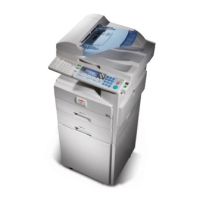
A Press {User Tools / Counter}.
B Press [Logout].
C Press [Yes].
D Press {User Tools / Counter}.
RuC4_EN_gsg-F_FM_forPaper.book Page 26 Tuesday, April 5, 2005 12:06 PM


 To Next Page