LEAD FLUID TECHNOLOGY CO.,LTD.
1 2
3
4 5 6 7 8
9 10 11 12 13
14
15
ADC_W
AGND
0
-
5V
/0
-
10V
/
4-20mA
24
VDC
VCC_W COM
RS
_W
CW_W
1
.5K
1.
5
K
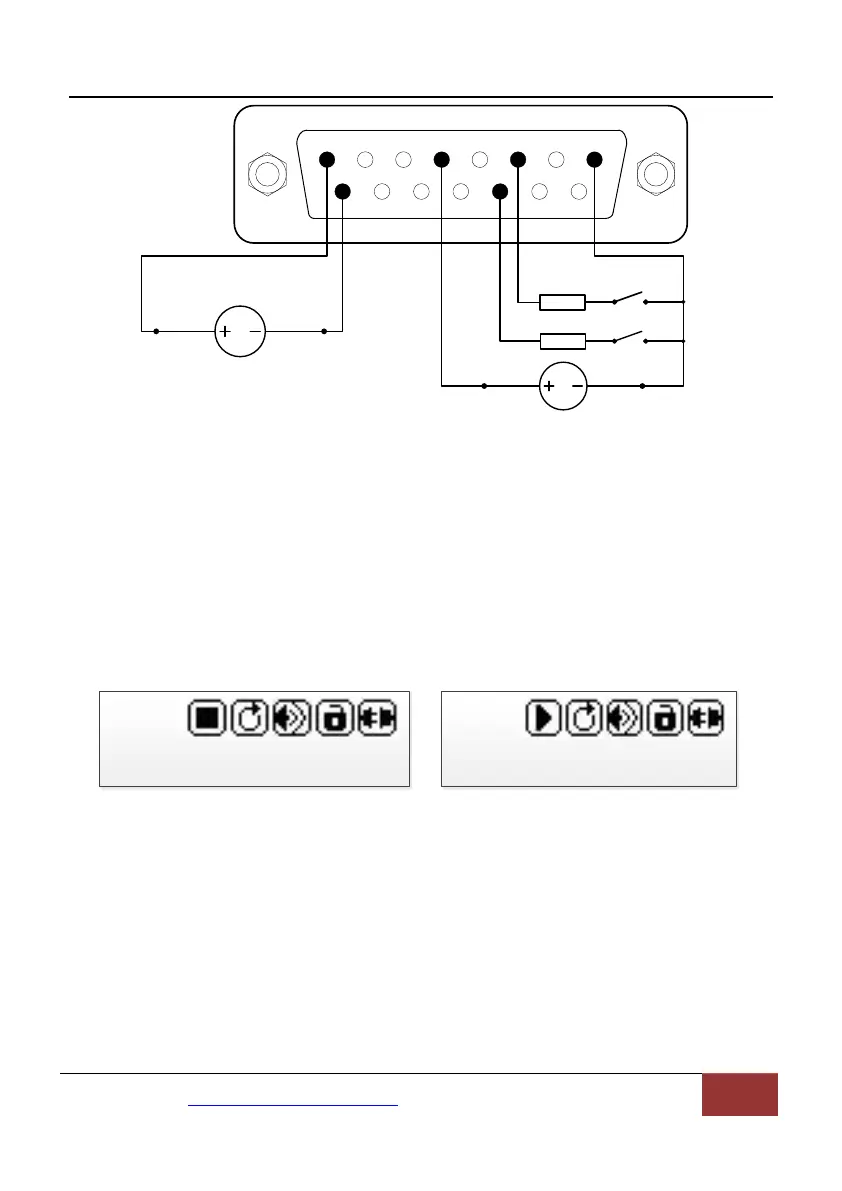
Figure 18. DB15 Wiring with External 24VDC Power Source
7.6 Time Dispense Mode
Pump will dispense fluid automatically by setting duration for each dose,
pause time between doses and number of cycles. When dispensing, the
display will show the dispensing time or lag time that has passed (1.2s on
the figure below), and the total cycles (4 on the figure) that has dispensed.
Dispense Stopped Dispense Running
Figure 19. Time Dispense Mode
To set Time Dispense mode:
1) Turn on the power switch. Pump will display the main screen.
2) Press MODE key to change the mode to Time Dispense mode
(Disp shown on the screen).
3) Press MENU key to enter the Setting menu.
Mail:master@leadfluid.com WEB:www.leadfluid.com 16


 To Next Page