LEAD FLUID TECHNOLOGY CO.,LTD.
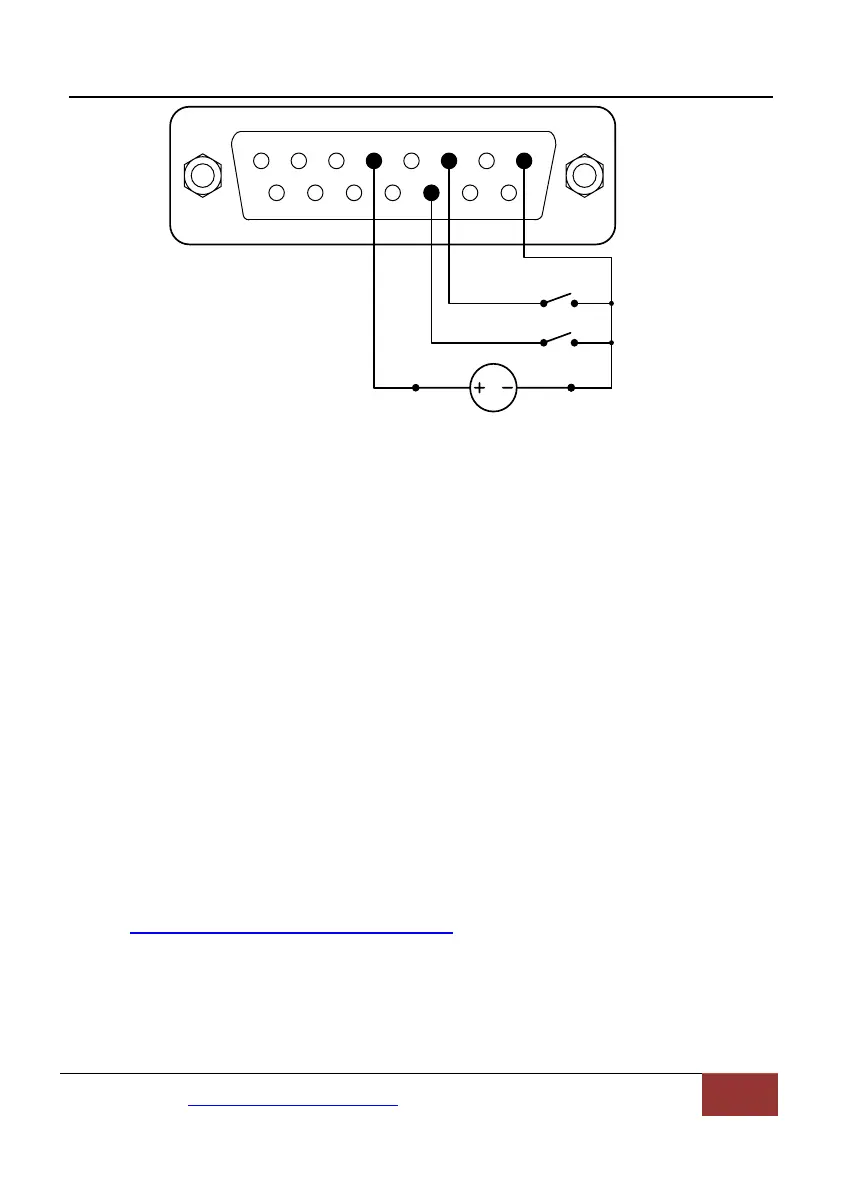
1 2 3 4 5 6 7 8
9 10 11 12 13 14
15
12VDC
VCC_W COM
RS_W
CW_W
Figure 26. Logic Level 2 Control with External 12V Power Source
1) Turn on the power switch. Pump will display the main screen.
2) Press MODE key to change the mode to Logic Level 2 control mode
(shows lev2 on the screen).
3) Press UP or DOWN key to adjust the speed.
4) When the switch RS_W is closed, the drive will be running at the set
speed; when the switch RS_W is open, the drive will stop.
5) When the switch CW_W is open, the drive will be running in
clockwise direction. When the switch CW_W is closed, the drive will
be running in counterclockwise direction.
7.9 Communication Mode
The RS485 interface supports standard MODBUS protocol. Pump can
communicate with external device via the communication port. Please refer
to the
Communication Instruction manual for the parameters and supported
commands.
Mail:master@leadfluid.com WEB:www.leadfluid.com 20


 To Next Page