LEAD FLUID TECHNOLOGY CO.,LTD.
4 Display Panel and Operating Keypads
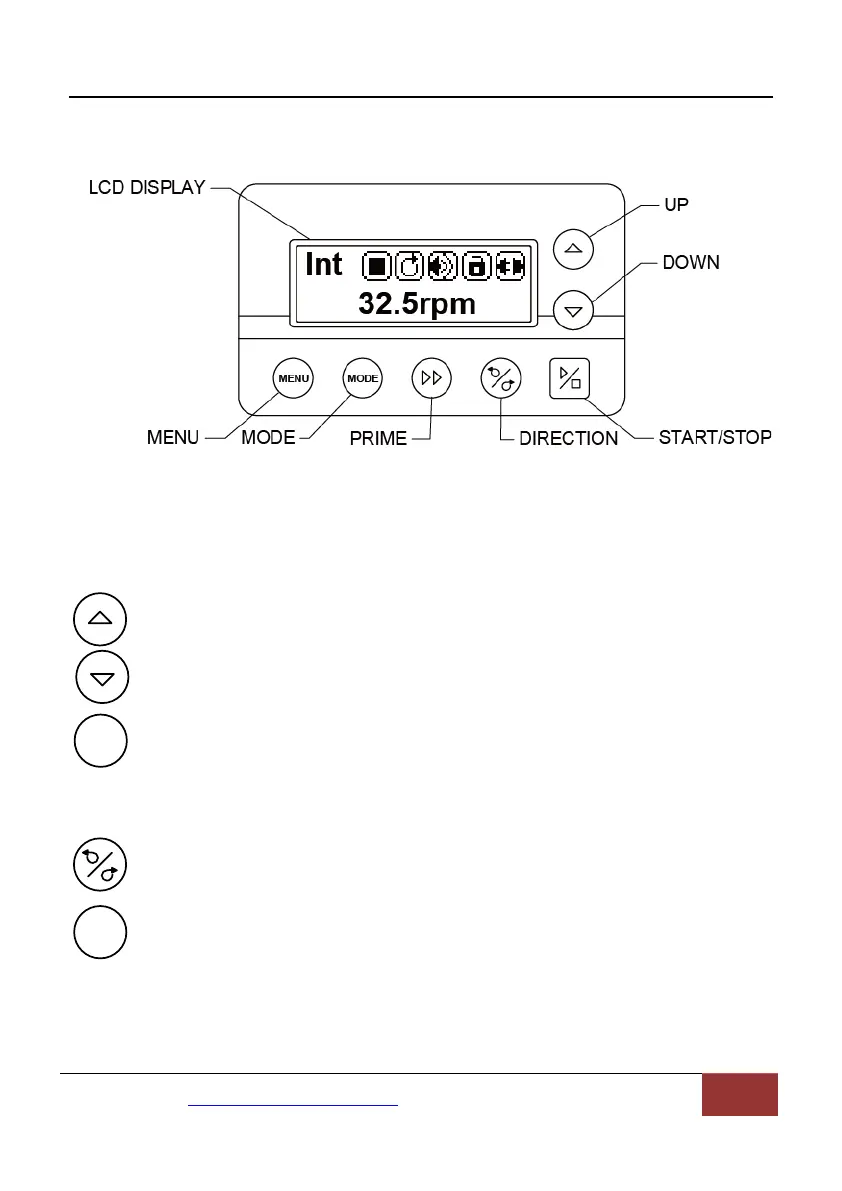
Figure 2.Display Panel
4.1 Keypad
UP Key. When press it shortly, the last digit of the value will
increase 1. Hold the key to increase the value quickly.
DOWN Key. When press it shortly, the last digit of the value will
decrease 1. Hold the key to decrease the value quickly.
MENU Key. When on main screen, press the MENU key to enter
the setting menu. When on the setting menu, press the MENU key
to switch between the different setting menus. Press and hold it to return to
main screen. When the drive is running, this key is disabled.
DIRECTION Key.Press to key to change the drive rotating direction,
clockwise or counterclockwise.
MODE key. When the drive is not running, use the MODE key to
change the working mode: Internal Control mode, External Control
mode, Time Dispense mode, Logic Level 1 control mode or Logic
Level 2 Control mode.
Mail:master@leadfluid.com WEB:www.leadfluid.com 4


 To Next Page