4PSXXIVXIWXW
%P]WQEMRXIRERGIQERYEP %%
'LVM;%XWWRQLIWKLVEXWWRQOLJKWVXSGLVMXQFWLRQH[LVWVLQWKH;PRWRU
FRPPDQG&OLFNWKH067EXWWRQWRUHDUPWKHEUHDNHU
&OLFNWKH067EXWWRQDJDLQWRUHVWDUWWKHWHVW
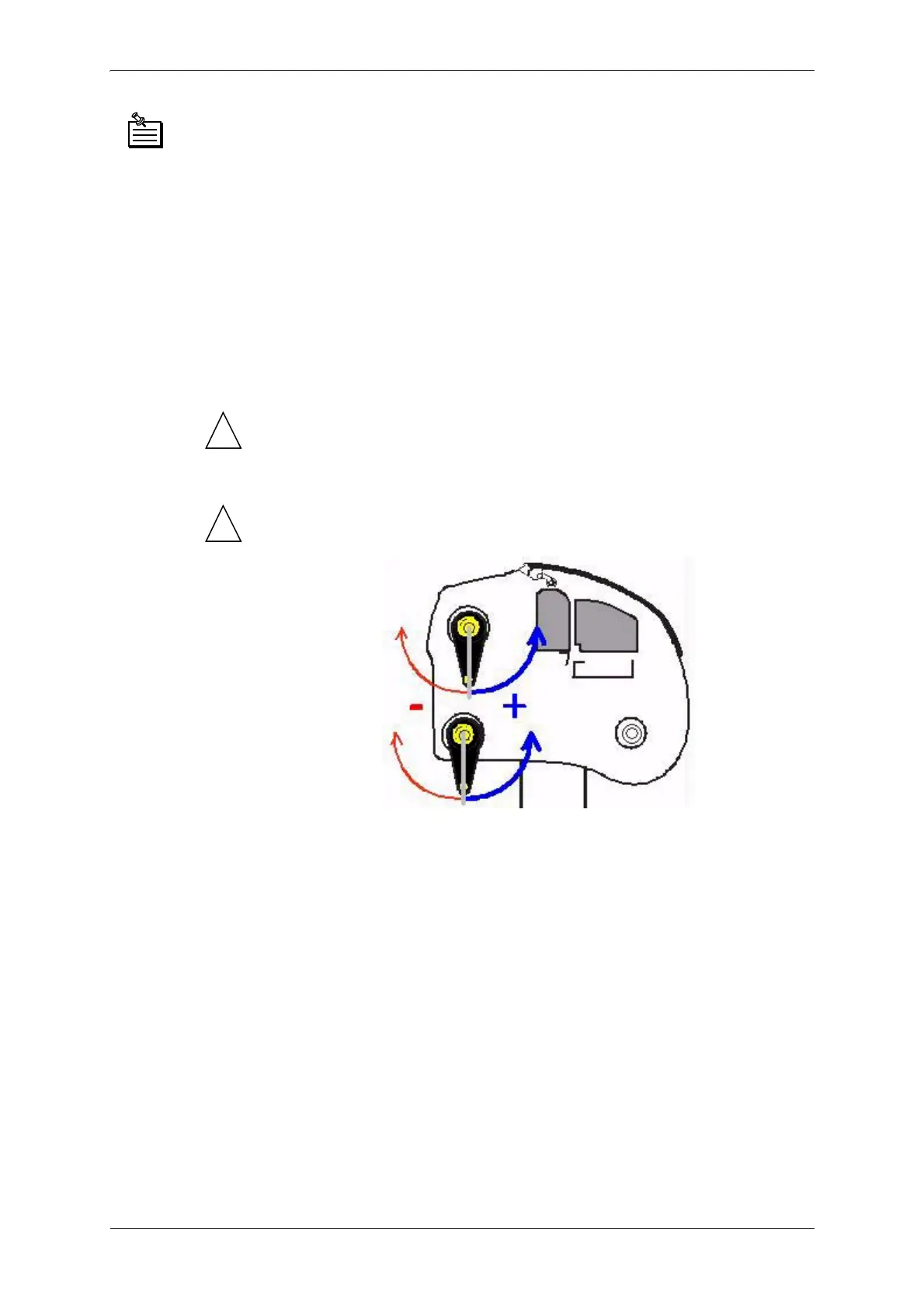
Testing the bar encoder:
4. Put the bar to test in low position.
5. Check to make sure the value in the Encoder bar window is zero. If this
is not the case, click the 0000 button.
6. Turn the bar towards the plotter beam (at the front of the plotter).
The value in the control window should increase (value shown should be
positive).
!
'RQRWWXUQWKHEDUPRUHWKDQKDOIZD\GXULQJWKLVWHVW
7. Turn the bar towards the rear of the plotter. The value in the control
window should decrease (value shown should be negative).
!
'RQRWWXUQWKHEDUPRUHWKDQKDOIZD\GXULQJWKLVWHVW



 To Next Page