UHF Digital Hybrid Wireless
®
Rio Rancho, NM
13
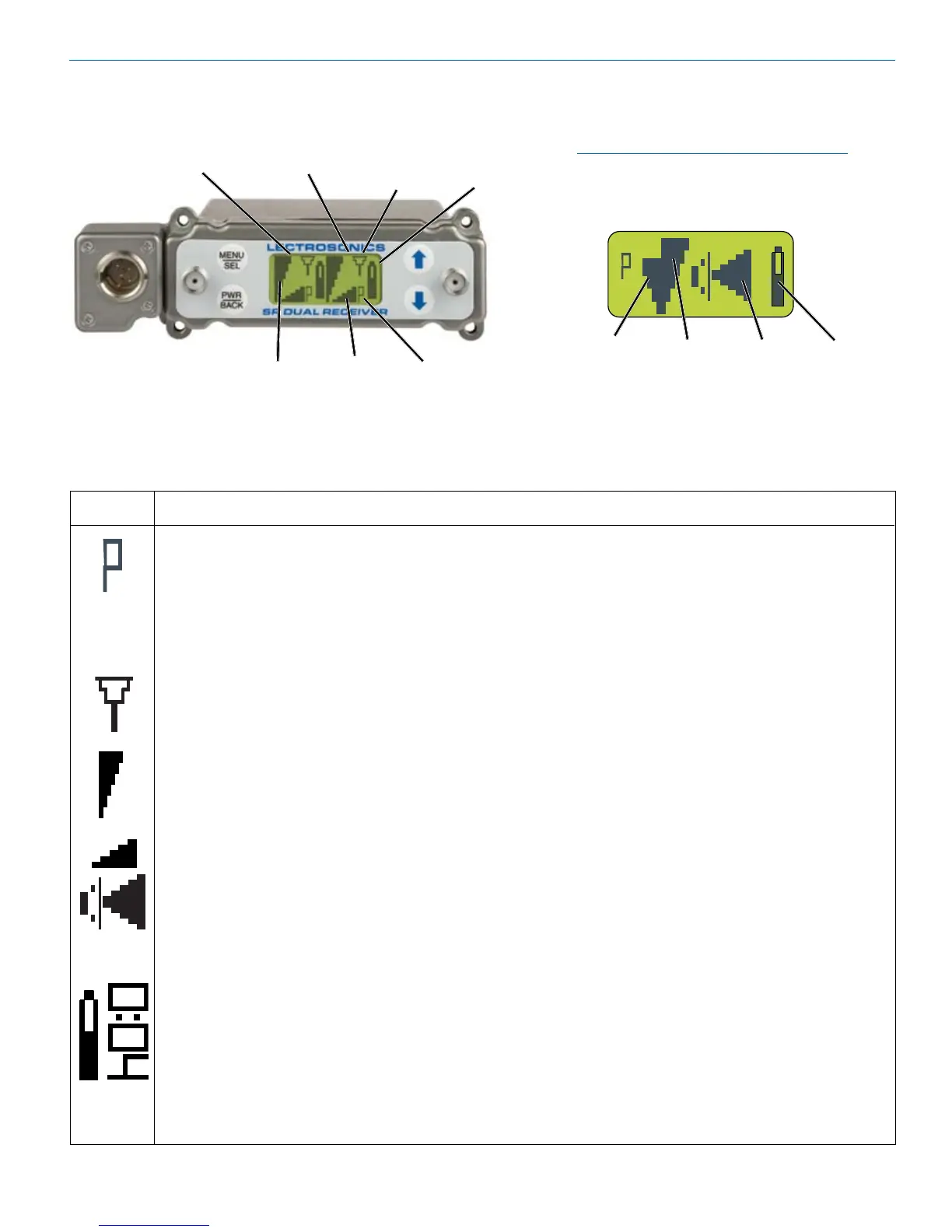
Main Window (LCD)
The Main Window displays information concerning the
condition of the Pilot Tone, antenna phase, RF and
audio signal levels and battery conditions for both the
receiver and the associated transmitter.
Pressing the Sel/Sel button accesses the sel Selec-
tions for setting up the receiver and searching for clear
frequency channels.
Pilot Tone Indicator
A steady “P” icon will be displayed when a pilot tone from the transmitter is present. The “P” will
appearonlyinthosecompatibilitymodeswhichusepilottone,suchasthenative400Series,200
Series modes and Mode 6. The icon will flash if no pilot tone is detected and will change to a small
“b” if the pilot tone has been bypassed. To bypass or enable the pilot tone on Receiver 1, hold Sel and
press the UP button briefly. To bypass or enable the pilot tone on Receiver 2, hold Sel and press the
DOWNbuttonbriey.Bypassingthepilottonealsodisablesthesquelch,regardlessofwhichcompat-
ibility mode has been selected.
Antenna Phase Indicator
ThisiconantennaisdisplayedwhentheSWITCHINGDIVERSITYmodeisSelected.Astheantenna
phase is switched, the symbol will flip vertically.
RF Level
ThisiconchangesinsizeverticallytoindicatethestrengthoftheincomingRFsignal.
Audio Levels
OneiconisusedintheSWITCHEDDIVERSITYmodeandtheotherwhenRATIODIVERSITYis
Selected.Theiconchangesinsizehorizontallytoindicatetheaudiolevel(modulation)ofthesignal
received from the transmitter. The icon display will change to a solid rectangular block when the audio
signal is being limited in the transmitter.
Battery Levels
WhentheCOMPATmodeissetforacompatibilitymodethatsupportsbatterytelemetry(400and
200Series),abatteryiconisdisplayedontheLCDtoindicatethetransmitterbatterycondition.The
receiverwillperiodicallycheckthebatteryvoltageandupdatetheiconina“fuelguage”manner.In
theexampleatleft,theiconindicatesabout“halffull.”WhenotherCOMPATmodesareSelected,this
areaoftheLCDwillbeblank.
IfSelectedintheTXBATsetupscreen,atransmitterbatterytimerisavailableforanycompatibility
mode.Itaccumulateshoursandminuteswheneverthetransmitteristurnedon,andretainstheac-
cumulatedtimeevenwhenthereceiverisoff.Theiconrepresentsadigitalclockreadout(rotated90
degrees) and in this example is indicating 4 minutes. To reset the battery timer, change the Selec-
tion in TXBAT to something other than a timer mode (NOT AAT or 9VT).
Icon
Description
NOTE:WhentheRATIODIVERSITYmode
is Selected, both receivers are combined to
pick up the same transmitter, so the Main
Window will display a single audio channel.
Receiver 1
RF Level
Receiver 2
RF Level
Audio
Level
Transmitter
Battery Level
RF Level Audio Level
Transmitter
Battery Level
Pilot Tone
Indicator
Receiver 1 Receiver 2
Diversity
Activity


 To Next Page