SRa5P and SRa Dual Receivers
LECTROSONICS, INC.
16
Main Window
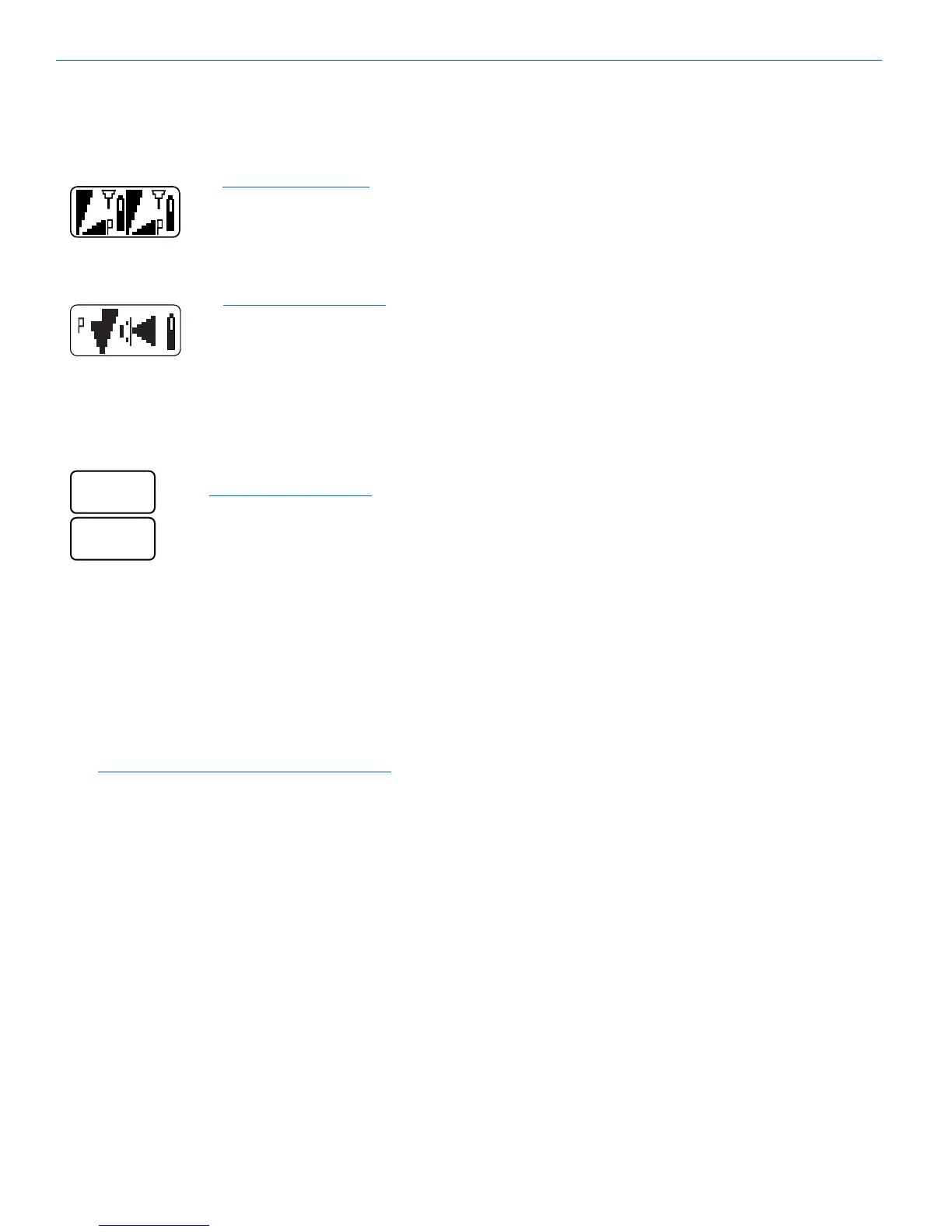
TheappearanceoftheLCDMainWindowwillchange
according to which diversity mode Selected. When set
toSWITCH,thescreenwillbesplittoshowbothreceiv-
ers at the same time.
WiththeDIVMODEset
toSWITCHED,twoaudio
channels will be displayed.
WhensettoRATIO,asingleaudiochannelisdisplayed
since the receiver are combined to pick up the same
transmitter.
WiththeDIVMODEsetto
RATIO,asingleaudiochannel
will be displayed.
Frequency Screen
Press Sel from the Main Window once for Receiver 1
and twice for Receiver 2. The Selected receiver is de-
noted in the upper left corner of the screen.
PressBACKtomovefrom
Receiver 2 back to Receiver 1
Inthisexample,theupperscreendenotesthatreceiver
1issetat652.800MHz,requiringthatthecorrespond-
ingtransmitterhexswitchesbesetat80forthisfre-
quency.LectrosonicstransmitterswithLCDinterfaces
allowfrequencytobesetinMHzorhexsettings.
Press the Up and Down buttons to change the frequen-
cyofthereceiver.WhentheTUNINGmodeissetto
NORMAL,theSelUpandDownbuttonstuneinsingle
channelincrements.Inthegrouptuningmodes,theUp
and Down buttons step through the pre-coordinated
frequencies.
NOTE:Whenoperatinginthe2-channelmode,
always set Receiver 2 to a higher frequency than
Receiver1byleast400kHz(fourstandardsteps
on the switches).
Setup Screens
From the Main Window, press Sel three times to enter
thesetupsels.PressUPand/orDOWNtoscrollthrough
the available sel items. Press Sel to enter the setup
screen for the Selected sel item. For those sel items
that allow separate settings for each receiver, press Sel
repeatedly to toggle back and forth between Receiver 1
andReceiver2,thenpresstheUPandDOWNbuttons
toSelectthevalueoroption.PressBACKtoreturnto
the setup sel to Select the next item.
LEVEL
This setup screen displays the audio output level of
the receiver in dBu. Use the Sel Up or Down buttons to
changethelevel.Rangeisfrom-50to+5dBuin1dB
steps. Press the Sel button to leave this screen.
Theoutputlevelsatthetwojacksmaybesetindepen-
dently, regardless of the diversity mode setting.
SCAN
This function provides a fast and reliable method of
finding clear channels for each receiver. Press Sel to
start the scanning. Follow the procedure outlined in the
navigation map on the previous page and on the page
entitledScanningforClearFrequenciesforinstructions
on using the scanner to find clear channels.
DIVMODE
TheSWITCHdiversitymodeallowsthetwointernal
receivers to operate independently on different frequen-
cies and settings with two different transmitters. When
this mode is Selected, the setup screens will prompt
youtoSelectthereceivertobeadjusted.
TheRATIOmodecombinesthetwointernalreceiv-
ers to pick up the same transmitter and mix their audio
outputsforratiodiversityreception.Inthismode,the
setup screens will prompt you for a single value which
will automatically be set for both receivers.
COMPAT
The COMPAT setup screen Selects the type of trans-
mitter used with the receiver. The available modes are:
• HYB is used with Lectrosonics Digital Hybrid trans-
mitters. This is the default setting and should be
used if your transmitter supports it. This mode offers
the best audio quality.
• 100forLectrosonics100Seriestransmitters.
• 200forLectrosonics200Seriestransmitters.
• IFBforLectrosonicsIFBtransmitters.
• M.3 and M.6 are compatible with certain non-
Lectrosonicstransmitters.Contactthefactoryfor
details.
TUNING
InadditiontotheNORMALmode,thisscreenalso
allows Selection of one of four factory pre-selected
frequencygroups(GroupsAthroughD)ortwouser
programmablefrequencygroups(GroupsUandV).
• NOR allows Selection of all 256 frequencies that
thereceiverwilltune.EachpressoftheUPor
DOWNbuttonwillstepin100kHzincrementstothe
next frequency.
• a, b, c, d sets the receiver to tune only factory
preSelected frequencies, up to eight in each group.
EachpressoftheUPorDOWNbuttonwillstepto
the next frequency in the group.


 To Next Page