3.Operating and Programming
9
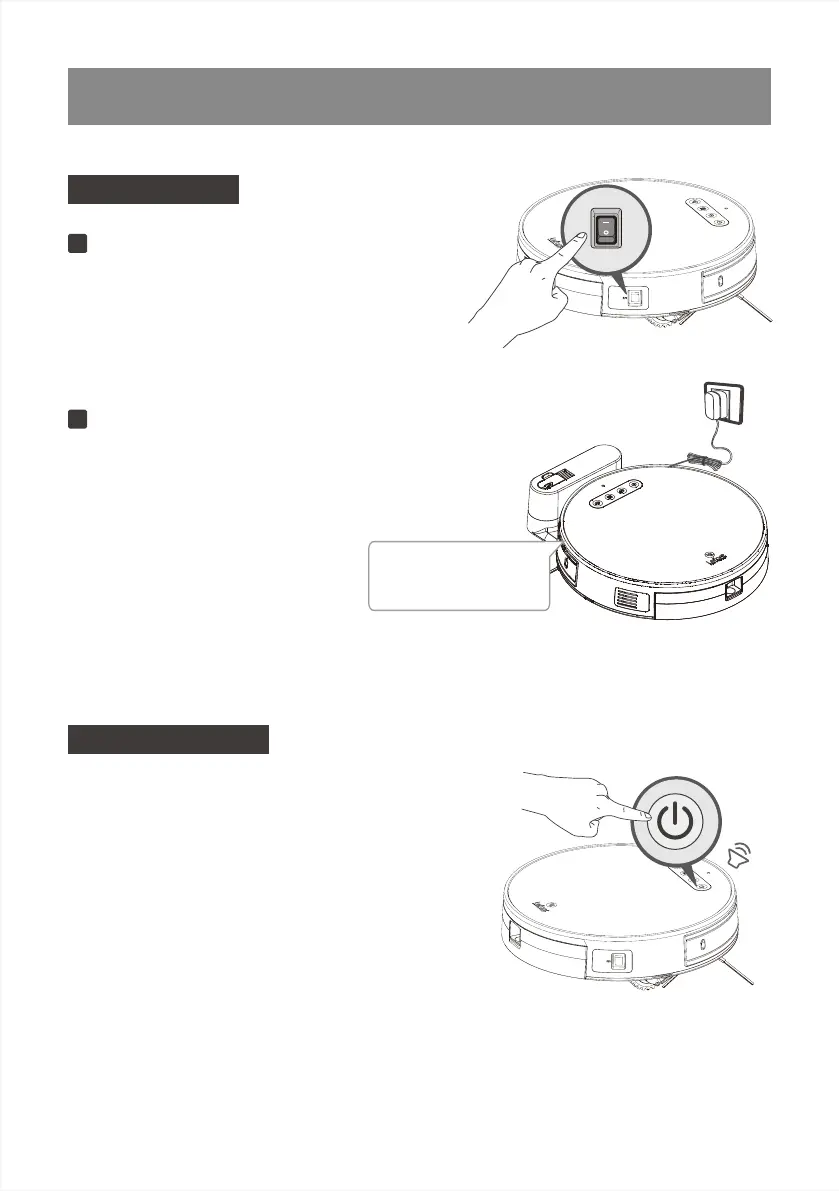
Turn the robot’s Side Power Switch to the ON
position. “-” indicates ON and“O” indicates OFF.
Robot is powered ON when button glows
acontinuous BLUE.
Start to Charge
Language Settings
Turn on the Robot
1
Place robot on the Charging Dock making sure the
Charging Contacts on robot and the Charging Dock
Pins make a connection. Charge Robot for at least
5 hours before the first use.
When charging, do not install the water
tank assembly to ensure charging
safety and prevent the floor from being
damaged by the wet mopping cloth.
Charge Robot
2
making sure the Charging
Contacts on robot and the
Charging Dock Pinsmake a
connection
To facilitate the use of users in different languages,
the robot has built-in multi-language, To change the
language, pressand hold the start/pause button on
the robot for 10 seconds,
enter the language setting mode, robot's build in
multi-language will start loop playback broadcast.When
hearing the language you wanted, Press andhold the
Start/Pause button for 2 seconds to save the settings.



 To Next Page