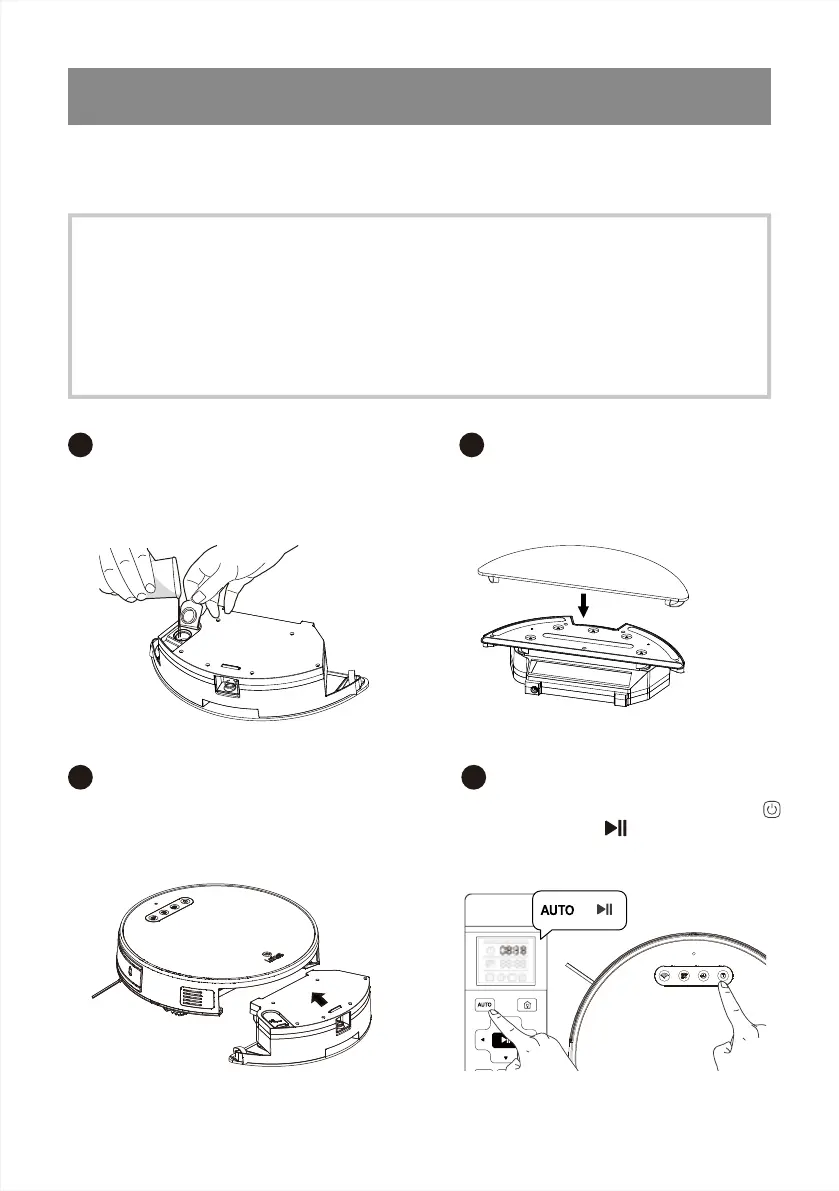
Open the water inlet cover and
take enough water.
Close the water inlet cover and
stick the mop pad.
Press the dust bin release button at
the rear of the robot to remove the
dust bin and replace the water tank
assembly.
Press the start button (On the robot
or remote control ) or press the AUTO
button on the remote control to start
mopping.
3.Operating and Programming
This product is equipped with a water tank assembly. After the cleaning work is completed,
ifthere is a demand for mopping, the Dustbin can be replaced with a water tank assembly.
Forthe cleaning method, please refer to the [Maintenance] section in this manual. Do not use
thewater tank assembly on the carpet. When using the mopping function to clean, please fold
upthe edge of the carpet to avoid the foreign matters on the mop contaminating the carpet.
During cleaning, please pay attention to it, add water or clean it in time, and remove the water
tank components when adding water.
15
3.5 Mopping Function((Applicable for M571)
Add Water
1
Sticking the Mop pad
2
Install Water Tank Assembly
3
Mopping
4
or



 To Next Page