11
3.3 Cleaning Mode Selection
3.Operating and Programming
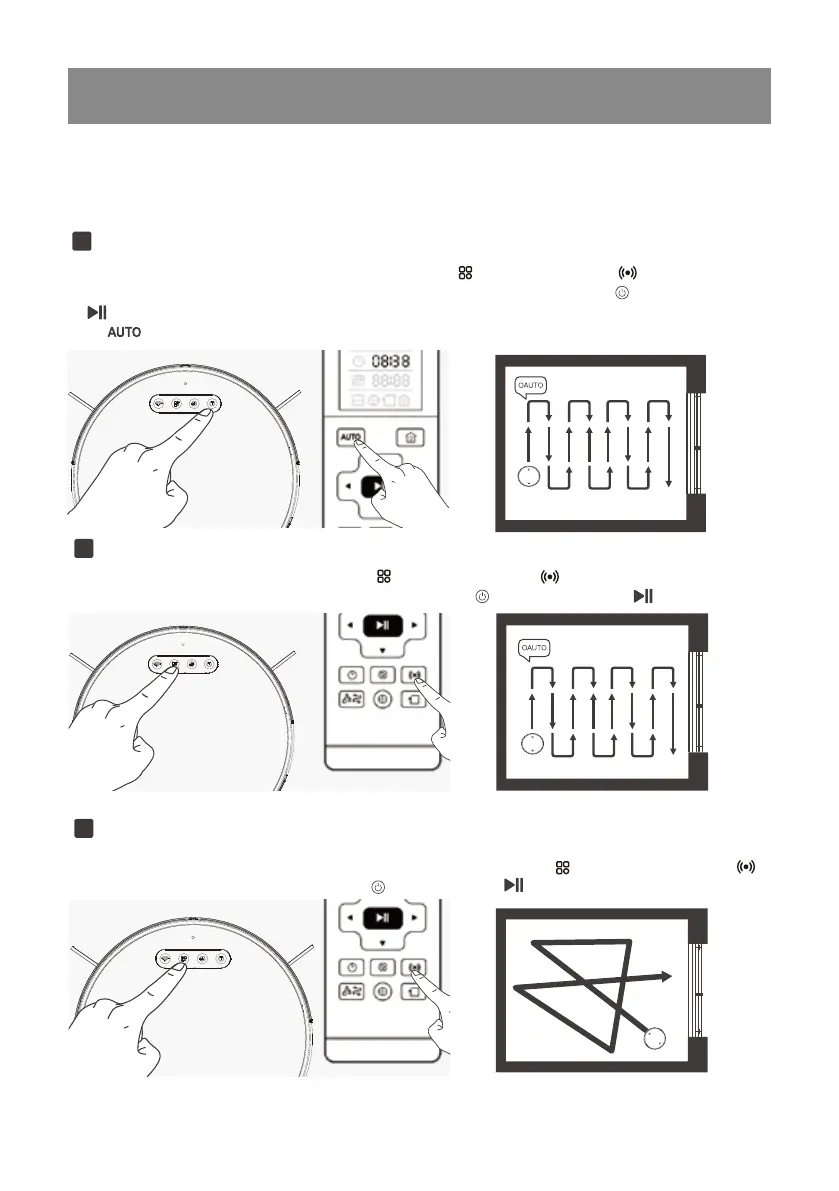
Powerful cleaning mode
2
Press the mode selection button (on the robot or the remote control ) to switch to the powerful
cleaning mode, and then press the start button (on the robot or the remote control ) to start cleaning.
(planned cleaning to low battery, default Max suction power)
Random Cleaning Mode
3
Switch to the random cleaning mode with the mode button (on the robot or on the remote control
bol), and then press the start button (robot’s or remote control ) to start cleaning.
(Working in Ramdom cleaning mode until the battery is low, default, Medium suction power)
Standard cleaning mode
1
Press the mode selection button (on the robot’s top panel or the remote control ) to switch to the
standard cleaning mode, and then press the start button (on the robot’s top panel or the remote cont
rol ) to start the cleaning. You can also directly start the standard cleaning mode via the remote cont
rol's ( ) button.
(planned path cleaning once, default mid suction power)
The Robot has Three cleaning modes to choose from to effectively clean different floors.Cleaning
modes are selected using the Remote Control.



 To Next Page