27
7. Assembling the Options
7. Assembling the Options
Note:
These assembly tasks are omitted if no additional
accessory components were purchased with the
microscope.
7.1 Inserting the phase contrast slider on the
transmitted light illumination carrier*
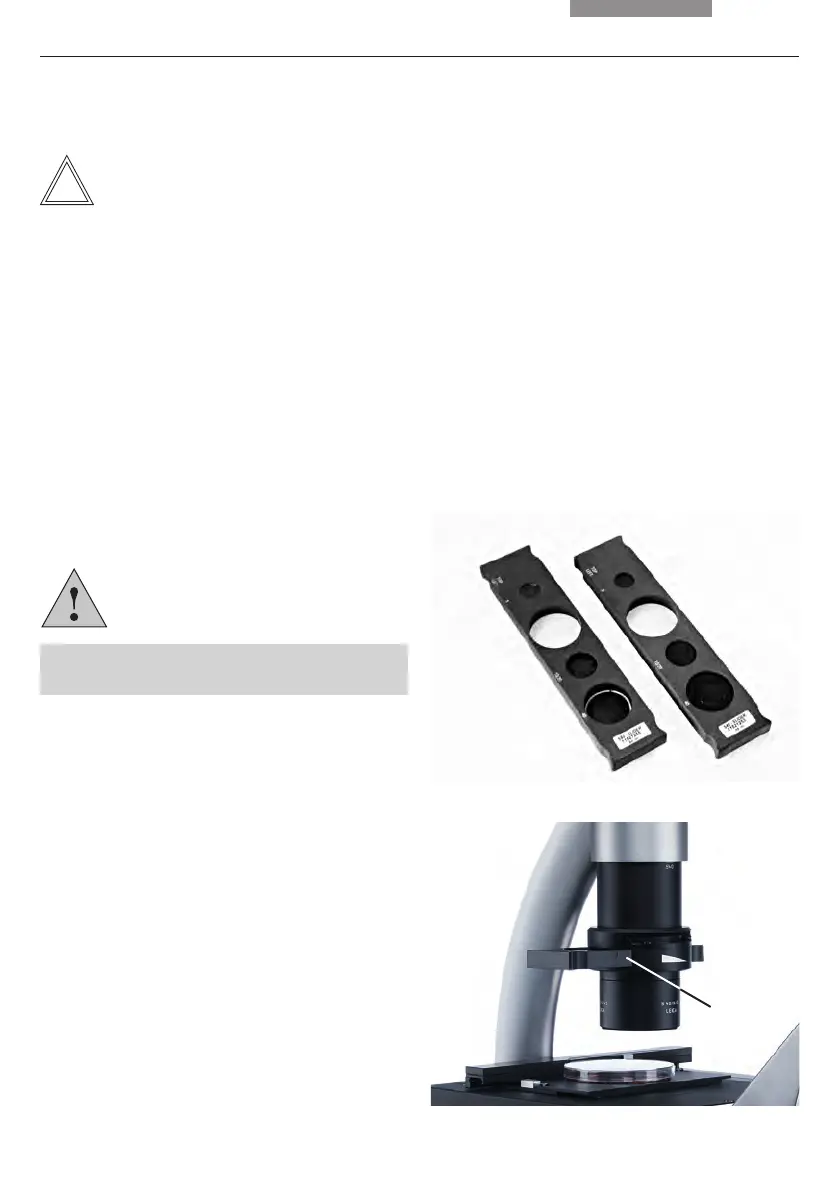
Depending on whether the S40/0.45 or S80/0.30
condenser is used, 2 kind of phase contrast slid-
ers exist. 2 position slider contains Brightfield(BF)
and Phase 1(Ph1), 4 position slider contains
Brightfield(BF) and Phase 0(Ph0), Phase 1(Ph1),
Phase 2(Ph2).
Caution!
The phase contrast slider is not protected
against inadvertently sliding out.
• Remove the dummy slide, where applicable.
• Hold the light ring slide so that the marking
"TOP LEFT" is at the top left and the marking
of light rings 5, 10/20 and 40 is facing you. The
click stops are on the front longitudinal side of
the slide.
• Insert the light ring slide laterally into the
transmitted light illumination carrier. The key-
ways should click in place when the slide is
inserted.
Fig. 17 Phase contrast sliders
Fig. 18 Inserting the phase contrast slider
1 Phase contrast slider
1
7.2 Mount the camera system
• Loosen the screw of the camera mount on the
rear side of the microscope.
• Position the camera and tight the screw of the
camera mount.
• Connect the USB cable with camera and the
Camera USB power supply port (PWR port) on
the back side of the microscope.
• Mount the camera protection shield with two
screws.


 To Next Page