55
Leica RM 2145 – Rotary Microtome
12. Optional accessories
1
2
8
4
10
9
7
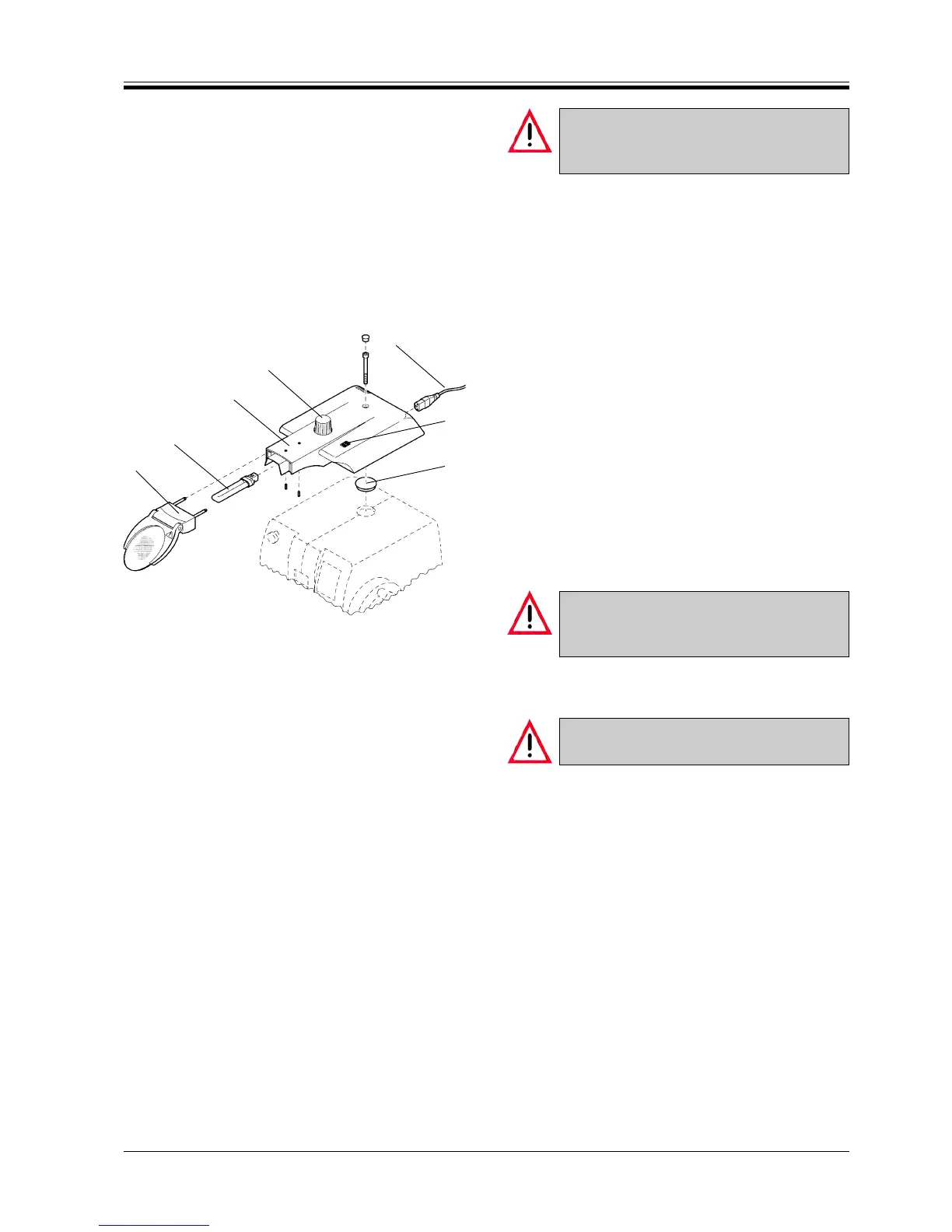
Fig. 55
Do not operate the magnifier & illumination
carrier at a power rating other than specified
on the nameplate!
Connecting the mains cable and turning on
• Connect the mains cable (7) to the socket at the rear
of the carrier.
• Place the mains plug into the mains power outlet
socket.
• Turn on with the mains switch (8).
Carrier adjustments
• The carrier (2) can be repositioned back and forth
on the microtome housing.
• It also may be slewn to the side if required.
To do so, slightly lift the carrier at front and move
as desired.
• The carrier may be adjusted in height by means of
the knob (9).
• The inclination angle of magnifier (1) can be ad-
justed as required.
Lamp replacement
Prior to replacing the lamp, turn the illumina-
tion off with the mains switch (8) and discon-
nect the carrier from the mains power supply!
• Fold the magnifier (1) up.
• Pull the lamp (10) out of the holder.
Use lamp of the same specification only!
Lamp type: Osram DULUX 7 W.
• Lightly push the new lamp into the holder until it
locks in place.
• Reconnect the carrier to the mains power supply.
• Turn on with the mains switch.



 To Next Page