User Interface TPS1200+ 33
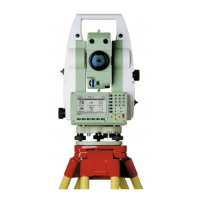
Keys
a) Hot keys F7-F12
b) Alphanumeric keys
c) CE, ESC, USER, PROG
d) ENTER
e) Arrow keys
f) SHIFT
g) Function keys F1-F6
Key Description
Hot keys F7-F12 • User definable keys to execute commands or access
chosen screens.
Alphanumeric keys • To type letters and numbers.
CE • Clears all entry at the beginning of user input.
• Clears the last character during user input.
ESC • Leaves the current menu or dialog without storing
changes made.
USER • Calls the user defined menu.
PROG (ON) • If the instrument is off: to turn instrument on.
• If the sensor is on: press at any time to select an applica-
tion program.



 To Next Page