User Interface TPS1200+ 37
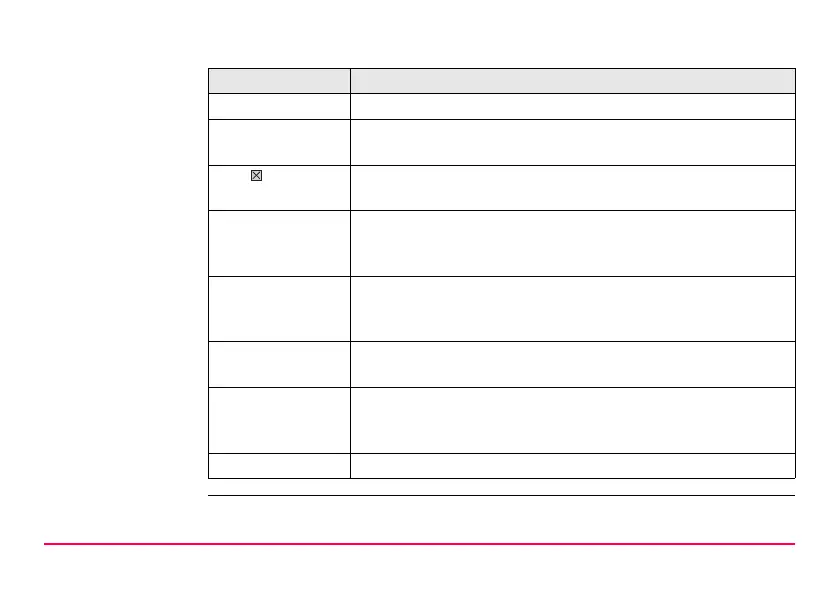
Message line Messages are shown for 10 s.
Icons Shows current status information of the instrument. Refer to
"2.4 Icons". Can be used with touch screen.
ESC Can be used with touch screen. Same functionality as the fixed
key ESC. The last operation will be undone.
CAPS The caps mode for upper case letters is active.The caps mode
is activated and deactivated by pressing UPPER (F5) or
LOWER (F5) in some screens.
SHIFT icon Shows the status of the SHIFT key; either first or second level
of softkeys is selected. Can be used with touch screen and has
the same functionality as the fixed key SHIFT.
Quick coding icon Shows the quick coding configuration. Can be used with touch
screen to turn quick coding on and off.
Softkeys Commands can be executed using F1-F6 keys. The
commands assigned to the softkeys are screen dependent.
Can be used directly with touch screen.
Scroll bar Scrolls the screen area up and down.
Element Description



 To Next Page