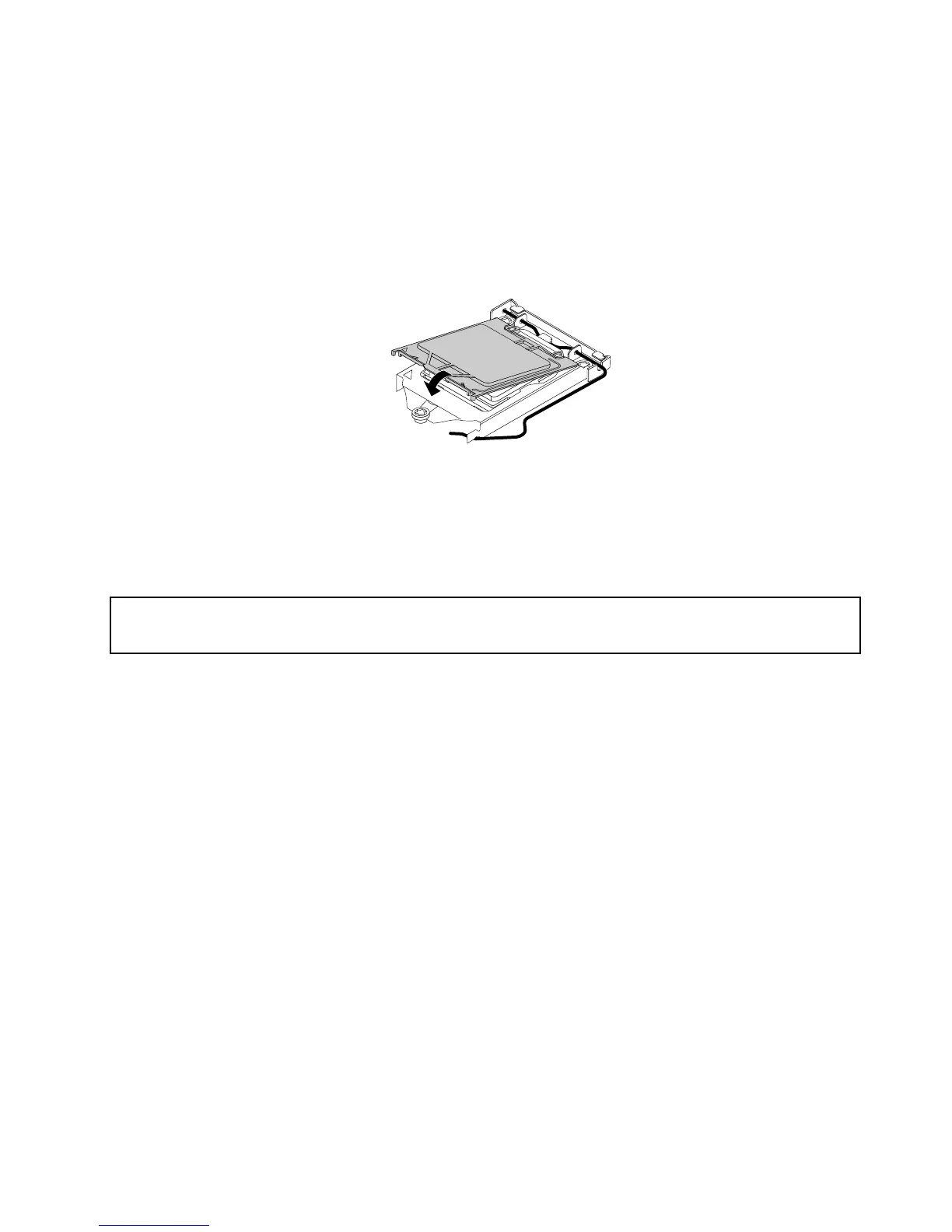
Toinstallthemicroprocessorsocketcover,dothefollowing:
1.Afteryouhaveremovedthemicroprocessorfromthefailingsystemboard,closethemicroprocessor
retainerandthenputthelevertothelockedpositiontosecuretheretainerinplace.
2.Notetheorientationofthesocketcover,andinstallonesideofthesocketcoverontothemicroprocessor
socket.Carefullypresstheothersideofthesocketcoverdownwarduntilthesocketcoversnaps
intoposition.
Note:Yourmicroprocessorsocketandcovermightlookslightlydifferentfromtheillustration.
Figure43.Installingthesocketcoverontothemicroprocessorsocket
3.Carefullycheckthefourcornersofthesocketcovertoensurethatthecoverisseatedsecurely.
4.Followanyadditionalinstructionsincludedwiththereplacementpartyoureceived.
ReplacingthefrontaudioandUSBassembly
Attention:
Donotopenyourcomputerorattemptanyrepairbeforereadingandunderstanding“Importantsafetyinformation”
onpage1.
ThissectionprovidesinstructionsonhowtoreplacethefrontaudioandUSBassembly.
ToreplacethefrontaudioandUSBassembly,dothefollowing:
1.Turnoffthecomputeranddisconnectallpowercordsfromelectricaloutlets.
2.Removethecomputercover.See“Removingthecomputercover”onpage82.
3.Removethefrontbezel.See“Removingandreinstallingthefrontbezel”onpage83.
4.LocatethefrontaudioandUSBassembly.
5.DisconnectthefrontaudioandUSBassemblycablesfromthesystemboard.See“Locatingpartson
thesystemboard”onpage72.
Note:Ensurethatyounotethelocationsofthecableswhenyoudisconnectthecablesfromthe
systemboard.
Chapter9.ReplacingFRUs(machinetypes:10ASand10AU)111








 To Next Page