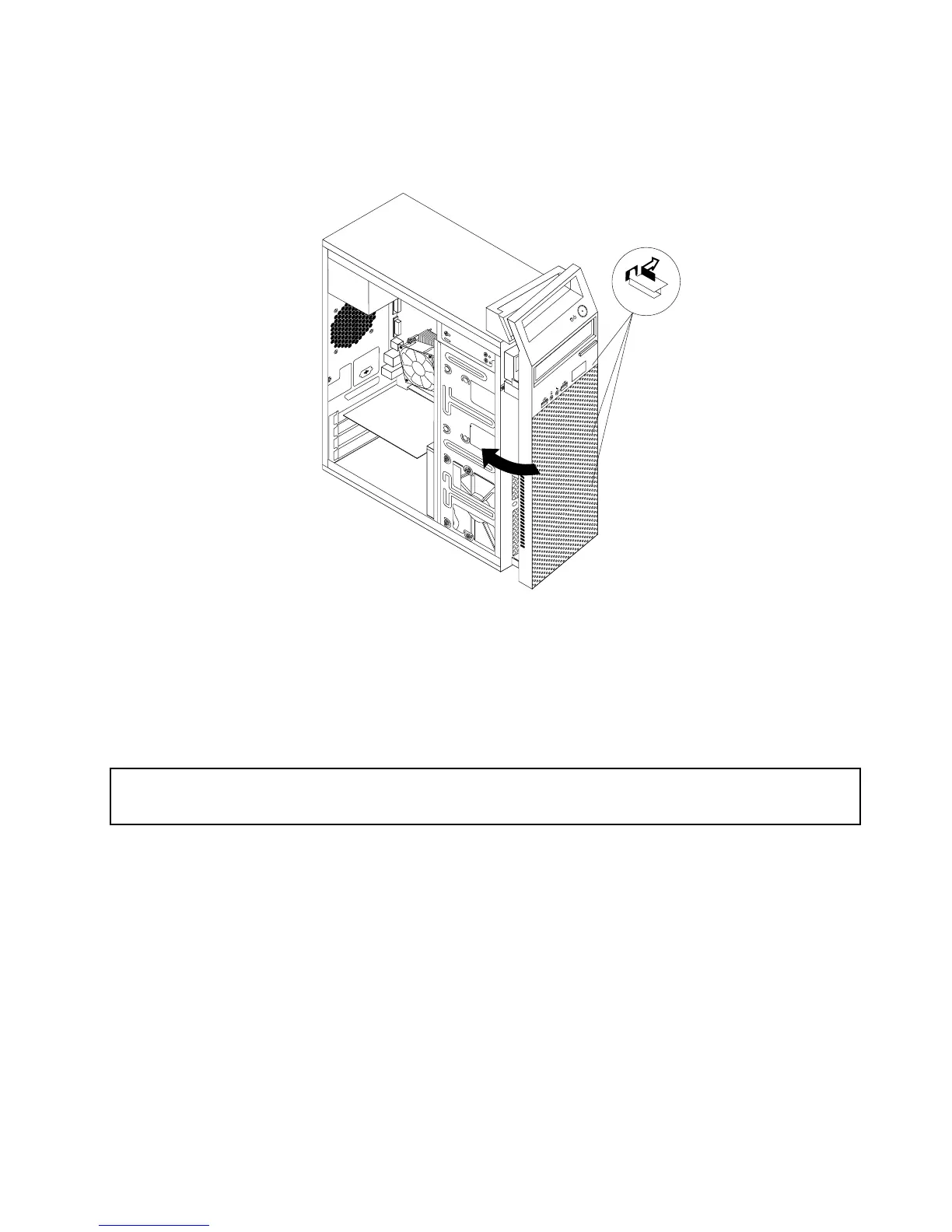
4.Toreinstallthefrontbezel,alignthethreeplastictabsontherightsideofthefrontbezelwiththe
correspondingholesinthechassis,thenpivotthefrontbezelinwardsuntilitsnapsintopositionon
theleftside.
Figure13.Reinstallingthefrontbezel
Whattodonext:
•Toworkwithanotherpieceofhardware,gototheappropriatesection.
•Tocompletetheinstallationorreplacement,goto“Completingthepartsreplacement”onpage122
.
InstallingorreplacingaPCIExpresscard
Attention:
Donotopenyourcomputerorattemptanyrepairbeforereadingandunderstanding“Importantsafetyinformation”
onpage1.
ThissectionprovidesinstructionsonhowtoinstallorreplaceaPCIExpresscard.Yourcomputerhastwo
PCIExpressx1cardslotsandonePCIExpressx16graphicscardslot.
ToinstallorreplaceaPCIExpresscard,dothefollowing:
1.Turnoffthecomputeranddisconnectallpowercordsfromelectricaloutlets.
2.Removethecomputercover.See“Removingthecomputercover”onpage82.
Chapter9.ReplacingFRUs(machinetypes:10ASand10AU)85













 To Next Page