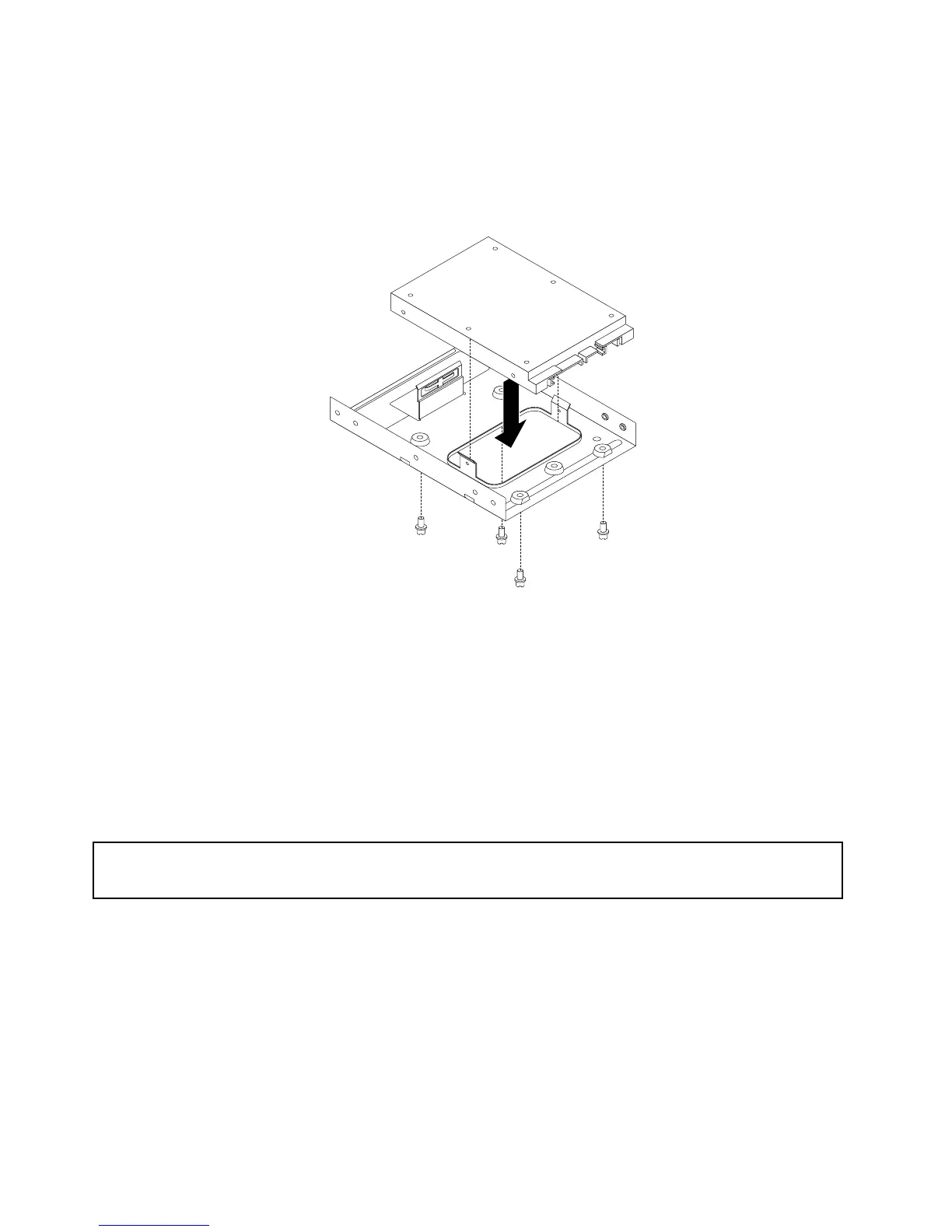
Thissectionprovidesinstructionsonhowtoinstallthe2.5-inchsolid-statedrive.
Toinstallthesolid-statedrive,dothefollowing:
1.Installthesolid-statedriveintothestorageconverter.Then,installthefourscrewstosecurethe
solid-statedrivetothestorageconverter.
Figure27.Installingthesolid-statedriveintothestorageconverter
2.Connectthesignalcableandthepowercabletothesolid-statedrive.
3.Installthesolid-statedriveintotheharddiskdrivebay.See“Replacingtheprimaryharddiskdrive”on
page93.
Whattodonext:
•Toworkwithanotherpieceofhardware,gototheappropriatesection.
•Tocompletetheinstallationorreplacement,goto“Completingthepartsreplacement”onpage122
.
Replacingtheopticaldrive
Attention:
Donotopenyourcomputerorattemptanyrepairbeforereadingandunderstanding“Importantsafetyinformation”
onpage1.
Thissectionprovidesinstructionsonhowtoinstallorreplacetheopticaldrive.
Note:Theopticaldriveisonlyavailableinsomemodels.
Toreplaceanopticaldrive,dothefollowing:
1.Turnoffthecomputeranddisconnectallpowercordsfromelectricaloutlets.
2.Removethecomputercover.See“Removingthecomputercover”onpage82.
3.Removethefrontbezel.See“Removingandreinstallingthefrontbezel”onpage83.
96ThinkCentreE73HardwareMaintenanceManual








 To Next Page