Note:Youmightalsoneedtoreleasethepowersupplyassemblycablesfromsomecableclipsorties
thatsecurethecablestothechassis.Makesurethatyounotethecableroutingbeforedisconnecting
thecables.
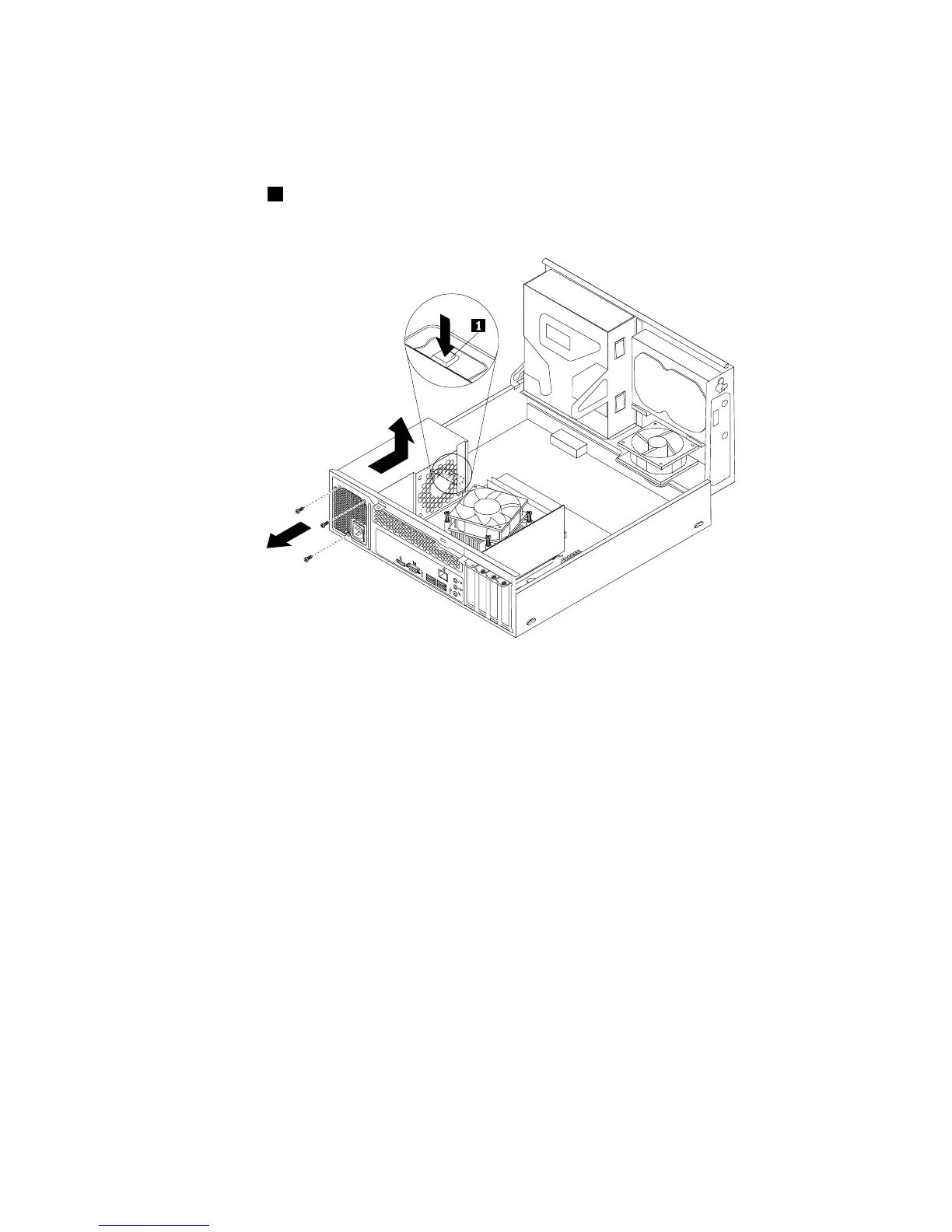
6.Attherearofthecomputer,removethethreescrewsthatsecurethepowersupplyassembly.Pressthe
powersupplyclip1downwardtoreleasethepowersupplyassemblyandthenslidethepowersupply
assemblytothefrontofthecomputer.Liftthepowersupplyassemblyoutofthecomputer.
Figure93.Removingthepowersupplyassembly
7.Ensurethatthenewpowersupplyassemblyisthecorrectreplacement.
Chapter10.ReplacingFRUs(machinetypes:10AU,10AW,10BF,and10BG)149








 To Next Page