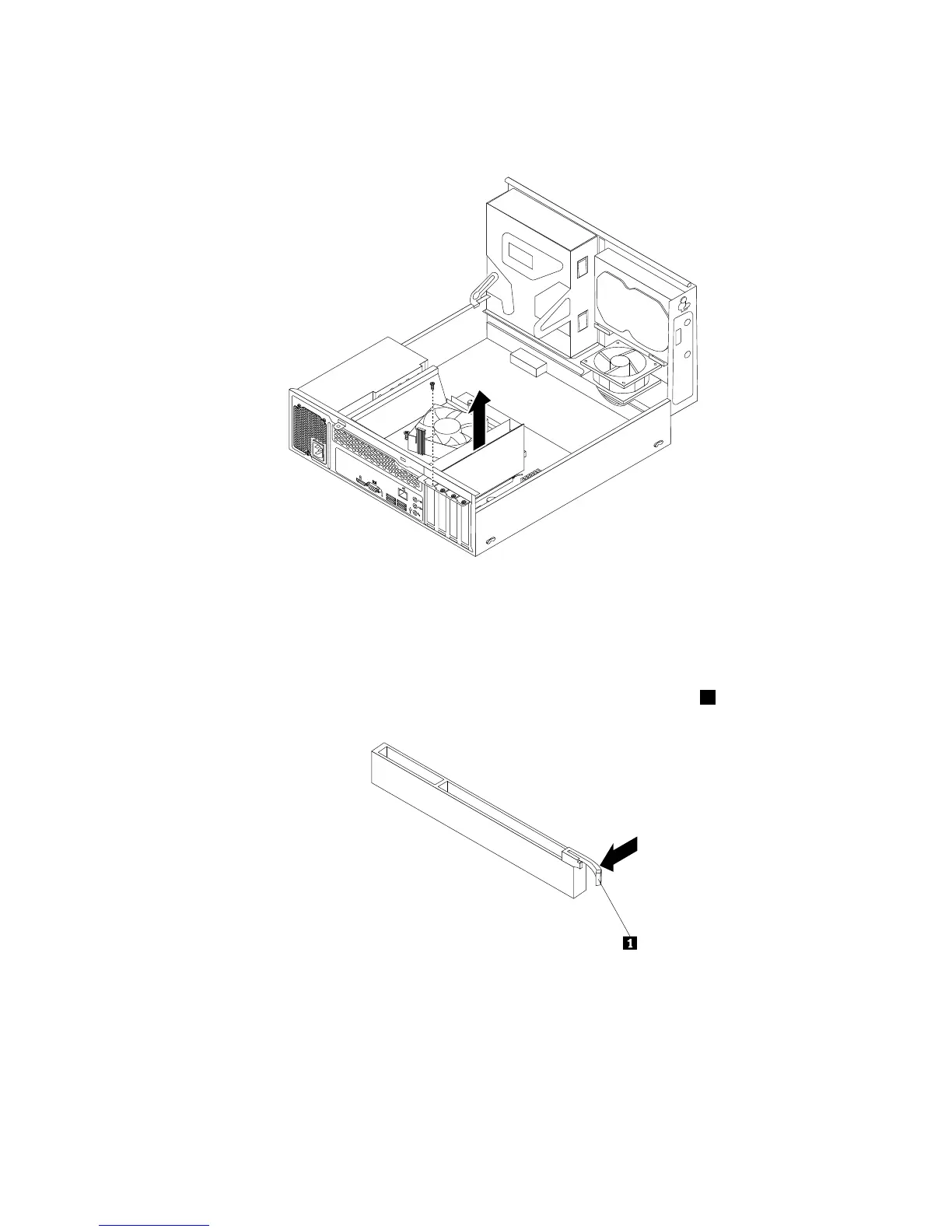
•IfyouarereplacinganoldPCIExpresscard,removethescrewthatsecurestheoldPCIExpress
card,grasptheoldcardthatiscurrentlyinstalled,andgentlypullitoutoftheslot.
Figure14.RemovingaPCIExpresscard
Notes:
a.Thecardtstightlyintothecardslot.Ifnecessary,alternatemovingeachsideofthecardasmall
amountuntilitisremovedfromthecardslot.
b.Ifthecardisheldinplacebyaretaininglatch,pressthecardretaininglatch1asshownto
disengagethelatch.Graspthecardandgentlypullitoutoftheslot.
4.RemovethenewPCIExpresscardfromitsstatic-protectivepackage.
5.InstallthenewPCIExpresscardintotheappropriateslotonthesystemboard.See“Locatingpartson
thesystemboard”onpage13.
Note:IfyouareinstallingaPCIExpressx16graphicscard,makesurethatthememoryslotretaining
clipsareclosedbeforeyouinstallthegraphicscard.
6.InstallthescrewtosecurethenewPCIExpresscardinplace.
42ThinkCentreE73UserGuide













 To Next Page