ThissectionprovidesinstructionsonhowtoreplacetheWiFiunits.TheWiFiunitsincludeaWiFiadapter
card,aWiFicardmodule,andarearWiFiantennacable.
ReplacingtheWiFiunitsinvolvesthefollowingoperations:
•“RemovingtheWiFiadaptercard”onpage69
•“RemovingtheWiFicardmodule”onpage69
•“InstallingtheWiFiunits”onpage71
RemovingtheWiFiadaptercard
ToremovetheWiFiadaptercard,dothefollowing:
1.Turnoffthecomputeranddisconnectallpowercordsfromelectricaloutlets.
2.Removethecomputercover.See“Removingthecomputercover”onpage38.
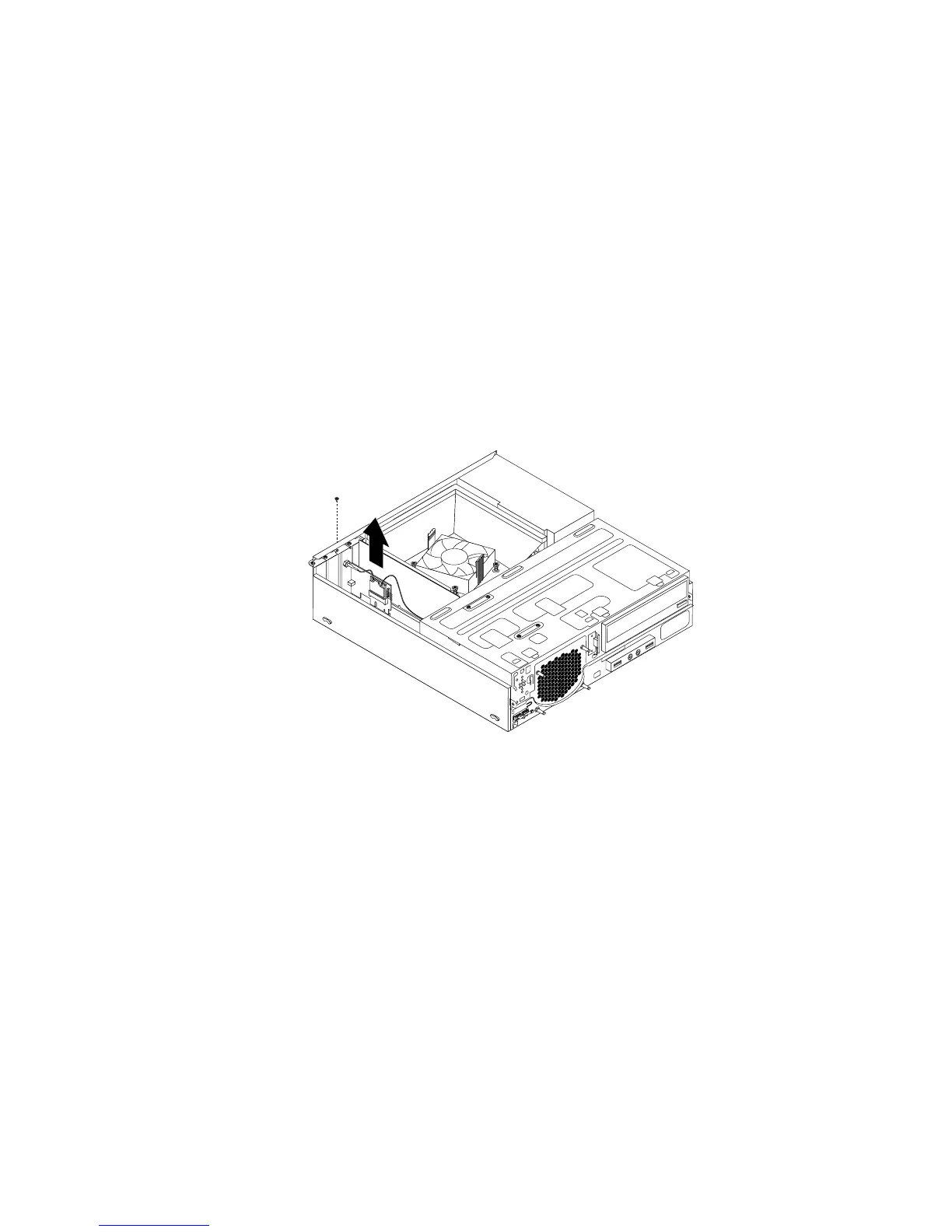
3.RemovethescrewthatsecurestheWiFiadaptercard.
4.GrasptheWiFiadaptercardthatisinstalledandgentlypullitoutoftheslot.
Figure50.RemovingtheWiFiadaptercard
Note:Thecardtstightlyintothecardslot.Ifnecessary,alternatemovingeachsideofthecarda
smallamountuntilitisremovedfromthecardslot.
RemovingtheWiFicardmodule
ToremovetheWiFicardmodule,dothefollowing:
Chapter5.Installingorreplacinghardware69













 To Next Page